
Join the Conversation
- Find Answers
- :
- Splunk Administration
- :
- Getting Data In
- :
- Re: Windows Key Management Service logs to Splunk
- Subscribe to RSS Feed
- Mark Topic as New
- Mark Topic as Read
- Float this Topic for Current User
- Bookmark Topic
- Subscribe to Topic
- Mute Topic
- Printer Friendly Page
- Mark as New
- Bookmark Message
- Subscribe to Message
- Mute Message
- Subscribe to RSS Feed
- Permalink
- Report Inappropriate Content
How to onboard Windows Key Management Service logs to Splunk?

Hi Splunker,
We are already onboarding Windows Event logs to Splunk, and with that now we also want to onboard windows Key Management Service logs to Splunk. Does anyone know how to onboard this type of log into Splunk?
Thanks in advance.
- Mark as New
- Bookmark Message
- Subscribe to Message
- Mute Message
- Subscribe to RSS Feed
- Permalink
- Report Inappropriate Content

Assuming, these are under Event Viewer ( For example: Event Viewer > Windows Logs > Applications and Services ) you need to add monitors like below in the local inputs.conf of the Windows host in question.
Example: Below is the way we specify the path of the channel from EventViewer for sending over UAC logs. This is to be defined under
c:\program files\splunk forwarder\apps\splunk_TA_Windows\local\inputs.conf
[WinEventLog:Microsoft-Windows-UAC/Operational]
disabled = 0
You will have to adjust the path of the channel ( log folder) accordingly to where those KMS logs are stored.. Check this link for getting the path correct:
https://docs.splunk.com/Documentation/Splunk/9.0.3/Data/MonitorWindowseventlogdata#Use_the_Full_Name...
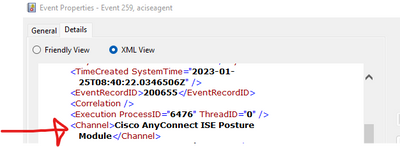
Note: You can also get the path by right clicking on a sampe Event >> event properties >> Details >> XML View >> channel name
Pls vote up or mark as Solution if it helps
- Mark as New
- Bookmark Message
- Subscribe to Message
- Mute Message
- Subscribe to RSS Feed
- Permalink
- Report Inappropriate Content


KMS seems to have its own event log. So just add a [wineventlog://Key Management Service] stanza with proper windows settings (sourcetype, destination index) and you should be ready to go.

Join the Splunk Community Slack to learn, troubleshoot, and make connections with fellow Splunk practitioners in real time!
Join Splunk User Groups to connect and learn in-person by region or remotely by topic or industry.
Make Your Machine Data AI-Ready in Splunk
Splunk Asynchronous Forwarding Explained
How to Monitor AI Agents with Splunk Agent Observability
