
Turn on suggestions
Auto-suggest helps you quickly narrow down your search results by suggesting possible matches as you type.
Getting Data In
×
Join the Conversation
Without signing in, you're just watching from the sidelines. Sign in or Register to connect, share, and be part of the Splunk Community.
- Find Answers
- :
- Splunk Administration
- :
- Getting Data In
- :
- How to get the right time?
Options
- Subscribe to RSS Feed
- Mark Topic as New
- Mark Topic as Read
- Float this Topic for Current User
- Bookmark Topic
- Subscribe to Topic
- Mute Topic
- Printer Friendly Page
- Mark as New
- Bookmark Message
- Subscribe to Message
- Mute Message
- Subscribe to RSS Feed
- Permalink
- Report Inappropriate Content

veveok
Engager
05-04-2022
07:41 PM
my log appear:
1;1;laptop-rdvt90t4;http://update-software.xxx.com/WeatherFix03_SP03120.exe;C:\Windows\SysWOW64\DynamicWeather.exe;NT AUTHORITY\SYSTEM;2022-05-02 09:23:25;192.168.1.8;;;
1;1;laptop-rdv7446p;http://update-software.xxx.com/qatherFixP00190.exe;C:\Windows\SysWOW64\Der.exe;ScWhJ\lizonghao;2022-05-02 09:25:27;192.168.1.8;;;
I use :strptime() %H:%M:%S , and reg “202\d+-\d+\-\d+\s” to get the time,
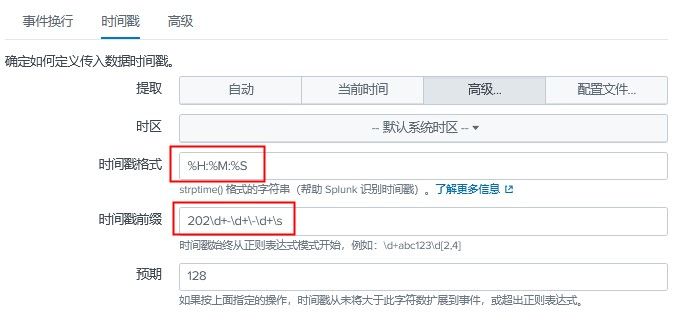
but it look like wrong。
like this pic.

how to write this reg to get the time?
1 Solution
- Mark as New
- Bookmark Message
- Subscribe to Message
- Mute Message
- Subscribe to RSS Feed
- Permalink
- Report Inappropriate Content
veveok
Engager
05-04-2022
10:39 PM
- Mark as New
- Bookmark Message
- Subscribe to Message
- Mute Message
- Subscribe to RSS Feed
- Permalink
- Report Inappropriate Content
veveok
Engager
05-04-2022
10:39 PM
it works with:
%Y-%m-%d %H:%M:%S
and
^(?:[^;]*\;){10}\s*

Got questions? Get answers!
Join the Splunk Community Slack to learn, troubleshoot, and make connections with fellow Splunk practitioners in real time!
Meet up IRL or virtually!
Join Splunk User Groups to connect and learn in-person by region or remotely by topic or industry.
Get Updates on the Splunk Community!
Kubernetes Alerts That Work Out of the Box with AutoDetect detectors in Splunk ...
A deployment rolls out slowly, one pod sits not ready for a few minutes, and whoever is on call gets an alert ...
Observability at Your Fingertips Directly From Splunk Platform—for Free
At .conf, we announced our roadmap to bring observability foundations to Splunk Platform. Bringing metrics and ...
Accelerate Splunk App Development with AI
Learn how to automate the repetitive parts of your build cycle.
Watch On-Demand
Replay the Accelerate ...
