
Join the Conversation
- Find Answers
- :
- Splunk Administration
- :
- Getting Data In
- :
- How to fix time for the Index, Source and Timeline...
- Subscribe to RSS Feed
- Mark Topic as New
- Mark Topic as Read
- Float this Topic for Current User
- Bookmark Topic
- Subscribe to Topic
- Mute Topic
- Printer Friendly Page
- Mark as New
- Bookmark Message
- Subscribe to Message
- Mute Message
- Subscribe to RSS Feed
- Permalink
- Report Inappropriate Content

Set up: The system clocks for our Searcher and Indexers run GMT, our events are coming from servers posting in PST, EST and GMT.
I have 2 questions/Issues:
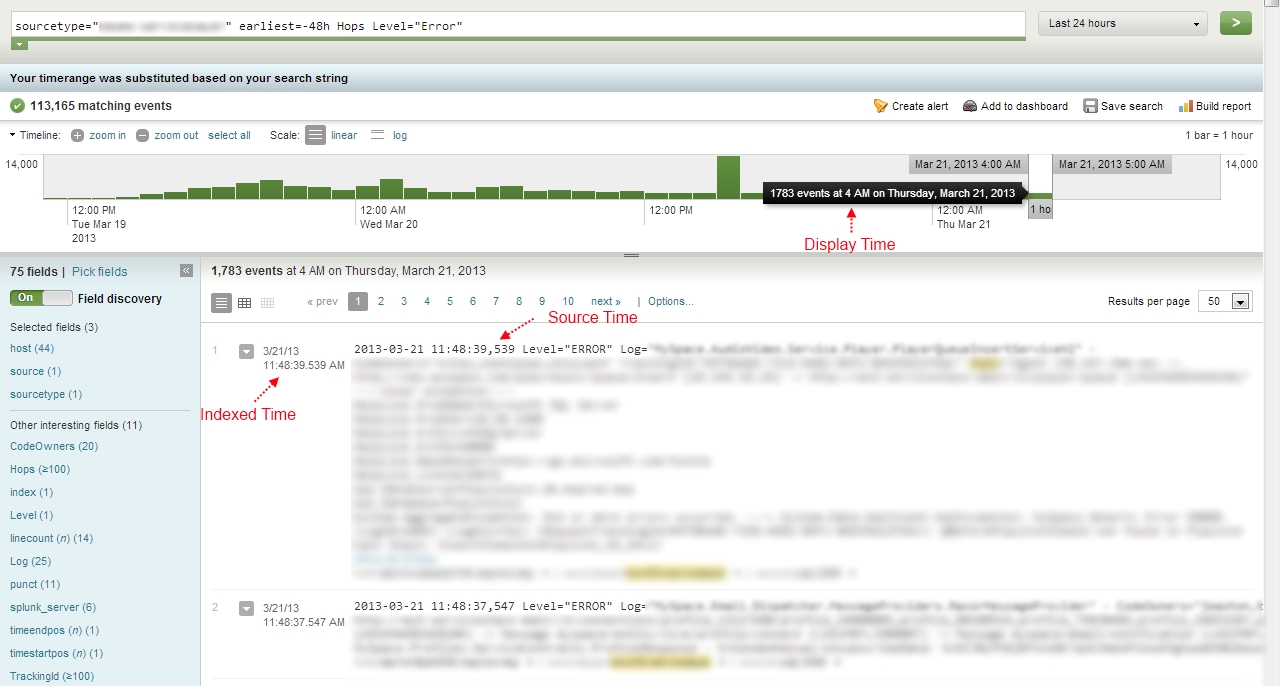
1) The index, Source, and timeline display time are all different and out of sync. How can I get them in sync? (see picture: http://www.ugu.com/splunk/time.jpg)
2) One indexer displays the Index time in GMT and all of our other indexers display the index time the same as the event source time. What would make this one indexer different from the rest.
- Mark as New
- Bookmark Message
- Subscribe to Message
- Mute Message
- Subscribe to RSS Feed
- Permalink
- Report Inappropriate Content
- Mark as New
- Bookmark Message
- Subscribe to Message
- Mute Message
- Subscribe to RSS Feed
- Permalink
- Report Inappropriate Content
Resolved: Restart of Splunk Searcher resolved the issue.
- Mark as New
- Bookmark Message
- Subscribe to Message
- Mute Message
- Subscribe to RSS Feed
- Permalink
- Report Inappropriate Content
ooops, Sorry. Version 4.2.3-105575
Also #2 has been resolved after a reboot of the server had been preformed.
But #1 display time on the top graph is not the same as the indexed time or the source time. Could this be a bug in the version we are running? http://www.ugu.com/splunk/time.jpg
- Mark as New
- Bookmark Message
- Subscribe to Message
- Mute Message
- Subscribe to RSS Feed
- Permalink
- Report Inappropriate Content

what version of Splunk are you running?


Join the Splunk Community Slack to learn, troubleshoot, and make connections with fellow Splunk practitioners in real time!
Join Splunk User Groups to connect and learn in-person by region or remotely by topic or industry.
Cisco Data Fabric from Architecture to Investigation, Better SOC Visibility, and More ...
The Trust Gap: Why a Data Foundation is Fundamental to an Agentic Enterprise
Data Management Digest – September 2026
