
Join the Conversation
- Find Answers
- :
- Splunk Administration
- :
- Getting Data In
- :
- How to filter events on Linux Machine before forwa...
- Subscribe to RSS Feed
- Mark Topic as New
- Mark Topic as Read
- Float this Topic for Current User
- Bookmark Topic
- Subscribe to Topic
- Mute Topic
- Printer Friendly Page
- Mark as New
- Bookmark Message
- Subscribe to Message
- Mute Message
- Subscribe to RSS Feed
- Permalink
- Report Inappropriate Content
How to filter events on Linux Machine before forwarding them to Splunk?

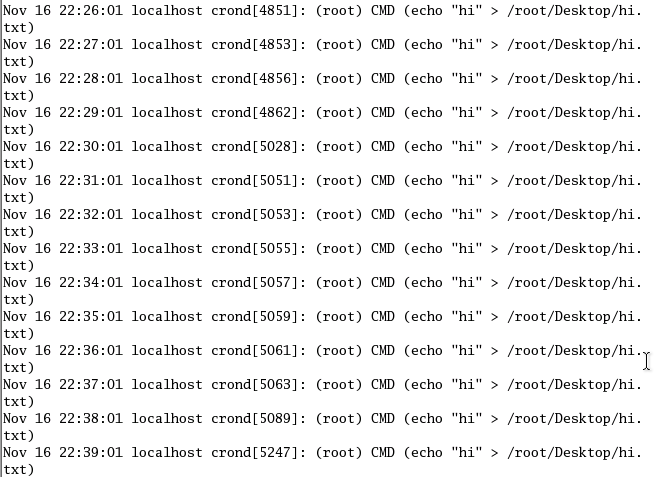
Image attached is the following log I wish to forward but however I want to detect ONLY newly added Cronjobs (only the first same entry of each command), I've done it on Splunk Enterprise after these are forwarded but however, Splunk Server will keep receiving these events non-stop at the back end even if I filter it on the Splunk Server side since Cronjob is always running, I wish not to index data that I am not using before forwarding it to Splunk Server, how do I go about attempting this with props.conf or transform.conf.
At the end of the day, there will be many different Cronjobs, but I want to uniquely identify them by once and only the first one of each just by looking at the CMD parameter in the brackets ()
- Mark as New
- Bookmark Message
- Subscribe to Message
- Mute Message
- Subscribe to RSS Feed
- Permalink
- Report Inappropriate Content
Splunk can't filter (at index time) based on any kind of state (for monitor inputs). It can filter by regex of each individual event. What you are looking for can't be done at index time by Splunk natively.
If you are willing to add complexity to your input method in order to accomplish this you can look into modular inputs. That would allow you to write code that can dedup events before passing them to Splunk to index.



Join the Splunk Community Slack to learn, troubleshoot, and make connections with fellow Splunk practitioners in real time!
Join Splunk User Groups to connect and learn in-person by region or remotely by topic or industry.
Cisco Data Fabric from Architecture to Investigation, Better SOC Visibility, and More ...
The Trust Gap: Why a Data Foundation is Fundamental to an Agentic Enterprise
Data Management Digest – September 2026
