
Join the Conversation
- Find Answers
- :
- Splunk Administration
- :
- Getting Data In
- :
- Re: How to extract new fields from a JSON array?
- Subscribe to RSS Feed
- Mark Topic as New
- Mark Topic as Read
- Float this Topic for Current User
- Bookmark Topic
- Subscribe to Topic
- Mute Topic
- Printer Friendly Page
- Mark as New
- Bookmark Message
- Subscribe to Message
- Mute Message
- Subscribe to RSS Feed
- Permalink
- Report Inappropriate Content
How to extract new fields from a JSON array?

Hi All!
How to extract and create different fields by transforms when there is an array (JSON) with several fields with the same name but different values?
For example, the "text" field in the first case means "action", in the second the "text" field means "hostname".
Just like "port" that appears twice would have to be identified as src_port and dst_port.
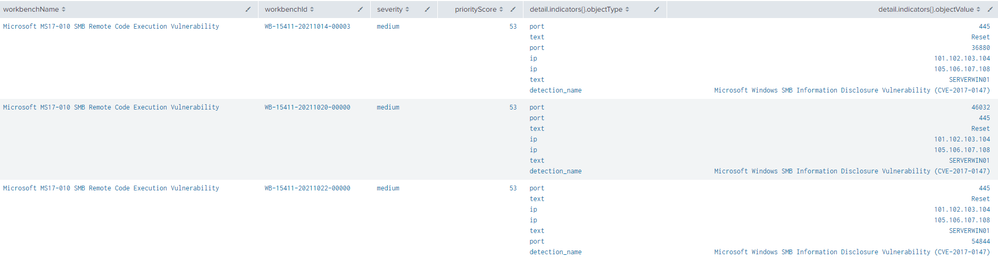
Sample:
"{
detail: {
indicators: [
{
filterId: [
]
id: 1
objectType: port
objectValue: 445
relatedEntities: [
]
}
{
filterId: [
]
id: 2
objectType: text
objectValue: Reset
relatedEntities: [
]
}
{
filterId: [
]
id: 3
objectType: port
objectValue: 36880
relatedEntities: [
]
}
{
filterId: [
]
id: 6
objectType: text
objectValue: SERVERWIN01
relatedEntities: [
]
}
{
filterId: [
]
id: 7
objectType: detection_name
objectValue: Microsoft Windows SMB Information Disclosure Vulnerability (CVE-2017-0147)
relatedEntities: [
]
}"
Thanks!
James
- Mark as New
- Bookmark Message
- Subscribe to Message
- Mute Message
- Subscribe to RSS Feed
- Permalink
- Report Inappropriate Content
Hi All!
I still haven't been able to solve this problem.
Does anyone have any outline suggestions?
Thanks!
James \°/
- Mark as New
- Bookmark Message
- Subscribe to Message
- Mute Message
- Subscribe to RSS Feed
- Permalink
- Report Inappropriate Content


Firstly, it looks like an output of spath command, not the automatic json extraction (the automatic extraction doesn't understand json structure and just uses "final" field names).
Secondly, how would you distinguish between different ports? You can of course retrieve specific value of multivalue field by mvindex() but are you sure that src port will always be firts value? And so on?

Join the Splunk Community Slack to learn, troubleshoot, and make connections with fellow Splunk practitioners in real time!
Join Splunk User Groups to connect and learn in-person by region or remotely by topic or industry.
Make Your Machine Data AI-Ready in Splunk
Splunk Asynchronous Forwarding Explained
How to Monitor AI Agents with Splunk Agent Observability
