
Join the Conversation
- Find Answers
- :
- Splunk Administration
- :
- Getting Data In
- :
- How to execute searches with auth token, using the...
- Subscribe to RSS Feed
- Mark Topic as New
- Mark Topic as Read
- Float this Topic for Current User
- Bookmark Topic
- Subscribe to Topic
- Mute Topic
- Printer Friendly Page
- Mark as New
- Bookmark Message
- Subscribe to Message
- Mute Message
- Subscribe to RSS Feed
- Permalink
- Report Inappropriate Content

Hi @jkat54, thank you for creating this wonderful app. I have a use case that requires executing remote searches from one independent search head to another search head, with the use of auth tokens.
I am able to do so using the linux curl command, using the following command syntax:
curl -k -H "Authorization: Bearer eyJraWQiOiJzcGx1bmsuc2VjcmV0IiwiYWxnIjoiSFM1MTIiLCJ2ZXIiOiJ2MiIsInR0eXAiOiJzdGF0aWMifQ.eyJpc" https://localhost:8089/services/search/jobs/export -d output_mode=csv -d search="search index=_internal | head 10"
I would like to know how I can translate the above syntax into search command, leveraging the webtools add-on. Thanks in advance for your help.
- Mark as New
- Bookmark Message
- Subscribe to Message
- Mute Message
- Subscribe to RSS Feed
- Permalink
- Report Inappropriate Content


Did you see the examples on the splunkbase details tab?
the one below matches what you're doing:
Setting a Custom Header & Test Data:
| makeresults count=1
| eval header="{\"content-type\":\"application/json\"}"
| eval data="{\"test data\":\"DATA\"}"
| curl method=post uri=https://localhost:8089/services user=admin pass=changeme debug=true headerfield=header datafield=data
- Mark as New
- Bookmark Message
- Subscribe to Message
- Mute Message
- Subscribe to RSS Feed
- Permalink
- Report Inappropriate Content
Did you see the examples on the splunkbase details tab?
the one below matches what you're doing:
Setting a Custom Header & Test Data:
| makeresults count=1
| eval header="{\"content-type\":\"application/json\"}"
| eval data="{\"test data\":\"DATA\"}"
| curl method=post uri=https://localhost:8089/services user=admin pass=changeme debug=true headerfield=header datafield=data
- Mark as New
- Bookmark Message
- Subscribe to Message
- Mute Message
- Subscribe to RSS Feed
- Permalink
- Report Inappropriate Content
Thank you @jkat54 for your tip. This seems to work as expected now:
| makeresults count=1
| eval header="{\"content-type\":\"application/json\",\"Authorization\":\"Bearer eyJraWQiOiJzcGx1bmsuc2VjcmV0IiwiYWxnIjoiSFM1MTIiLCJ2ZXIiOiJ2MiIsInR0eXAiOiJzdGF0aWMifQ.eyJpc...\"}"
| eval data="{\"search\":\"search index=_internal source=*splunkd.log | head 10 | table _raw\",\"output_mode\":\"csv\"}"
| curl method=get uri=https://localhost:8089/services/search/jobs/export headerfield=header datafield=data
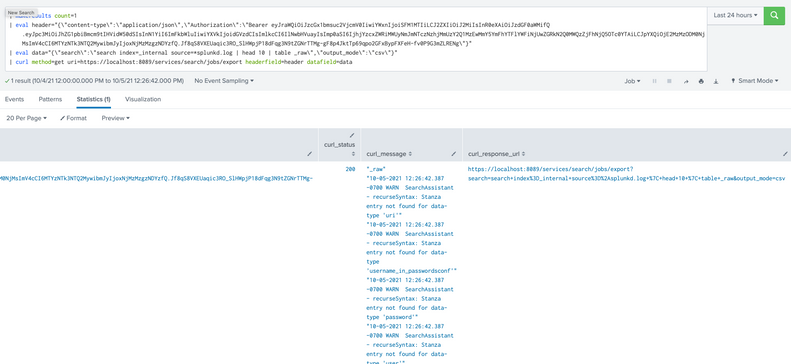
Thanks again for this useful tool. Please keep up the good work. 🙏
- Mark as New
- Bookmark Message
- Subscribe to Message
- Mute Message
- Subscribe to RSS Feed
- Permalink
- Report Inappropriate Content
Great! Thanks for accepting my answer and smashing the thumbs up button!
Happy POWER splunking!
- Mark as New
- Bookmark Message
- Subscribe to Message
- Mute Message
- Subscribe to RSS Feed
- Permalink
- Report Inappropriate Content
Make sure you rotate auth tokens for that account or restart splunk on that host. You have the whole token shown in the image.

Join the Splunk Community Slack to learn, troubleshoot, and make connections with fellow Splunk practitioners in real time!
Join Splunk User Groups to connect and learn in-person by region or remotely by topic or industry.
Meet the .conf26 AI Agent Buildathon Winners
Trusted Autonomy in the SOC: A Maturity Journey
Supercharging Windows Security Detection Performance: Introducing Hybrid Field ...
