
Join the Conversation
- Find Answers
- :
- Splunk Administration
- :
- Getting Data In
- :
- Re: How to configure line breaker?
- Subscribe to RSS Feed
- Mark Topic as New
- Mark Topic as Read
- Float this Topic for Current User
- Bookmark Topic
- Subscribe to Topic
- Mute Topic
- Printer Friendly Page
- Mark as New
- Bookmark Message
- Subscribe to Message
- Mute Message
- Subscribe to RSS Feed
- Permalink
- Report Inappropriate Content

Hola comunidad
I'm trying to configure the props file so that the following event starts from the third line:

Currently, I am testing as follows:
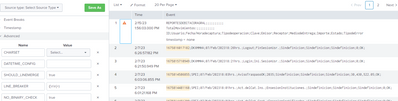
If I leave this setting, the timestamp of the first few lines will be taken from splunk, but it should take the timestamp of the lines with date.
Regards
- Mark as New
- Bookmark Message
- Subscribe to Message
- Mute Message
- Subscribe to RSS Feed
- Permalink
- Report Inappropriate Content


Hi @sgarcia,
you have to filter the first three rows using something l.ike this:
in props.conf:
[yoursourceytpe]
SHOULD_LINEMERGE = false
TRANSFORMS-removeheaderevent = setnull
in transforms.conf:
[setnull]
REGEX = ^(REPORTESDEBIT|TotalMovimientos|Id;Usuario)
DEST_KEY = queue
FORMAT = nullQueue
Please, next time, put the log samples in the Code/Sample box instead using a printscreen so we can use it to answer.
Ciao.
Giuseppe
- Mark as New
- Bookmark Message
- Subscribe to Message
- Mute Message
- Subscribe to RSS Feed
- Permalink
- Report Inappropriate Content
Hi @sgarcia,
you have to filter the first three rows using something l.ike this:
in props.conf:
[yoursourceytpe]
SHOULD_LINEMERGE = false
TRANSFORMS-removeheaderevent = setnull
in transforms.conf:
[setnull]
REGEX = ^(REPORTESDEBIT|TotalMovimientos|Id;Usuario)
DEST_KEY = queue
FORMAT = nullQueue
Please, next time, put the log samples in the Code/Sample box instead using a printscreen so we can use it to answer.
Ciao.
Giuseppe
- Mark as New
- Bookmark Message
- Subscribe to Message
- Mute Message
- Subscribe to RSS Feed
- Permalink
- Report Inappropriate Content
REPORTESDEBITACORAGRAL;;;;;;;;;;
TotalMovimientos:;;;;;;;;;;
ID;Usuario;Fecha/Horadecaptura;Tipodeoperacion;Clave;Emisor;Receptor;MediodeEntrega;Importe;Estado;TipodeError
1675816017182;DKXMMHA;07/Feb/202318:26hrs.;Logout;FinSesionUsr.;Sindefinicion;Sindefinicion;Sindefinicion;0;OK;
1675815710949;DKXMMHA;07/Feb/202318:21hrs.;Login;Ini.SesionUsr.;Sindefinicion;Sindefinicion;Sindefinicion;0;OK;
1675814586855;SPEI;07/Feb/202318:03hrs.;AvisoTraspasoOK;2035;Sindefinicion;Sindefinicion;Sindefinicion;30,430,522.05;OK;
1675814481168;SPEI;07/Feb/202318:01hrs.;Act.delCat.Ins.;EnsesionInstituciones.;Sindefinicion;Sindefinicion;Sindefinicion;0;OK;
1675814481200;SPEI;07/Feb/202318:01hrs.;Act.delCat.Cert.;EnsesionCertificados.;Sindefinicion;Sindefinicion;Sindefinicion;0;OK;
1675814481231;SPEI;07/Feb/202318:01hrs.;Act.delCat.Nvls.;EnsesionNiveles.;Sindefinicion;Sindefinicion;Sindefinicion;0;OK;
- Mark as New
- Bookmark Message
- Subscribe to Message
- Mute Message
- Subscribe to RSS Feed
- Permalink
- Report Inappropriate Content
Hi @sgarcia,
please try this regex:
^(REPORTESDEBITACORAGRAL|TotalMovimientos|ID;Usuario)that you can test at https://regex101.com/r/0m8hng/1
Ciao.
Giuseppe
- Mark as New
- Bookmark Message
- Subscribe to Message
- Mute Message
- Subscribe to RSS Feed
- Permalink
- Report Inappropriate Content
Thank you, i try the configuration, and comeback as soon .


Join the Splunk Community Slack to learn, troubleshoot, and make connections with fellow Splunk practitioners in real time!
Join Splunk User Groups to connect and learn in-person by region or remotely by topic or industry.
Supercharging Windows Security Detection Performance: Introducing Hybrid Field ...
Ditch the Manual Grind: Building AI Agents with Splunk
Cisco Data Fabric from Architecture to Investigation, Better SOC Visibility, and More ...
