
Join the Conversation
- Find Answers
- :
- Splunk Administration
- :
- Getting Data In
- :
- Re: Time format in raw data in human readable
- Subscribe to RSS Feed
- Mark Topic as New
- Mark Topic as Read
- Float this Topic for Current User
- Bookmark Topic
- Subscribe to Topic
- Mute Topic
- Printer Friendly Page
- Mark as New
- Bookmark Message
- Subscribe to Message
- Mute Message
- Subscribe to RSS Feed
- Permalink
- Report Inappropriate Content
How to change Time format in raw data to a readable format?

Hi Team,
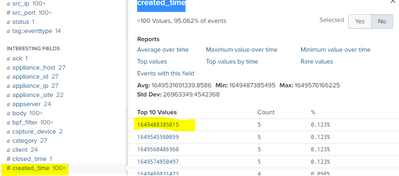
I am getting date and time format as "Created_time =1649576166225" in raw log we have to convert. Please help me convert in readable format for all logs. Need to do any changes in input level or anything please help me

- Mark as New
- Bookmark Message
- Subscribe to Message
- Mute Message
- Subscribe to RSS Feed
- Permalink
- Report Inappropriate Content


Hi @splunkpri,
as @PickleRick said, the best approach is to leave the timestamp and all the other dates in original format so you can use them as timestamp or to compare dates.
When you need to display ine date you can use the eval command with the strftime function that disaplys a date in the format you prefer, for more infos see at https://docs.splunk.com/Documentation/SCS/current/SearchReference/DateandTimeFunctions#Usage_3
in few words: to dortma your date from epochtime to human readable YYYY-mm-dd HH:MM:SS you could use:
| eval Created_time=strftime(Created_time,"%Y-%m-%d %H:%M:%S")Ciao.
Giuseppe
- Mark as New
- Bookmark Message
- Subscribe to Message
- Mute Message
- Subscribe to RSS Feed
- Permalink
- Report Inappropriate Content
- Mark as New
- Bookmark Message
- Subscribe to Message
- Mute Message
- Subscribe to RSS Feed
- Permalink
- Report Inappropriate Content

Do not "convert" the value. Use fieldformat to display the field in a human-readable format but leave the original field as it is. You can also create a calculated field which would give you another field containing the rendered string value.
But the first and most important thing is - since this sems to be an excerpt from some json data - where is your _time field being extracted from? Is the created_time field the only field in the event or do you have other time-related fields? If so, which of them is most important?
- Mark as New
- Bookmark Message
- Subscribe to Message
- Mute Message
- Subscribe to RSS Feed
- Permalink
- Report Inappropriate Content
Yes we do have _time field as well in RAW logs. Customer asked us they want Created_time in human readable format


Join the Splunk Community Slack to learn, troubleshoot, and make connections with fellow Splunk practitioners in real time!
Join Splunk User Groups to connect and learn in-person by region or remotely by topic or industry.
All Work and No Play? Not at .conf26! Unwind at These Evening Events
Join the Hackathon at .conf26 and build a No-Code AI agent
Level Up Your Workflow: Mastering Splunk Cloud Management via Terraform
