
Join the Conversation
- Find Answers
- :
- Splunk Administration
- :
- Getting Data In
- :
- How to blacklist files with a wildcard in monitori...
- Subscribe to RSS Feed
- Mark Topic as New
- Mark Topic as Read
- Float this Topic for Current User
- Bookmark Topic
- Subscribe to Topic
- Mute Topic
- Printer Friendly Page
- Mark as New
- Bookmark Message
- Subscribe to Message
- Mute Message
- Subscribe to RSS Feed
- Permalink
- Report Inappropriate Content

Hi,
I need to index windows server logs and blacklist all the previous year logs.
Inputs.conf.
[monitor://E:\application\logs\server*]
disabled=0
sourcetype=_error_text
index=_error_file
Logs in the servers looks like below
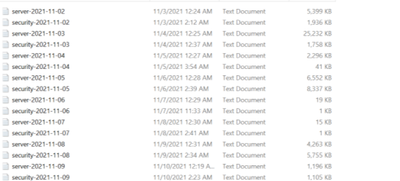
I refered solunk doc and came up with this stanza but it says only the last filter will be applied. Does it mean only 2019 blacklist regex will be applied?
[monitor://E:\application\logs\server*]
disabled=0
sourcetype=_error_text
index=_error_file
blacklist.1=^server-2021-\d{2}-\d{2}
blacklist.2=^server-2020-\d{2}-\d{2}
blacklist.3=^server-2019-\d{2}-\d{2}
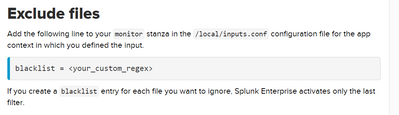
Please suggest.
- Mark as New
- Bookmark Message
- Subscribe to Message
- Mute Message
- Subscribe to RSS Feed
- Permalink
- Report Inappropriate Content


Monitor stanzas support a single blacklist setting. That's why you get the message about only the last one being applied. Contrast this with the blacklists for wineventlog stanzas.
Blacklists use regular expressions. There is no concept in regex for "not this year" or "< 2023", etc.
I suggest using a whitelist for the current year, instead. Something like this
whitelist = server-202[34]-\d\d-\d\dwill match files created this year and next (giving you time to update it at the end of 2023).
If this reply helps you, Karma would be appreciated.
- Mark as New
- Bookmark Message
- Subscribe to Message
- Mute Message
- Subscribe to RSS Feed
- Permalink
- Report Inappropriate Content
Monitor stanzas support a single blacklist setting. That's why you get the message about only the last one being applied. Contrast this with the blacklists for wineventlog stanzas.
Blacklists use regular expressions. There is no concept in regex for "not this year" or "< 2023", etc.
I suggest using a whitelist for the current year, instead. Something like this
whitelist = server-202[34]-\d\d-\d\dwill match files created this year and next (giving you time to update it at the end of 2023).
If this reply helps you, Karma would be appreciated.

Index This | What is broken 80% of the time by February?
Unlock Faster Time-to-Value on Edge and Ingest Processor with New SPL2 Pipeline ...
Splunk MCP & Agentic AI: Machine Data Without Limits
