
Join the Conversation
- Find Answers
- :
- Splunk Administration
- :
- Getting Data In
- :
- How to add setup parameters to a new shell input i...
- Subscribe to RSS Feed
- Mark Topic as New
- Mark Topic as Read
- Float this Topic for Current User
- Bookmark Topic
- Subscribe to Topic
- Mute Topic
- Printer Friendly Page
- Mark as New
- Bookmark Message
- Subscribe to Message
- Mute Message
- Subscribe to RSS Feed
- Permalink
- Report Inappropriate Content
How to add setup parameters to a new shell input in the Splunk Add-on Builder?


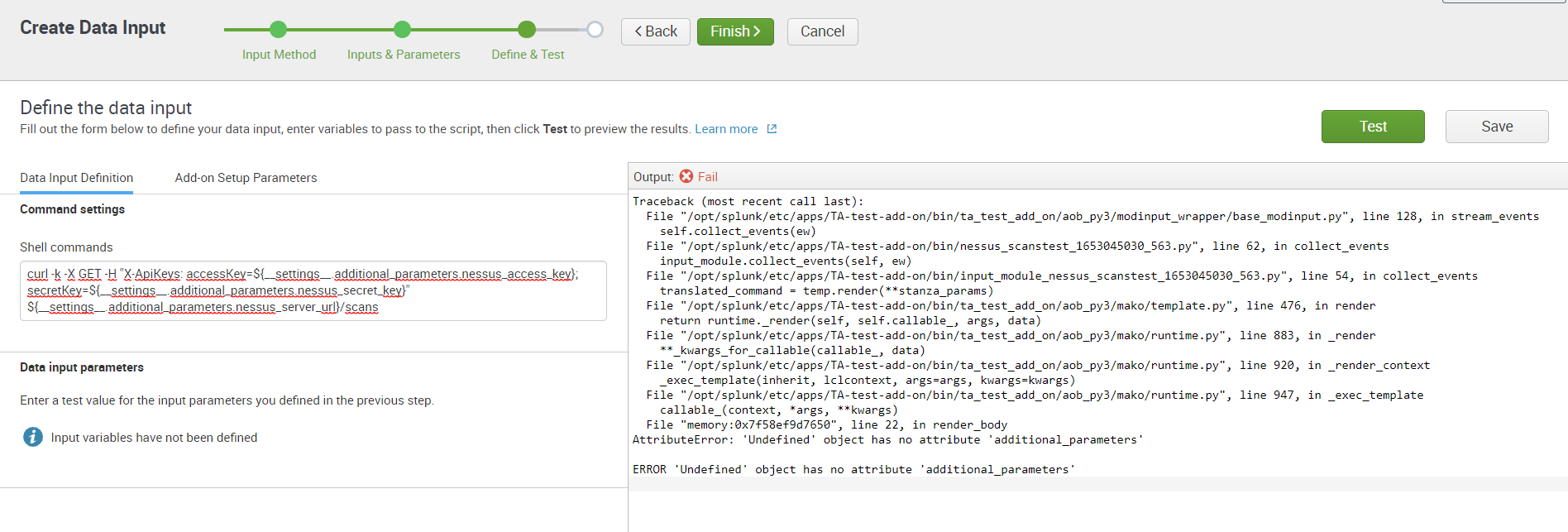
On the page "Configure data collection using a REST API call" there is a section about adding setup parameters. However, on the shell input page "Configure data collection using a shell command" there is no such section. There is a section about adding input parameters, but it's not the same. The reason I'm asking is because I'm trying to add setup parameterts to a shell input, and I just get error messages in the final validation page, no matter what I do.
Should it be the same syntax as for REST-inputs, or is it different for shell inputs?
See attached screenshot of what I'm trying to do. I've already tried the following versions of the parameter syntax, but I get the same error messages for all of them, and yes, I've added values to the parameters (in the Add-on Setup Parameters tab).
${__settings__.additional_parameters.my_parameter}
${additional_parameters.my_parameter}
${my_parameter}
Also, I get it to work if I switch to input parameters instead, but in this case I want to use setup parameters, as I'm planning to re-use the parameters in several inputs.


Join the Splunk Community Slack to learn, troubleshoot, and make connections with fellow Splunk practitioners in real time!
Join Splunk User Groups to connect and learn in-person by region or remotely by topic or industry.
What’s New in Splunk AI: Volume 02
Splunk App Dev Quarterly Roundup: AI, Agents, and Innovation!
Value Insights: Now Generally Available in the CMC
