
Join the Conversation
- Find Answers
- :
- Splunk Administration
- :
- Getting Data In
- :
- How to achieve auto field extraction of nested JSO...
- Subscribe to RSS Feed
- Mark Topic as New
- Mark Topic as Read
- Float this Topic for Current User
- Bookmark Topic
- Subscribe to Topic
- Mute Topic
- Printer Friendly Page
- Mark as New
- Bookmark Message
- Subscribe to Message
- Mute Message
- Subscribe to RSS Feed
- Permalink
- Report Inappropriate Content

Hello!
We have some logs coming across which are in JSON and thus 'just work'. The problem is, inside the log field are the events we need to extract. There are about 200 app's that will be logging this way and each app will have different fields and values so doing a standard field extract won't work or would be 1000's of potential kvps. The format however is always the same.
{
  "log": "[2022-08-25 18:54:40.031] INFO  JsonLogger [[MuleRuntime].uber.143312: [prd-ops-mulesoft].encryptFlow.BLOCKING @4ac358d5] [event: 25670349-e6b5-4996-9cb6-c4c9657cd9ba]: {\n  \"correlationId\" : \"25670349-e6b5-4996-9cb6-c4c9657cd9ba\",\n  \"message\" : \"MESSAGE_HERE\",\n  \"tracePoint\" : \"END\",\n  \"priority\" : \"INFO\",\n  \"elapsed\" : 0,\n  \"locationInfo\" : {\n    \"lineInFile\" : \"95\",\n    \"component\" : \"json-logger:logger\",\n    \"fileName\" : \"buildLoggingAndResponse.xml\",\n    \"rootContainer\" : \"responseStatus_success\"\n  },\n  \"timestamp\" : \"2022-08-25T18:54:40.030Z\",\n  \"content\" : {\n    \"ResponseStatus\" : {\n      \"type\" : \"SUCCESS\",\n      \"title\" : \"Encryption successful.\",\n      \"status\" : \"200\",\n      \"detail\" : { },\n      \"correlationId\" : \"25670349-e6b5-4996-9cb6-c4c9657cd9ba\",\n      \"apiMethodName\" : null,\n      \"apiURL\" : \"https://app.com/prd-ops-mulesoft/encrypt/v1.0\",\n      \"apiVersion\" : \"v1\",\n      \"x-ConsumerRequestSentTimeStamp\" : \"\",\n      \"apiRequestReceivedTimeStamp\" : \"2022-08-25T18:54:39.856Z\",\n      \"apiResponseSentTimeStamp\" : \"2022-08-25T18:54:40.031Z\",\n      \"userId\" : \"GID01350\",\n      \"orchestrations\" : [ ]\n    }\n  },\n  \"applicationName\" : \"ops-mulesoft\",\n  \"applicationVersion\" : \"v1\",\n  \"environment\" : \"PRD\",\n  \"threadName\" : \"[MuleRuntime].uber.143312: [prd-ops-mulesoft].encryptFlow.BLOCKING @4ac358d5\"\n}\n",
  "stream": "stdout",
  "time": "2022-08-25T18:54:40.086450071Z",
  "kubernetes": {
    "pod_name": "prd-ops-mulesoft-94c49bdff-pcb5n",
    "namespace_name": "4cfa0f08-92b0-467b-9ca4-9e49083fd922",
    "pod_id": "e9046b5e-0d70-11ed-9db5-0050569b19f6",
    "labels": {
      "am-org-id": "01a4664d-9e16-454b-a14c-59548ef896b5",
      "app": "prd-ops-mulesoft",
      "environment": "4cfa0f08-92b0-467b-9ca4-9e49083fd922",
      "master-org-id": "01a4664d-9e16-454b-a14c-59548ef896b5",
      "organization": "01a4664d-9e16-454b-a14c-59548ef896b5",
      "pod-template-hash": "94c49bdff",
      "rtf.mulesoft.com/generation": "aab6b8074cf73151b1515de0e468478e",
      "rtf.mulesoft.com/id": "18d3e5d6-ce59-4837-9f3b-8aad3ccffcef",
      "type": "MuleApplication"
    },
    "host": "1.1.1.1",
    "container_name": "app",
    "docker_id": "cf07f321aec551b200fb3f31f6f1c67b2678ff6f6a335d4ca41ec2565770513c",
    "container_hash": "rtf-runtime-registry.kprod.msap.io/mulesoft/poseidon-runtime-4.3.0@sha256:6cfeb965e0ff7671778bc53a54a05d8180d4522f0b1ef7bb25e674686b8c3b75",
    "container_image": "rtf-runtime-registry.kprod.msap.io/mulesoft/poseidon-runtime-4.3.0:20211222-2"
  }
}
The JSON works fine, but the events we ALSO want extracted are in here
{\n \"correlationId\" : \"25670349-e6b5-4996-9cb6-c4c9657cd9ba\",\n \"message\" : \"MESSAGE_HERE\",\n \"tracePoint\" : \"END\",\n \"priority\" : \"INFO\",\n \"elapsed\" : 0,\n \"locationInfo\" : {\n \"lineInFile\" : \"95\",\n \"component\" : \"json-logger:logger\",\n \"fileName\" : \"buildLoggingAndResponse.xml\",\n \"rootContainer\" : \"responseStatus_success\"\n },\n \"timestamp\" : \"2022-08-25T18:54:40.030Z\",\n \"content\" : {\n \"ResponseStatus\" : {\n \"type\" : \"SUCCESS\",\n \"title\" : \"Encryption successful.\",\n \"status\" : \"200\",\n \"detail\" : { },\n \"correlationId\" : \"25670349-e6b5-4996-9cb6-c4c9657cd9ba\",\n \"apiMethodName\" : null,\n \"apiURL\" : \"https://app.com/prd-ops-mulesoft/encrypt/v1.0\",\n \"apiVersion\" : \"v1\",\n \"x-ConsumerRequestSentTimeStamp\" : \"\",\n \"apiRequestReceivedTimeStamp\" : \"2022-08-25T18:54:39.856Z\",\n \"apiResponseSentTimeStamp\" : \"2022-08-25T18:54:40.031Z\",\n \"userId\" : \"GID01350\",\n \"orchestrations\" : [ ]\n }\n },\n \"applicationName\" : \"ops-mulesoft\",\n \"applicationVersion\" : \"v1\",\n \"environment\" : \"PRD\",\n \"threadName\" : \"[MuleRuntime].uber.143312: [prd-ops-mulesoft].encryptFlow.BLOCKING @4ac358d5\"\n}
SPATH would work, but the JSON is fronted by this
"[2022-08-25 18:54:40.031] INFO JsonLogger [[MuleRuntime].uber.143312: [prd-ops-mulesoft].encryptFlow.BLOCKING @4ac358d5] [event: 25670349-e6b5-4996-9cb6-c4c9657cd9ba]:
So it doesn't treat it as JSON.
This is one example, others events don't have the correlationID, etc.
We need a method that will take the raw data, parse it as JSON AND then dynamically extract the events in the log field in their KV pairs (e.g. \"correlationId\" : \"25670349-e6b5-4996-9cb6-c4c9657cd9ba\" == $1::$2)
Can this be done in transforms using regex?
Is this even possible, or do we ultimately need to create extractions based on every possible field?
Appreciate the guidance here!
Thanks!!
- Mark as New
- Bookmark Message
- Subscribe to Message
- Mute Message
- Subscribe to RSS Feed
- Permalink
- Report Inappropriate Content


Can you please try this?
YOUR_SEARCH
| rex field=log "(?<log_json>\{[^$]*)"
| spath input=log_json
| table log_json correlationId kubernetes.container_hash content.ResponseStatus.type
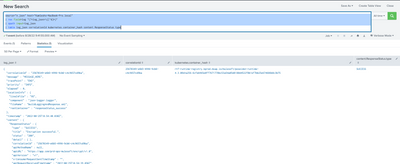
I hope this will help you.
Thanks
KV
If any of my replies help you to solve the problem Or gain knowledge, an upvote would be appreciated.
- Mark as New
- Bookmark Message
- Subscribe to Message
- Mute Message
- Subscribe to RSS Feed
- Permalink
- Report Inappropriate Content
Can you please try this?
YOUR_SEARCH
| rex field=log "(?<log_json>\{[^$]*)"
| spath input=log_json
| table log_json correlationId kubernetes.container_hash content.ResponseStatus.type
I hope this will help you.
Thanks
KV
If any of my replies help you to solve the problem Or gain knowledge, an upvote would be appreciated.
- Mark as New
- Bookmark Message
- Subscribe to Message
- Mute Message
- Subscribe to RSS Feed
- Permalink
- Report Inappropriate Content
Yep, that has worked!!
Thanks!


Join the Splunk Community Slack to learn, troubleshoot, and make connections with fellow Splunk practitioners in real time!
Join Splunk User Groups to connect and learn in-person by region or remotely by topic or industry.
SOC4Kafka - New Kafka Connector Powered by OpenTelemetry
Event Series: Level up your SOC: Advancing with Splunk Enterprise Security
Announcing Modern Navigation: A New Era of Splunk User Experience
