
Join the Conversation
- Find Answers
- :
- Splunk Administration
- :
- Getting Data In
- :
- How do I fix this error: One or more sourcetypes h...
- Subscribe to RSS Feed
- Mark Topic as New
- Mark Topic as Read
- Float this Topic for Current User
- Bookmark Topic
- Subscribe to Topic
- Mute Topic
- Printer Friendly Page
- Mark as New
- Bookmark Message
- Subscribe to Message
- Mute Message
- Subscribe to RSS Feed
- Permalink
- Report Inappropriate Content
How do I fix this error: One or more sourcetypes has been found to present events in the future

Hello everyone,
In Splunk GUI when i run health check its showing one error like One or more source types has been found to present events in the future. All the sources are giving the correct timestamp with timezone UTC +0:00 but when i checked the devices that are configured with the source types with the error, the devices are in the other timezone i.e UTC +08:00, and we are receiving the logs that are also in the future timezone. so how can i overcome this problem with the future timestamp. the Splunk indexer time zone is UTC +0:00 please refer the screenshot.
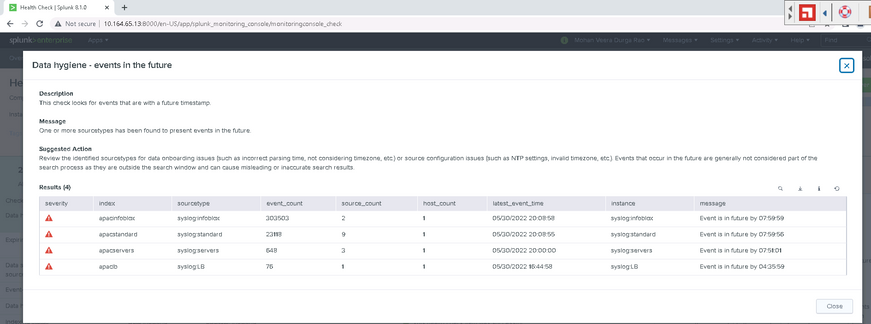
Thanks in advance............
- Mark as New
- Bookmark Message
- Subscribe to Message
- Mute Message
- Subscribe to RSS Feed
- Permalink
- Report Inappropriate Content

HI @Mohanveera1
it could be that the timestamp extraction for this sourcetype in the props.conf might be ignoring the time zone specifier probably you might want to consider using theTimezone(TZ) attribute if the event time stamp does not have a time zone
would you mind sharing the props configuration for this sourcetype
Note: if it helps karma points are appreciated/if it resolves acceptance of the solution is appreciated
- Mark as New
- Bookmark Message
- Subscribe to Message
- Mute Message
- Subscribe to RSS Feed
- Permalink
- Report Inappropriate Content
Hi @venky1544
Thank you for your response.
The events are having the timestamp and the devices from which the events are generating are in other time zone i.e +08:00 UTC. But the splunk time zone is +0:00 UTC.
I have searched for the props.conf for the specific sourcetype which are getting the future timestamp error. but there was no file available.
the path where is searched for the props.conf is Splunk home/etc/apps/apacinfoblox/local. so please suggest me the way to solve the issue.


Join the Splunk Community Slack to learn, troubleshoot, and make connections with fellow Splunk practitioners in real time!
Join Splunk User Groups to connect and learn in-person by region or remotely by topic or industry.
Value Insights: Now Generally Available in the CMC
What’s New in Splunk AI: Volume 02
Splunk App Dev Quarterly Roundup: AI, Agents, and Innovation!
