
Join the Conversation
- Find Answers
- :
- Splunk Administration
- :
- Getting Data In
- :
- Re: Events between two date ranges
- Subscribe to RSS Feed
- Mark Topic as New
- Mark Topic as Read
- Float this Topic for Current User
- Bookmark Topic
- Subscribe to Topic
- Mute Topic
- Printer Friendly Page
- Mark as New
- Bookmark Message
- Subscribe to Message
- Mute Message
- Subscribe to RSS Feed
- Permalink
- Report Inappropriate Content

Hello!, First time posting here. Just started learning Splunk and I am trying to extract events between two date ranges 4/6/2021 and 4/7/2021.
I tried one of the earlier suggested answers which were


index="security"
| eval Date="04/07/2021"
| eval timestampDate=strptime(Date, "%m/%d/%Y")
| eval timestampStart=strptime("04/06/2021", "%m/%d/%Y")
| eval timestampEnd=strptime("04/07/2021", "%m/%d/%Y")
| eval formattedTimestamp = strftime(timestamp,"%Y-%m-%dT%H:%M:%S")
| where timestampDate >= timestampStart AND timestampDate <= timestampEnd
and
index="security" | eval Date="4/7/2021" | where (strptime(Date, "%m/%d/%Y")>=strptime("4/6/2021", "%m/%d/%Y")) AND (strptime(Date, "%m/%d/%Y")<=strptime("4/7/2021", "%m/%d/%Y"))
But the queries return all the events available in the log file. Attaching the screenshots here.
Here the sample from the index.
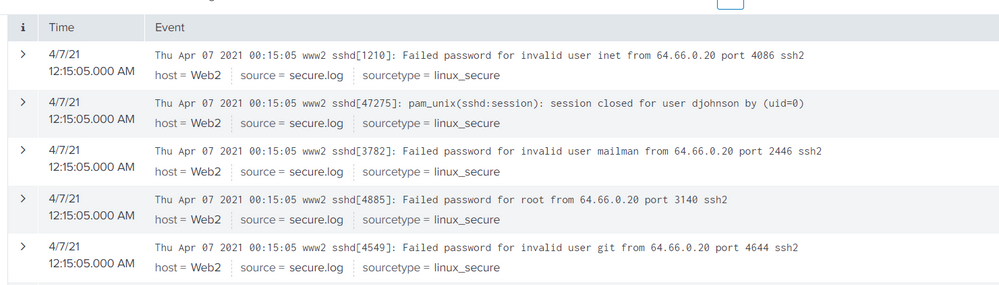
Can someone please assist, thanks in advance.
- Mark as New
- Bookmark Message
- Subscribe to Message
- Mute Message
- Subscribe to RSS Feed
- Permalink
- Report Inappropriate Content


Hi @Saikarankot,
I suppose that you are not speaking of identify two dates using Time Picker.
In this case you can use something lie this:
index=security (earliest="10/03/2022:00:00:00" latest="10/05/2022:00:00:00")beware to the format of the timestamp!
Ciao.
Giuseppe
- Mark as New
- Bookmark Message
- Subscribe to Message
- Mute Message
- Subscribe to RSS Feed
- Permalink
- Report Inappropriate Content
Hi @Saikarankot,
I suppose that you are not speaking of identify two dates using Time Picker.
In this case you can use something lie this:
index=security (earliest="10/03/2022:00:00:00" latest="10/05/2022:00:00:00")beware to the format of the timestamp!
Ciao.
Giuseppe
- Mark as New
- Bookmark Message
- Subscribe to Message
- Mute Message
- Subscribe to RSS Feed
- Permalink
- Report Inappropriate Content
Hi @gcusello . Apologies for the late response.
Thank you so much, this works. I'm also curious why queries that I tried earlier didn't work. Would you be able to shed some light on that?
Best Regards,
Sai
- Mark as New
- Bookmark Message
- Subscribe to Message
- Mute Message
- Subscribe to RSS Feed
- Permalink
- Report Inappropriate Content
Hi @Saikarankot,
probably the proble is in the format of those fields.
good for you, see next time!
Please accept one answer for the other people of Community
Ciao and happy splunking
Giuseppe
P.S.: Karma Points are appreciated 😉

Join the Splunk Community Slack to learn, troubleshoot, and make connections with fellow Splunk practitioners in real time!
Join Splunk User Groups to connect and learn in-person by region or remotely by topic or industry.
Make Your Machine Data AI-Ready in Splunk
Splunk Asynchronous Forwarding Explained
How to Monitor AI Agents with Splunk Agent Observability
