
Turn on suggestions
Auto-suggest helps you quickly narrow down your search results by suggesting possible matches as you type.
Getting Data In
×
Join the Conversation
Without signing in, you're just watching from the sidelines. Sign in or Register to connect, share, and be part of the Splunk Community.
- Find Answers
- :
- Splunk Administration
- :
- Getting Data In
- :
- Re: How come my unique JSON event returns duplicat...
Options
- Subscribe to RSS Feed
- Mark Topic as New
- Mark Topic as Read
- Float this Topic for Current User
- Bookmark Topic
- Subscribe to Topic
- Mute Topic
- Printer Friendly Page
- Mark as New
- Bookmark Message
- Subscribe to Message
- Mute Message
- Subscribe to RSS Feed
- Permalink
- Report Inappropriate Content
How come my unique JSON event returns duplicate values in a search string?
justins777
New Member
12-03-2018
02:39 PM
Hi All,
I have some logging that is ingested through a Splunk agent. A sample log looks like:
{
   "asctime" : "2018-11-30T02:29:19Z+0000",
   "name" : "sloth_start_stop",
   "processName" : "MainProcess",
   "filename" : "sloth_start_stop.py",
   "funcName" : "remove_pending_action_tag",
   "levelname" : "INFO",
   "lineno" : 174,
   "module" : "sloth_start_stop",
   "threadName" : "MainThread",
   "message" : "Removed pending action tag '{'SlothPendingAction': 'start'}' from resource 'i-xxxxxxxxxxxxx'",
   "current_status" : "running",
   "event_time" : "0001-01-01T12:29:00+10:00",
   "resource_id" : "i-xxxxxxxxxxxxxxxxxxxx",
   "event_action" : "SlothPendingAction",
   "lambda_current_time" : "2018-11-30T12:29:14.961459+10:00",
   "event_value" : "12:29+10:00",
   "aws_account_id" : "xxxxxxxxxxx",
   "ami_id" : "ami-xxxxxxxxxxxx",
   "time_zone" : "+10:00",
   "instance_type" : "m4.large",
   "context" :
      {
         "aws_request_id" : "bac8149b-f447-xxxxxxxxxxxxxx",
         "log_stream_name" : "2018/11/29/[$LATEST]e9234dbcfxxxxxxxxxxxxxxx",
         "invoked_function_arn" : "arn:aws:lambda:ap-southeast-2:xxxxxxxxx:function:aws-platform-sloth-start-stop",
         "client_context" : null,
         "log_group_name" : "/aws/lambda/aws-platform-sloth-start-stop",
         "function_name" : "aws-platform-sloth-start-stop",
         "function_version" : "$LATEST",
         "identity" : "<__main__.CognitoIdentity object at xxxxxxx",
         "memory_limit_in_mb" : "128"
      },
   "timestamp" : "2018-11-30T02:29:19Z+0000"
}
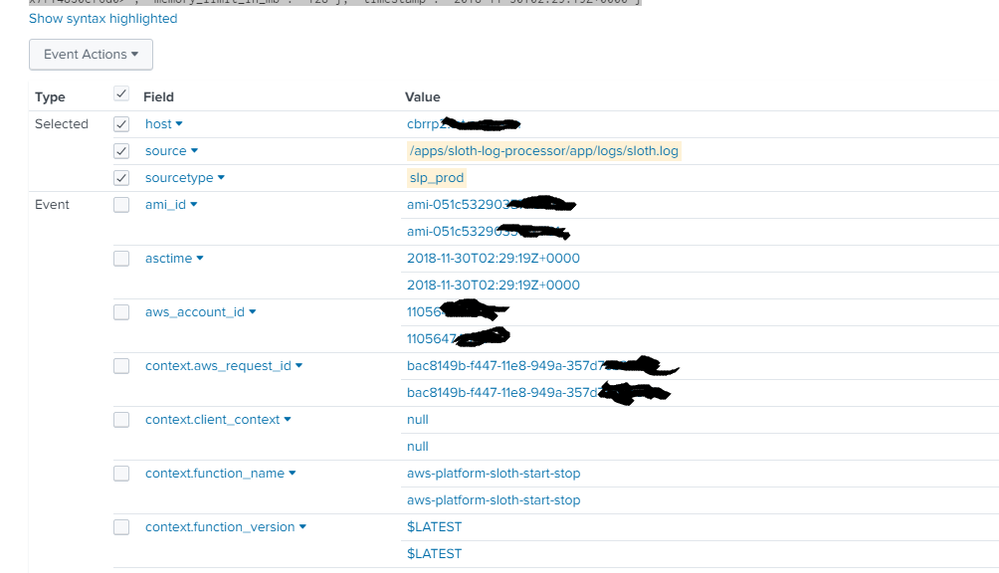
when I open the event, it shows duplicate values:
When i try and create a table:
| table aws_account_id, resource_id, lambda_current_time, levelname
I also get duplicates in my row:

No idea what is going on?
- Mark as New
- Bookmark Message
- Subscribe to Message
- Mute Message
- Subscribe to RSS Feed
- Permalink
- Report Inappropriate Content

MuS

SplunkTrust
12-03-2018
04:02 PM
Hi justins777,
check the props.conf for the sourcetype and validate that you either use :
INDEXED_EXTRACTIONS = JSON on the parsing Splunk instance (eq indexer or heavy weight forwarder)
OR
KV_MODE = json on the search head.
Don't use both settings at the same time.
Hope this helps ...
cheers, MuS




Got questions? Get answers!
Join the Splunk Community Slack to learn, troubleshoot, and make connections with fellow Splunk practitioners in real time!
Meet up IRL or virtually!
Join Splunk User Groups to connect and learn in-person by region or remotely by topic or industry.
Get Updates on the Splunk Community!
Get Agentic with Splunk Lantern: Connect to Cisco Cloud Control, Transform ...
Splunk Lantern is Splunk’s customer success center that provides practical guidance from Splunk experts on key ...
July Community Events: Master ITSI 5.0 & Automate Splunk
Struggling with alert fatigue or feeling like you're spending more time on infrastructure maintenance than ...
New Release of Federated Search: Bringing Splunk Analytics to More of Your Data
Organizations today are generating more data than ever and storing it across cloud object stores, data lakes, ...
