
Join the Conversation
- Find Answers
- :
- Splunk Administration
- :
- Getting Data In
- :
- How can we identify forwarders which are not conne...
- Subscribe to RSS Feed
- Mark Topic as New
- Mark Topic as Read
- Float this Topic for Current User
- Bookmark Topic
- Subscribe to Topic
- Mute Topic
- Printer Friendly Page
- Mark as New
- Bookmark Message
- Subscribe to Message
- Mute Message
- Subscribe to RSS Feed
- Permalink
- Report Inappropriate Content
How can we identify forwarders which are not connected to certain indexers?

The DMC shows us the following -
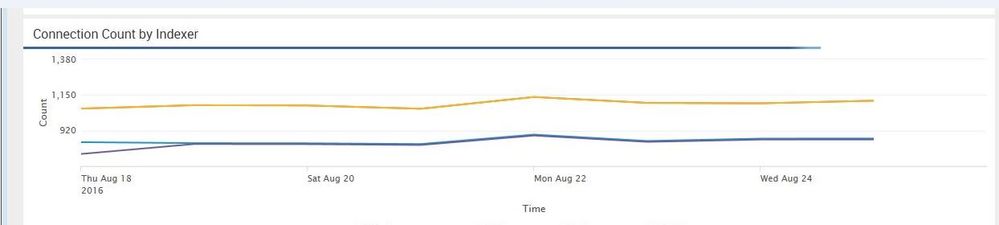
It shows the connected forwarders to the four indexers, the yellow line is actually two indexers one on top of the other.
How can we figure out which two hundred or so forwarders are not connected to the two newer indexers (the blue and purple) at the bottom of the chart?
- Mark as New
- Bookmark Message
- Subscribe to Message
- Mute Message
- Subscribe to RSS Feed
- Permalink
- Report Inappropriate Content
Jeff suggested -
-- You should be able to run a search on _internal for the last 24 hours looking for host whose count of splunk_server != 4.
- Mark as New
- Bookmark Message
- Subscribe to Message
- Mute Message
- Subscribe to RSS Feed
- Permalink
- Report Inappropriate Content

I know this isn't what you're asking, but having hundreds of forwarders going directly to your indexers is against best practice. The Heavy Forwarder role should be intercepting these messages from the UFs and such and then forwarding them to the indexers.
This also allows you to do some preprocessing with transforms and props that would otherwise take resources away from your indexers.



Join the Splunk Community Slack to learn, troubleshoot, and make connections with fellow Splunk practitioners in real time!
Join Splunk User Groups to connect and learn in-person by region or remotely by topic or industry.
Persistent Queue at TcpOut — One of Splunk's Most Practical Features
Skip the Awkward Silence: Have a .conf-ersation at .conf26
Rethinking Zero Trust: From Product Purchases to Logical Control Evidence
