
Join the Conversation
- Find Answers
- :
- Splunk Administration
- :
- Getting Data In
- :
- How can I filter data in search-time from a genera...
- Subscribe to RSS Feed
- Mark Topic as New
- Mark Topic as Read
- Float this Topic for Current User
- Bookmark Topic
- Subscribe to Topic
- Mute Topic
- Printer Friendly Page
- Mark as New
- Bookmark Message
- Subscribe to Message
- Mute Message
- Subscribe to RSS Feed
- Permalink
- Report Inappropriate Content

Hi,
I have a csv file, generated each day from a Powershell script under the Splunk app lookups directory.
I use the info in those records with the | inputlookup command in many other searches. The columns are name, surname and domain of the internal company network.
Is there a way to filter (in search time) only some of those records present in the .csv file (maybe in a wildcard fashion - for example: eliminate those which name start with adm*)?
Thanks for any suggestion,
Skender
- Mark as New
- Bookmark Message
- Subscribe to Message
- Mute Message
- Subscribe to RSS Feed
- Permalink
- Report Inappropriate Content

If I understand your request, is this sort of what you're looking for?
|inputlookup testlookup1 | search NOT user=adm*
or for just the user field
|inputlookup testlookup1 | fields + user | search NOT user=adm*
(whatever your field is)
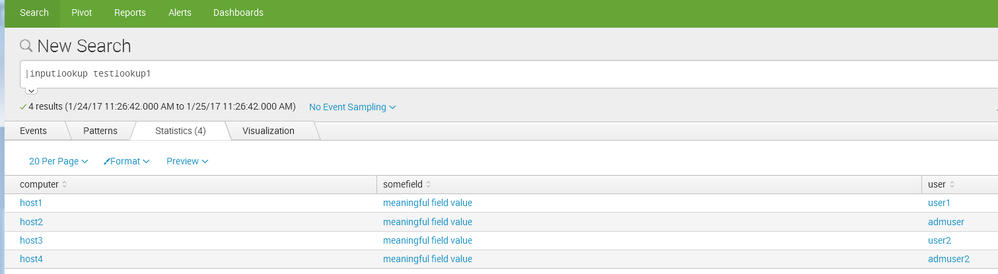
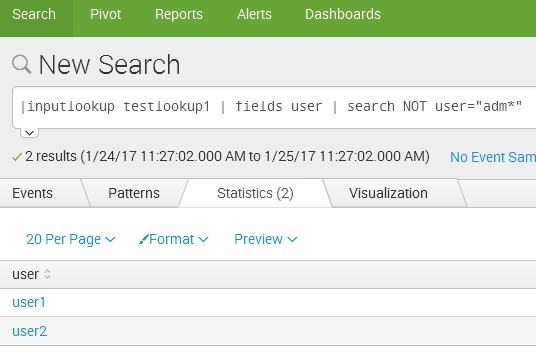
- Mark as New
- Bookmark Message
- Subscribe to Message
- Mute Message
- Subscribe to RSS Feed
- Permalink
- Report Inappropriate Content
- Mark as New
- Bookmark Message
- Subscribe to Message
- Mute Message
- Subscribe to RSS Feed
- Permalink
- Report Inappropriate Content

The inputlookup command is no different than using index=myindex sourcetype=mysourcetype; you have all the same filtering options with additional pipelines of commands. The only difference is that you must do a | search first. So you can do something like this:
| inputlookup | search NOT name="adm*"




Join the Splunk Community Slack to learn, troubleshoot, and make connections with fellow Splunk practitioners in real time!
Join Splunk User Groups to connect and learn in-person by region or remotely by topic or industry.
SOC4Kafka - New Kafka Connector Powered by OpenTelemetry
Rounding off the Splunk Dashboard Contest
A Four Part Event Series: AI + Observability: AI Agents, LLMs, Apps, & Infrastructure
