
Join the Conversation
- Find Answers
- :
- Splunk Administration
- :
- Getting Data In
- :
- Re: How can I avoid from adding an original hostna...
- Subscribe to RSS Feed
- Mark Topic as New
- Mark Topic as Read
- Float this Topic for Current User
- Bookmark Topic
- Subscribe to Topic
- Mute Topic
- Printer Friendly Page
- Mark as New
- Bookmark Message
- Subscribe to Message
- Mute Message
- Subscribe to RSS Feed
- Permalink
- Report Inappropriate Content
How can I avoid from adding an original hostname(or, IP address) to _SYSLOG_ROUGING event when forwarding a third party server?


How can I avoid from adding an original hostname(or, IP address) to _SYSLOG_ROUGING event when forwarding a third party server?
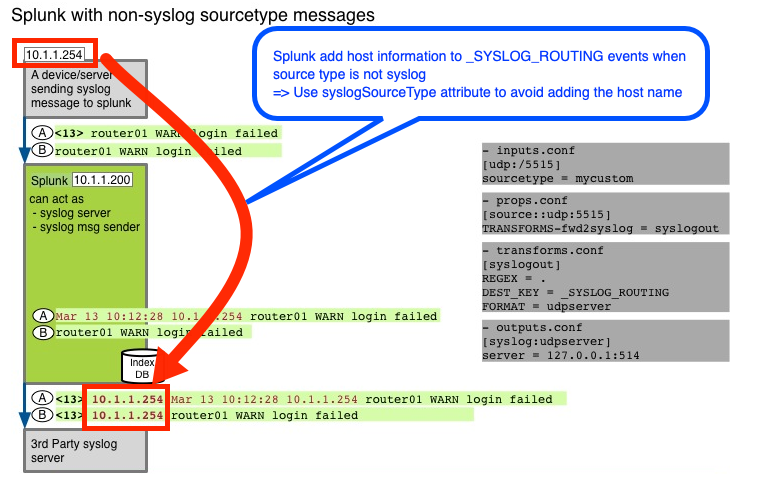
I can see that Splunk add host information to original syslog event when using _SYSLOG_ROUTING to forward syslog events to a third party server?
Below is an example added the server's IP address 192.168.10.111 which was already in the original event.
192.168.10.111 Mar 16 00:01:29 192.168.10.111 postfix/qmgr[1106]: EA11004022: from=, size=3514, nrcpt=1 (queue active)
How can I remove the host name?
- Mark as New
- Bookmark Message
- Subscribe to Message
- Mute Message
- Subscribe to RSS Feed
- Permalink
- Report Inappropriate Content
Probably you're using non-syslog sourcetype. In that case, try syslogSourceType attribute in outputs.conf. This should avoid adding the originated hostname.
syslogSourceType = <string>
* Specifies an additional rule for handling data, in addition to that
  provided by the 'syslog' source type.
* This string is used as a substring match against the sourcetype key. For
  example, if the string is set to "syslog", then all sourcetypes
  containing the string 'syslog' receive this special treatment.
* To match a sourcetype explicitly, use the pattern
  "sourcetype::sourcetype_name".
    * Example: syslogSourceType = sourcetype::apache_common
* Data that is "syslog" or matches this setting is assumed to already be in
  syslog format.
* Data that does not match the rules has a header, optionally a timestamp
  (if defined in 'timestampformat'), and a hostname added to the front of
  the event. This is how Splunk software causes arbitrary log data to match syslog expectations.
* No default.
For more detail,
Official Doc:
https://docs.splunk.com/Documentation/Splunk/latest/Data/HowSplunkEnterprisehandlessyslogdata
Community Wiki: (old)
https://wiki.splunk.com/Community:Test:How_Splunk_behaves_when_receiving_or_forwarding_udp_data


Join the Splunk Community Slack to learn, troubleshoot, and make connections with fellow Splunk practitioners in real time!
Join Splunk User Groups to connect and learn in-person by region or remotely by topic or industry.
Accelerate Splunk App Development with AI
Meet the .conf26 AI Agent Buildathon Winners
Trusted Autonomy in the SOC: A Maturity Journey
