
Join the Conversation
- Find Answers
- :
- Splunk Administration
- :
- Getting Data In
- :
- Re: Help splitting out a JSON file into multiple e...
- Subscribe to RSS Feed
- Mark Topic as New
- Mark Topic as Read
- Float this Topic for Current User
- Bookmark Topic
- Subscribe to Topic
- Mute Topic
- Printer Friendly Page
- Mark as New
- Bookmark Message
- Subscribe to Message
- Mute Message
- Subscribe to RSS Feed
- Permalink
- Report Inappropriate Content

Hi All,
There are lots of forum topics here on this but I'm really struggling to get my head around it.
I have the following information in JSON:
{
    "4": {
        "state": {
            "on": false,
            "bri": 254,
            "hue": 8418,
            "sat": 140,
            "effect": "none",
            "xy": [
                0.5053,
                0.4152
            ],
            "ct": 454,
            "alert": "select",
            "colormode": "ct",
            "mode": "homeautomation",
            "reachable": false
        },
        "swupdate": {
            "state": "transferring",
            "lastinstall": "2020-03-03T14:19:37"
        },
        "type": "Extended color light",
        "name": "Hue lightstrip plus 1",
        "modelid": "LST002",
        "manufacturername": "Signify Netherlands B.V.",
        "productname": "Hue lightstrip plus",
        "capabilities": {
            "certified": true,
            "control": {
                "mindimlevel": 40,
                "maxlumen": 1600,
                "colorgamuttype": "C",
                "colorgamut": [
                    [
                        0.6915,
                        0.3083
                    ],
                    [
                        0.17,
                        0.7
                    ],
                    [
                        0.1532,
                        0.0475
                    ]
                ],
                "ct": {
                    "min": 153,
                    "max": 500
                }
            },
            "streaming": {
                "renderer": true,
                "proxy": true
            }
        },
        "config": {
            "archetype": "huelightstrip",
            "function": "mixed",
            "direction": "omnidirectional",
            "startup": {
                "mode": "safety",
                "configured": true
            }
        },
        "uniqueid": "00:17:88:01:04:06:ae:3d-0b",
        "swversion": "1.50.2_r30933",
        "swconfigid": "59F2C3A3",
        "productid": "Philips-LST002-1-LedStripsv3"
    },
    "5": {
        "state": {
            "on": false,
            "bri": 144,
            "hue": 7676,
            "sat": 199,
            "effect": "none",
            "xy": [
                0.5016,
                0.4151
            ],
            "ct": 443,
            "alert": "select",
            "colormode": "xy",
            "mode": "homeautomation",
            "reachable": true
        },
        "swupdate": {
            "state": "noupdates",
            "lastinstall": "2021-08-13T13:53:48"
        },
        "type": "Extended color light",
        "name": "Upstairs Hall",
        "modelid": "LCT015",
        "manufacturername": "Signify Netherlands B.V.",
        "productname": "Hue color lamp",
        "capabilities": {
            "certified": true,
            "control": {
                "mindimlevel": 1000,
                "maxlumen": 806,
                "colorgamuttype": "C",
                "colorgamut": [
                    [
                        0.6915,
                        0.3083
                    ],
                    [
                        0.17,
                        0.7
                    ],
                    [
                        0.1532,
                        0.0475
                    ]
                ],
                "ct": {
                    "min": 153,
                    "max": 500
                }
            },
            "streaming": {
                "renderer": true,
                "proxy": true
            }
        },
        "config": {
            "archetype": "sultanbulb",
            "function": "mixed",
            "direction": "omnidirectional",
            "startup": {
                "mode": "safety",
                "configured": true
            }
        },
        "uniqueid": "00:17:88:01:04:ff:49:53-0b",
        "swversion": "1.88.1",
        "swconfigid": "76B74E79",
        "productid": "Philips-LCT015-1-A19ECLv5"
    },
I am wanting information for "4" and "5" to be ingested as separate events at index time. I understand that one could use regex to filter this properly, but honestly I'm struggling to wrap my head around how.
Any help would be massively appreciated.
Many Thanks,
John
- Mark as New
- Bookmark Message
- Subscribe to Message
- Mute Message
- Subscribe to RSS Feed
- Permalink
- Report Inappropriate Content
Absolutely amazing. Can't thank you enough!
I really need to read up more on how Splunk uses regex to split event data like this.
- Mark as New
- Bookmark Message
- Subscribe to Message
- Mute Message
- Subscribe to RSS Feed
- Permalink
- Report Inappropriate Content

Give this a try
[ <SOURCETYPE NAME> ]
SHOULD_LINEMERGE=false
LINE_BREAKER=([\r\n]+)(?=\s+\"\d+\":)
NO_BINARY_CHECK=true
CHARSET=UTF-8
disabled=false
SEDCMD-removeHeader=s/^\{$//
SEDCMD-addHeader=s/^\s+\"/{"/
SEDCMD-addFooter=s/\},$/}\n}/
You'll have to add timestamp parsing config as well (use timestamp on the event OR use current time)
- Mark as New
- Bookmark Message
- Subscribe to Message
- Mute Message
- Subscribe to RSS Feed
- Permalink
- Report Inappropriate Content
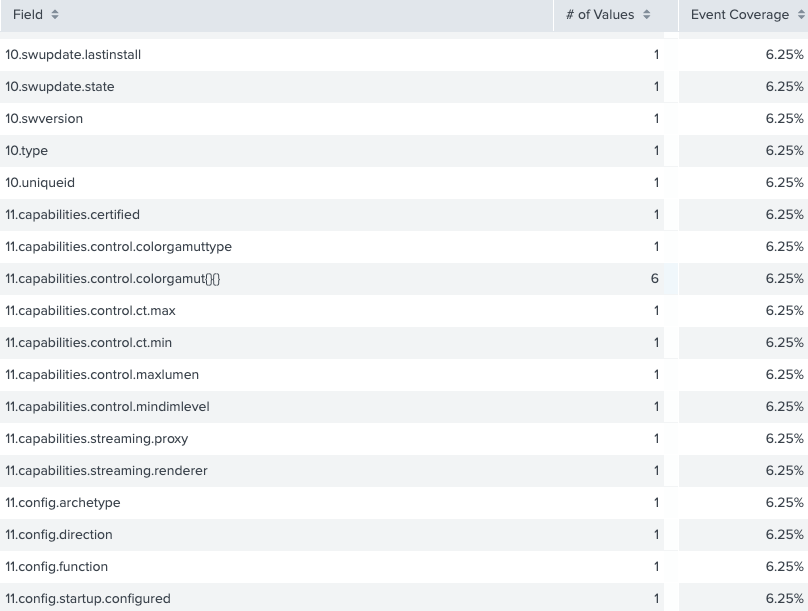
That's excellent thank you! Got that working, however all the field names have the number in front of them... Any idea how I'd get around this?
- Mark as New
- Bookmark Message
- Subscribe to Message
- Mute Message
- Subscribe to RSS Feed
- Permalink
- Report Inappropriate Content


@dumdees - I've not tested it but try this LINE_BREAKER in the staging/testing environment.
(,*{*[\r\n]+\s+\"\d+\":\s*)
I hope this helps!!!
- Mark as New
- Bookmark Message
- Subscribe to Message
- Mute Message
- Subscribe to RSS Feed
- Permalink
- Report Inappropriate Content
Absolutely amazing. Can't thank you enough!
I really need to read up more on how Splunk uses regex to split event data like this.

Join the Splunk Community Slack to learn, troubleshoot, and make connections with fellow Splunk practitioners in real time!
Join Splunk User Groups to connect and learn in-person by region or remotely by topic or industry.
Persistent Queue at TcpOut — One of Splunk's Most Practical Features
Catalog Is Now Generally Available on Splunk Cloud Platform
Your Path to AgenticOps: AI Experiences for Every Splunk Practitioner
