
Join the Conversation
- Find Answers
- :
- Splunk Administration
- :
- Getting Data In
- :
- Re: HTTP Response Code: 404 - Not Found from dyntr...
- Subscribe to RSS Feed
- Mark Topic as New
- Mark Topic as Read
- Float this Topic for Current User
- Bookmark Topic
- Subscribe to Topic
- Mute Topic
- Printer Friendly Page
- Mark as New
- Bookmark Message
- Subscribe to Message
- Mute Message
- Subscribe to RSS Feed
- Permalink
- Report Inappropriate Content
HTTP Response Code: 404 - Not Found from dyntrace to splunk HEC

Hi,
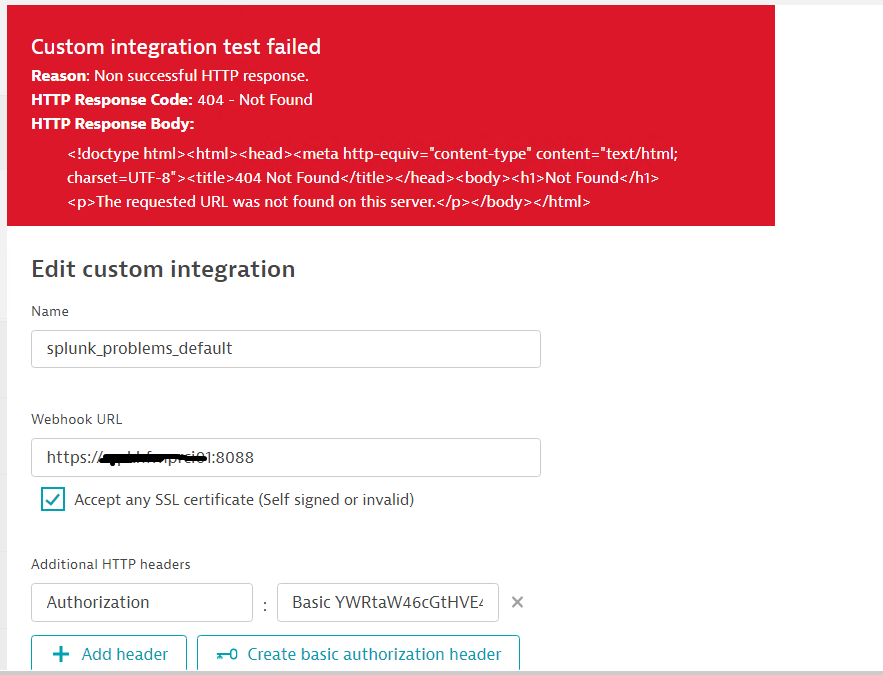
I am trying to push the problems(alerts) from dynatrace manged solution to Splunk Heavy forwarder on Http Event collector on port 8088. I am getting the "HTTP Response Code: 404 - Not Found". Can any one integrated splunk and dynatrace.

- Mark as New
- Bookmark Message
- Subscribe to Message
- Mute Message
- Subscribe to RSS Feed
- Permalink
- Report Inappropriate Content

Good Day: There are a few things to consider here as I have set up the Custom Webhook from Dynatrace successfully to the Splunk HEC.
Your HTTP header...instead of the word "Basic", I found the word Splunk to be something that worked for me. Not sure if Basic will work or not.
There is an additional header you may need - Content-Type:application/json
Issues can still arise, with these settings above, based on the payload of the Webhook.
This has worked for me as the custom payload:
{
"sourcetype": "manual",
"event": {ProblemDetailsJSON}
}

Join the Splunk Community Slack to learn, troubleshoot, and make connections with fellow Splunk practitioners in real time!
Join Splunk User Groups to connect and learn in-person by region or remotely by topic or industry.
Make Your Machine Data AI-Ready in Splunk
Splunk Asynchronous Forwarding Explained
How to Monitor AI Agents with Splunk Agent Observability
