
Join the Conversation
- Find Answers
- :
- Splunk Administration
- :
- Getting Data In
- :
- Getting a list of field extractions using the API
- Subscribe to RSS Feed
- Mark Topic as New
- Mark Topic as Read
- Float this Topic for Current User
- Bookmark Topic
- Subscribe to Topic
- Mute Topic
- Printer Friendly Page
- Mark as New
- Bookmark Message
- Subscribe to Message
- Mute Message
- Subscribe to RSS Feed
- Permalink
- Report Inappropriate Content
Getting a list of field extractions using the API

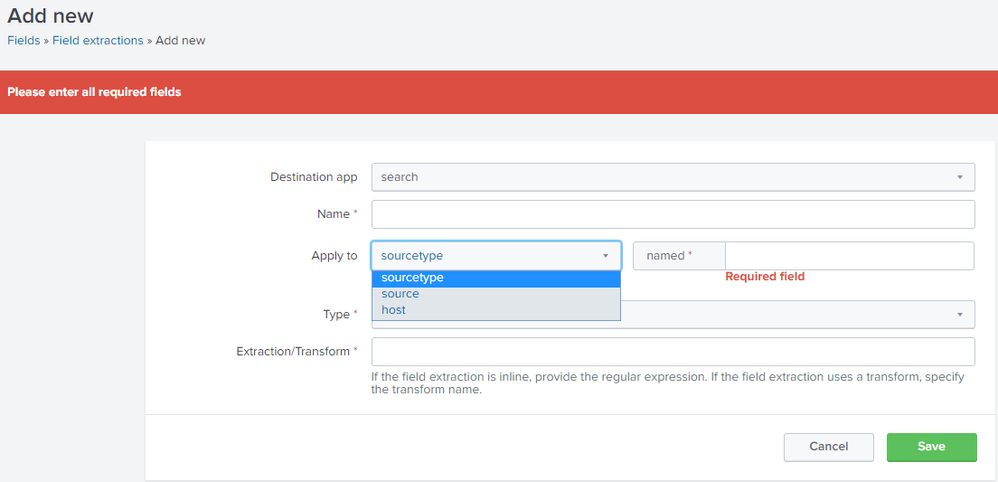
There are 2 endpoints that seem to return extractions which are data/transforms/extractions and data/props/extractions. I've created some extractions that don't appear in the list when I hit these endpoints. I can only get an extraction in the list by setting the "Apply to" field to host from the dropdown in the UI. Does anyone have any insight as to why the extraction has to be applied to a host for it to show up in endpoint output?
- Mark as New
- Bookmark Message
- Subscribe to Message
- Mute Message
- Subscribe to RSS Feed
- Permalink
- Report Inappropriate Content

- Mark as New
- Bookmark Message
- Subscribe to Message
- Mute Message
- Subscribe to RSS Feed
- Permalink
- Report Inappropriate Content
Right! I'm trying to get a list of every field extraction, but only extractions tagged with "host" are returned.
- Mark as New
- Bookmark Message
- Subscribe to Message
- Mute Message
- Subscribe to RSS Feed
- Permalink
- Report Inappropriate Content
It should be there. I tried to search an field extraction which is tagged to a sourcetype and the REST API returns result.
| rest /services/data/props/extractions
| search title="<NAME_OF_YOUR_FIELD_EXTRACTON>"
- Mark as New
- Bookmark Message
- Subscribe to Message
- Mute Message
- Subscribe to RSS Feed
- Permalink
- Report Inappropriate Content
@joemaz95
Kindly accept the answer if it helped you.
- Mark as New
- Bookmark Message
- Subscribe to Message
- Mute Message
- Subscribe to RSS Feed
- Permalink
- Report Inappropriate Content
Unfortunately, the extractions in question still don't appear when hitting that endpoint.
- Mark as New
- Bookmark Message
- Subscribe to Message
- Mute Message
- Subscribe to RSS Feed
- Permalink
- Report Inappropriate Content

Try these (it is probably in a different app that you think):
|rest/servicesNS/-/-/data/transforms/extractions
|rest/servicesNS/-/-/data/props/extractions
- Mark as New
- Bookmark Message
- Subscribe to Message
- Mute Message
- Subscribe to RSS Feed
- Permalink
- Report Inappropriate Content
Thanks for the response, this didn't appear to resolve the issue.
- Mark as New
- Bookmark Message
- Subscribe to Message
- Mute Message
- Subscribe to RSS Feed
- Permalink
- Report Inappropriate Content
How can anybody help you without more detail? The answer that I provided absolutely works unless you do not have privilege/permission to access the endpoint, which is probably the case.
- Mark as New
- Bookmark Message
- Subscribe to Message
- Mute Message
- Subscribe to RSS Feed
- Permalink
- Report Inappropriate Content
May I know in which screen you see 'Apply to' option?
" I can only get an extraction in the list by setting the "Apply to" field to host from the dropdown in the UI"
- Mark as New
- Bookmark Message
- Subscribe to Message
- Mute Message
- Subscribe to RSS Feed
- Permalink
- Report Inappropriate Content
Thanks for helping me clarify. The field in question is found here:
Settings Dropdown > Fields > Field Extractions > New Field Extraction > Apply to _____ named _____



Join the Splunk Community Slack to learn, troubleshoot, and make connections with fellow Splunk practitioners in real time!
Join Splunk User Groups to connect and learn in-person by region or remotely by topic or industry.
Supercharging Windows Security Detection Performance: Introducing Hybrid Field ...
Enriching Signals with the OTel Lookup Processor
Meet the .conf26 AI Agent Buildathon Winners
