
Join the Conversation
- Find Answers
- :
- Splunk Administration
- :
- Getting Data In
- :
- Exporting results from api search
- Subscribe to RSS Feed
- Mark Topic as New
- Mark Topic as Read
- Float this Topic for Current User
- Bookmark Topic
- Subscribe to Topic
- Mute Topic
- Printer Friendly Page
- Mark as New
- Bookmark Message
- Subscribe to Message
- Mute Message
- Subscribe to RSS Feed
- Permalink
- Report Inappropriate Content
Exporting results from api search

Hello, I am trying to export the results from an api search, currently I am using the curl command:
curl -k -u user:pass https://hostname:8089/services/search/jobs/export?search=$NewQ -o Output-file.csv
I can see that the search completed in the splunk webclient but am not able to find the output csv file that should result from this command. I have checked the $SPLUNK_HOME/var/run/splunk/csv folder after each attempt at using this command and there has never been a file created there (which to my understanding is where this file is supposed to be created). Any help is greatly appreciated 🙂 thank you.
- Mark as New
- Bookmark Message
- Subscribe to Message
- Mute Message
- Subscribe to RSS Feed
- Permalink
- Report Inappropriate Content


Wait a second. Where are you looking for the results file? On splunk server? If you're calling curl with -o option, you'll get an output file on your local computer - the one calling curl.
BTW, calling API this way might not be the best way if the search produces big result set.
- Mark as New
- Bookmark Message
- Subscribe to Message
- Mute Message
- Subscribe to RSS Feed
- Permalink
- Report Inappropriate Content
In my testing environment the PC I am executing the Curl command from is the acting splunk server, yet no files are created when I check that file mentioned file path
- Mark as New
- Bookmark Message
- Subscribe to Message
- Mute Message
- Subscribe to RSS Feed
- Permalink
- Report Inappropriate Content
Of you run the curl command without the -o switch, do you get any results on the terminal?
- Mark as New
- Bookmark Message
- Subscribe to Message
- Mute Message
- Subscribe to RSS Feed
- Permalink
- Report Inappropriate Content
Without the -o switch the curl command returns a large set of data for all the results of the search, which is what I am trying to export to the csv file in question that will not generate.
- Mark as New
- Bookmark Message
- Subscribe to Message
- Mute Message
- Subscribe to RSS Feed
- Permalink
- Report Inappropriate Content
The -o switch simply causes curl to write server's output (which is otherwise printed on screen) to a file. So unless you have some local issues, like insufficient permissions in the directory you're calling curl from to write a file ther, there has to be a file created with the output. If you're running this curl from unix/linux box remember that the filenames are case-sensitive, so if you wrote Output.csv and look for outout.csv, you won't find it - these are two different files.
- Mark as New
- Bookmark Message
- Subscribe to Message
- Mute Message
- Subscribe to RSS Feed
- Permalink
- Report Inappropriate Content

Try something like this....
curl -k -u user:password https://localhost:8089/servicesNS/admin/search/search/jobs/export -d search="search index=_internal
| head 3" -d output_mode=csv/xml/json
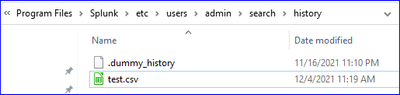
This will store the results in the user path as shown below.
- Mark as New
- Bookmark Message
- Subscribe to Message
- Mute Message
- Subscribe to RSS Feed
- Permalink
- Report Inappropriate Content
Thank you for the response, I have tried several variations on your suggested solution and this curl command still doesn't seems to produce any exported files of any type on my system. Is there anywhere this file could be generated that is not this directory? is there preliminary steps to take to get it to generate at all?


Join the Splunk Community Slack to learn, troubleshoot, and make connections with fellow Splunk practitioners in real time!
Join Splunk User Groups to connect and learn in-person by region or remotely by topic or industry.
Cisco Data Fabric from Architecture to Investigation, Better SOC Visibility, and More ...
The Trust Gap: Why a Data Foundation is Fundamental to an Agentic Enterprise
Data Management Digest – September 2026
