
Join the Conversation
- Find Answers
- :
- Splunk Administration
- :
- Getting Data In
- :
- Re: Convert String to Date Issue
- Subscribe to RSS Feed
- Mark Topic as New
- Mark Topic as Read
- Float this Topic for Current User
- Bookmark Topic
- Subscribe to Topic
- Mute Topic
- Printer Friendly Page
- Mark as New
- Bookmark Message
- Subscribe to Message
- Mute Message
- Subscribe to RSS Feed
- Permalink
- Report Inappropriate Content

I have gone through the forums looking for an answer to this, but nothing has worked. I am trying to convert a string to a date. I have data in an index that is extracted, with a field named Expiration_Date that contains a string that is actually a date/time, such as 5/22/2022 10:10:25 PM.
I found that this query works properly:
| makeresults
| eval x="08/04/16 9:40:41 PM"
| eval y=strptime(x, "%m/%d/%y %H:%M:%S")
| eval z=strftime(y, "%m/%d/%Y")
| table x y z
This query outputs the converted time properly in the z field. However, when I try to use this with my data, as such
index = ssl_certs
| eval x=Expiration_Date
| eval y=strptime(x, "%m/%d/%y %H:%M:%S")
| eval z=strftime(y, "%m/%d/%Y")
| table Expiration_Date, x, y, z
The x field is equal to the Expiration_Date field, but y and z fields are empty. Is there something special I am missing here with loading in the values of the Expiration_Date field into the eval statements?
- Mark as New
- Bookmark Message
- Subscribe to Message
- Mute Message
- Subscribe to RSS Feed
- Permalink
- Report Inappropriate Content

It looks like you are getting a 4 digit year, so it'd be more like this -
| makeresults
| eval x="8/04/2016 9:40:41 PM"
| eval y=strptime(x, "%m/%d/%Y %I:%M:%S %p")
| eval z=strftime(y, "%m/%d/%Y")
| table x y z
Lowercase y is for 2 digit years, capital Y is for 4 digit years
- Mark as New
- Bookmark Message
- Subscribe to Message
- Mute Message
- Subscribe to RSS Feed
- Permalink
- Report Inappropriate Content
Hello!
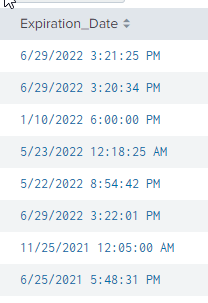
What is the data you're getting for Expiration_Date? It looks like you are expecting MM/DD/YY HH:MM:SS or 07/27/21 01:29:33. Is this the format of the Expiration_Date field? Can you provide an example?
- Mark as New
- Bookmark Message
- Subscribe to Message
- Mute Message
- Subscribe to RSS Feed
- Permalink
- Report Inappropriate Content
- Mark as New
- Bookmark Message
- Subscribe to Message
- Mute Message
- Subscribe to RSS Feed
- Permalink
- Report Inappropriate Content


Can you try to use %I and %p as you are using 12h not 24h time?
https://docs.splunk.com/Documentation/Splunk/latest/SearchReference/Commontimeformatvariables
r. Ismo
- Mark as New
- Bookmark Message
- Subscribe to Message
- Mute Message
- Subscribe to RSS Feed
- Permalink
- Report Inappropriate Content
I had tried this also, same result.
index = ssl_certs
| eval x=Expiration_Date
| eval y=strptime(x, "%m/%d/%y %I:%M:%S %p")
| eval z=strftime(y, "%m/%d/%Y")
| table Expiration_Date, x, y, z

- Mark as New
- Bookmark Message
- Subscribe to Message
- Mute Message
- Subscribe to RSS Feed
- Permalink
- Report Inappropriate Content
It looks like you are getting a 4 digit year, so it'd be more like this -
| makeresults
| eval x="8/04/2016 9:40:41 PM"
| eval y=strptime(x, "%m/%d/%Y %I:%M:%S %p")
| eval z=strftime(y, "%m/%d/%Y")
| table x y z
Lowercase y is for 2 digit years, capital Y is for 4 digit years
- Mark as New
- Bookmark Message
- Subscribe to Message
- Mute Message
- Subscribe to RSS Feed
- Permalink
- Report Inappropriate Content
That was my problem!! Thank you much!!
- Mark as New
- Bookmark Message
- Subscribe to Message
- Mute Message
- Subscribe to RSS Feed
- Permalink
- Report Inappropriate Content
- Mark as New
- Bookmark Message
- Subscribe to Message
- Mute Message
- Subscribe to RSS Feed
- Permalink
- Report Inappropriate Content
Yup I am sure, here is an example of the extracted field. No extra spaces or anything.
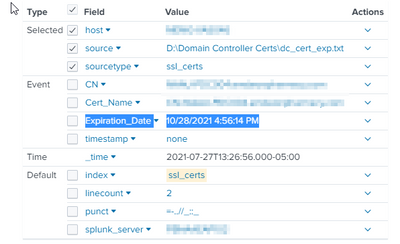
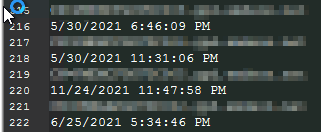
The source data comes from a file that looks like this (obfuscated hostnames):


Join the Splunk Community Slack to learn, troubleshoot, and make connections with fellow Splunk practitioners in real time!
Join Splunk User Groups to connect and learn in-person by region or remotely by topic or industry.
SOC4Kafka - New Kafka Connector Powered by OpenTelemetry
Rounding off the Splunk Dashboard Contest
A Four Part Event Series: AI + Observability: AI Agents, LLMs, Apps, & Infrastructure
