
Join the Conversation
- Find Answers
- :
- Splunk Administration
- :
- Getting Data In
- :
- Configure different index time transformations for...
- Subscribe to RSS Feed
- Mark Topic as New
- Mark Topic as Read
- Float this Topic for Current User
- Bookmark Topic
- Subscribe to Topic
- Mute Topic
- Printer Friendly Page
- Mark as New
- Bookmark Message
- Subscribe to Message
- Mute Message
- Subscribe to RSS Feed
- Permalink
- Report Inappropriate Content

Hello Splunker,
I'm currently working on a new use case and need some helps
I'm working on a HF receiving Microsoft Cloud Logs (with https://docs.splunk.com/Documentation/AddOns/released/MSCloudServices) and I would like to forwards those logs to two differents TCP output (Splunk indexers), one with some fields anonymized, and the other without any index time transformation.
Here is a schema to help you understand my problem :
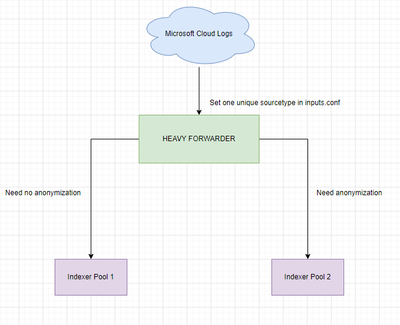
My thoughts :
I currently have a inputs.conf configured on my HF to receive the logs from MS Cloud (with sourcetype set to mscs:azure:eventhub, I think it's compulsory to keep this sourcetype)
Then I created props.conf & transforms.conf but should I put two TRANSFORMS-<class> in order to have two differents transforms depending on the destination ?
My props.conf :
[mscs:azure:eventhub]
TRANSFORMS-anonymize = user-anonymizer
My transforms.conf :
[user-anonymizer]
REGEX = ^(.*?)"\[{\\"UserName\\":[^,]*(.*)
FORMAT = $1"###"$2
DEST_KEY = _raw
Thanks a lot,
Gaétan
- Mark as New
- Bookmark Message
- Subscribe to Message
- Mute Message
- Subscribe to RSS Feed
- Permalink
- Report Inappropriate Content


You could use CLONE_SOURCETYPE to do a "copy" of your event. It would have to work something like that.
1. Your input provides splunk with an event of a sourcetype - let's say - microsoft:cloud
2. You do a CLONE_SOURCETYPE to a temporary:sourcetype
3a. The microsoft:cloud event goes through all the normal ingest steps and you route it to output1 (or simply don't touch anything if it's your default output
3b. The temporary:sourcetype gets reinserted into the queue, passes all appropriate transforms and at the end is routed to output2 and you rewrite the sourcetype field back to microsoft:cloud.
- Mark as New
- Bookmark Message
- Subscribe to Message
- Mute Message
- Subscribe to RSS Feed
- Permalink
- Report Inappropriate Content
You could use CLONE_SOURCETYPE to do a "copy" of your event. It would have to work something like that.
1. Your input provides splunk with an event of a sourcetype - let's say - microsoft:cloud
2. You do a CLONE_SOURCETYPE to a temporary:sourcetype
3a. The microsoft:cloud event goes through all the normal ingest steps and you route it to output1 (or simply don't touch anything if it's your default output
3b. The temporary:sourcetype gets reinserted into the queue, passes all appropriate transforms and at the end is routed to output2 and you rewrite the sourcetype field back to microsoft:cloud.
- Mark as New
- Bookmark Message
- Subscribe to Message
- Mute Message
- Subscribe to RSS Feed
- Permalink
- Report Inappropriate Content
Hello PickleRick, thanks for the answer!
I followed your instructions and it does the job!
Thanks again
- Mark as New
- Bookmark Message
- Subscribe to Message
- Mute Message
- Subscribe to RSS Feed
- Permalink
- Report Inappropriate Content

Why don't you just anonymize data on index time using SEDCMD?
Anonymize data - Splunk Documentation
Create a an anon app on the indexer that you want the data anonymized and put in the props.conf
in props.conf
[mscs:azure:eventhub]
SEDCMD-user_anon =  ^(.*?)"\[{\\"UserName\\":[^,]*(.*)
- Mark as New
- Bookmark Message
- Subscribe to Message
- Mute Message
- Subscribe to RSS Feed
- Permalink
- Report Inappropriate Content
Hello Azeemering, thanks for your answer!
The thing is I need to be sure that the events that leave the HF are already anonymized for compliance reason. And I don't have access to the indexer pool n°2.
Regarding SEDCMD or regular expression is equivalent if I'm not mistaken.


Join the Splunk Community Slack to learn, troubleshoot, and make connections with fellow Splunk practitioners in real time!
Join Splunk User Groups to connect and learn in-person by region or remotely by topic or industry.
Meet the .conf26 AI Agent Buildathon Winners
Trusted Autonomy in the SOC: A Maturity Journey
Supercharging Windows Security Detection Performance: Introducing Hybrid Field ...
