
Join the Conversation
- Find Answers
- :
- Splunk Administration
- :
- Getting Data In
- :
- Re: Can you help me with my timestamp mangling pro...
- Subscribe to RSS Feed
- Mark Topic as New
- Mark Topic as Read
- Float this Topic for Current User
- Bookmark Topic
- Subscribe to Topic
- Mute Topic
- Printer Friendly Page
- Mark as New
- Bookmark Message
- Subscribe to Message
- Mute Message
- Subscribe to RSS Feed
- Permalink
- Report Inappropriate Content
Can you help me with my timestamp mangling problem?

I have some old data in a database that I'm migrating to Splunk. The data spans the last 10 or so years, and has time and date information when each entry was generated. I'm using Python to convert each row into a message string, with the timestamp in ISO-format as the very first thing in this string, but I've run into a problem with Splunk not parsing this timestamp correctly.
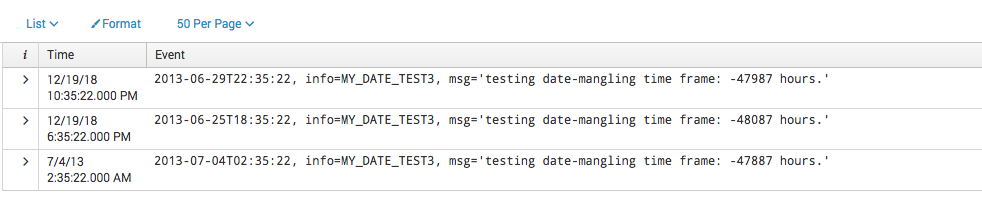
For timestamps older than roughly 48000 hrs, Splunk will update the time part of its timestamp associated with the event/message from what it found in the message, but set the date part to either today or yesterday. For dates younger than that, Splunk will update its timestamp correctly with what it found in the message/event.
I'm attaching a screenshot of what I mean below. The message I sent to Splunk is the text in the "Event" column, and the associated timestamp is in the "Time" column. Notice how only the last row has a timestamp that corresponds exactly to the one in the message.
My question: Can anyone elucidate what's happening, and/or how to fix this? I've asked my local Splunk admins, but we're all a bit at a loss here. Thanks!
- Mark as New
- Bookmark Message
- Subscribe to Message
- Mute Message
- Subscribe to RSS Feed
- Permalink
- Report Inappropriate Content

You're hitting the default of 2000 days, for "MAX_DAYS_AGO" in props.conf
MAX_DAYS_AGO = <integer>
* Specifies the maximum number of days in the past, from the current date as
  provided by input layer(For e.g. forwarder current time, or modtime for files),
  that an extracted date can be valid. Splunk software still indexes events
  with dates older than MAX_DAYS_AGO with the timestamp of the last acceptable
  event. If no such acceptable event exists, new events with timestamps older
  than MAX_DAYS_AGO will use the current timestamp.
* For example, if MAX_DAYS_AGO = 10, Splunk software applies the timestamp
  of the last acceptable event to events with extracted timestamps older
  than 10 days in the past. If no acceptable event exists, Splunk software
  applies the current timestamp.
* Defaults to 2000 (days), maximum 10951.
* IMPORTANT: If your data is older than 2000 days, increase this setting.



Join the Splunk Community Slack to learn, troubleshoot, and make connections with fellow Splunk practitioners in real time!
Join Splunk User Groups to connect and learn in-person by region or remotely by topic or industry.
SOC4Kafka - New Kafka Connector Powered by OpenTelemetry
Rounding off the Splunk Dashboard Contest
A Four Part Event Series: AI + Observability: AI Agents, LLMs, Apps, & Infrastructure
