
Join the Conversation
- Find Answers
- :
- Splunk Administration
- :
- Getting Data In
- :
- Re: CSV file ingest, exclude header
- Subscribe to RSS Feed
- Mark Topic as New
- Mark Topic as Read
- Float this Topic for Current User
- Bookmark Topic
- Subscribe to Topic
- Mute Topic
- Printer Friendly Page
- Mark as New
- Bookmark Message
- Subscribe to Message
- Mute Message
- Subscribe to RSS Feed
- Permalink
- Report Inappropriate Content

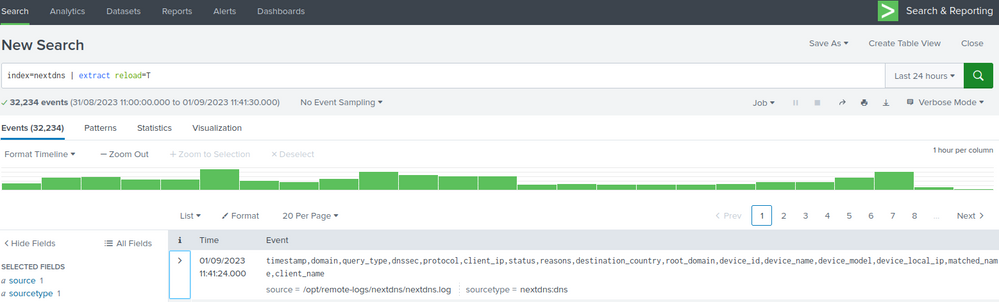
I'm ingesting logs from DNS (Next DNS via API) and struggling to exclude the header. I have seen @woodcock resolve some other examples and I can't quite see where I'm going wrong. The common mistake is not doing this on the UF.
Sample data: (comes in via a curl command and writes out to a file)
timestamp,domain,query_type,dnssec,protocol,client_ip,status,reasons,destination_country,root_domain,device_id,device_name,device_model,device_local_ip,matched_name,client_name
2023-09-01T09:09:21.561936+00:00,beam.scs.splunk.com,AAAA,false,DNS-over-HTTPS,213.31.58.70,,,,splunk.com,8D512,"NUC10i5",,,,nextdns-cli
2023-09-01T09:09:09.154592+00:00,time.cloudflare.com,A,true,DNS-over-HTTPS,213.31.58.70,,,,cloudflare.com,14D3C,"NUC10i5",,,,nextdns-cli
UF (On syslog server) v8.1.0
props.conf
[nextdns:dns]
INDEXED_EXTRACTIONS = CSV
HEADER_FIELD_LINE_NUMBER = 1
HEADER_FIELD_DELIMITER =,
FIELD_NAMES = timestamp,domain,query_type,dnssec,protocol,client_ip,status,reasons,destination_country,root_domain,device_id,device_name,device_model,device_local_ip,matched_name,client_name
TIMESTAMP_FIELDS = timestamp

inputs.conf
[monitor:///opt/remote-logs/nextdns/nextdns.log]
index = nextdns
sourcetype = nextdns:dns
initCrcLength = 375
Indexer (SVA S1) v9.1.0
Disabled the options, I will apply Great8 once I have this fixed. All the work needs to happen on the UF.
[nextdns:dns]
#INDEXED_EXTRACTIONS = CSV
#HEADER_FIELD_LINE_NUMBER = 1
#HEADER_FIELD_DELIMITER =,
#FIELD_NAMES = timestamp,domain,query_type,dnssec,protocol,client_ip,status,reasons,destination_country,root_domain,device_id,device_name,device_model,device_local_ip,matched_name,client_name
#TIMESTAMP_FIELDS = timestamp
Challenge:
- I'm still getting the header field ingest
- I have deleted the indexed data, regenerated updated log, reingested and still issues. Obviously I have restarted splunk on each instance after respective changes.
- Mark as New
- Bookmark Message
- Subscribe to Message
- Mute Message
- Subscribe to RSS Feed
- Permalink
- Report Inappropriate Content


Hi @NullZero,
as you can see at https://docs.splunk.com/Documentation/ITSI/4.17.0/Configure/props.conf#props.conf.example you should try add to your props.conf PREAMBLE_REGEX:
[nextdns:dns]
INDEXED_EXTRACTIONS = CSV
HEADER_FIELD_LINE_NUMBER = 1
HEADER_FIELD_DELIMITER =,
FIELD_NAMES = timestamp,domain,query_type,dnssec,protocol,client_ip,status,reasons,destination_country,root_domain,device_id,device_name,device_model,device_local_ip,matched_name,client_name
TIMESTAMP_FIELDS = timestamp
PREAMBLE_REGEX = ^timestamp,domain,query_type,
Ciao.
Giuseppe
- Mark as New
- Bookmark Message
- Subscribe to Message
- Mute Message
- Subscribe to RSS Feed
- Permalink
- Report Inappropriate Content
Thanks @gcusello . I saw other options but I didn't think them necessary, appreciate the assistance and good to have solved it.
- Mark as New
- Bookmark Message
- Subscribe to Message
- Mute Message
- Subscribe to RSS Feed
- Permalink
- Report Inappropriate Content
Hi @NullZero,
as you can see at https://docs.splunk.com/Documentation/ITSI/4.17.0/Configure/props.conf#props.conf.example you should try add to your props.conf PREAMBLE_REGEX:
[nextdns:dns]
INDEXED_EXTRACTIONS = CSV
HEADER_FIELD_LINE_NUMBER = 1
HEADER_FIELD_DELIMITER =,
FIELD_NAMES = timestamp,domain,query_type,dnssec,protocol,client_ip,status,reasons,destination_country,root_domain,device_id,device_name,device_model,device_local_ip,matched_name,client_name
TIMESTAMP_FIELDS = timestamp
PREAMBLE_REGEX = ^timestamp,domain,query_type,
Ciao.
Giuseppe

Join the Splunk Community Slack to learn, troubleshoot, and make connections with fellow Splunk practitioners in real time!
Join Splunk User Groups to connect and learn in-person by region or remotely by topic or industry.
Manage Edge Processor pipelines end to end with APIs
Splunk Brings Proof of Control to Digital Asset Transfers
Manage Ingest Processor pipelines end to end with APIs
