
Join the Conversation
- Find Answers
- :
- Splunk Administration
- :
- Getting Data In
- :
- Azure Event Hub messages coming to Splunk as multi...
- Subscribe to RSS Feed
- Mark Topic as New
- Mark Topic as Read
- Float this Topic for Current User
- Bookmark Topic
- Subscribe to Topic
- Mute Topic
- Printer Friendly Page
- Mark as New
- Bookmark Message
- Subscribe to Message
- Mute Message
- Subscribe to RSS Feed
- Permalink
- Report Inappropriate Content
Azure Event Hub messages coming to Splunk as multiple events

Hello,
We are integrating our on-prem Splunk (version 8.2.3) to retrieve messages from an Azure Event Hub. We have configured Linux server syslog to send to an Event Hub (Linux diagnostic extension 4.0).
We installed the Splunk Add-on for Microsoft Cloud Services app (version 4.2.0), configured the Azure app account, and created the inputs to map to the Event Hub namespace/hub name/consumer group.
We are seeing data arrive into Splunk, but it is arriving split across multiple events:
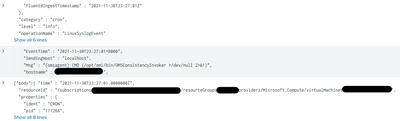
If I add all three events together, it is valid JSON for a single event:
{"body":{ "time" : "2021-11-30T23:30:01.0000000Z",
  "resourceId" : "/subscriptions/xxx/resourceGroups/xxx/providers/Microsoft.Compute/virtualMachines/xxx",
  "properties" : {
    "ident" : "CRON",
    "pid" : "177365",
    "Ignore" : "syslog",
    "Facility" : "authpriv",
    "Severity" : "info",
    "EventTime" : "2021-11-30T23:30:01+0000",
    "SendingHost" : "localhost",
    "Msg" : "pam_unix(cron:session): session closed for user root",
    "hostname" : "xxx",
    "FluentdIngestTimestamp" : "2021-11-30T23:30:01Z"
  },
  "category" : "authpriv",
  "level" : "info",
  "operationName" : "LinuxSyslogEvent"
},"x-opt-sequence-number":100,"x-opt-offset":"77128","x-opt-enqueued-time":1638315007941}
But we need such to be a single event in Splunk in order to process data effectively!
Interestingly enough, we are using the Event Hub integration to also retrieve resource diagnostic logs, and we don't see the same issue! Only when using Event Hubs for Linux diagnostics.
Has anyone faced this issue, or know how to correct the problem? Thanks!
- Mark as New
- Bookmark Message
- Subscribe to Message
- Mute Message
- Subscribe to RSS Feed
- Permalink
- Report Inappropriate Content
We configured INDEXED_EXTRACTIONS = json in apps/Splunk_TA_microsoft-cloudservices/local/props.conf and it seemed to do the trick.


Join the Splunk Community Slack to learn, troubleshoot, and make connections with fellow Splunk practitioners in real time!
Join Splunk User Groups to connect and learn in-person by region or remotely by topic or industry.
Announcing Modern Navigation: A New Era of Splunk User Experience
Self-Healing Pipeline Is Now Generally Available: AI-Powered CIM Compliance
Meet Splunk Observability Studio: AI-Assisted OpenTelemetry Instrumentation Without ...
