
Turn on suggestions
Auto-suggest helps you quickly narrow down your search results by suggesting possible matches as you type.
Getting Data In
×
Join the Conversation
Without signing in, you're just watching from the sidelines. Sign in or Register to connect, share, and be part of the Splunk Community.
- Find Answers
- :
- Splunk Administration
- :
- Getting Data In
- :
- Re: Anyone think they can lend help me figure this...
Options
- Subscribe to RSS Feed
- Mark Topic as New
- Mark Topic as Read
- Float this Topic for Current User
- Bookmark Topic
- Subscribe to Topic
- Mute Topic
- Printer Friendly Page
- Mark as New
- Bookmark Message
- Subscribe to Message
- Mute Message
- Subscribe to RSS Feed
- Permalink
- Report Inappropriate Content
Anyone think they can lend help me figure this out?

drobles96
Engager
11-09-2020
04:31 PM
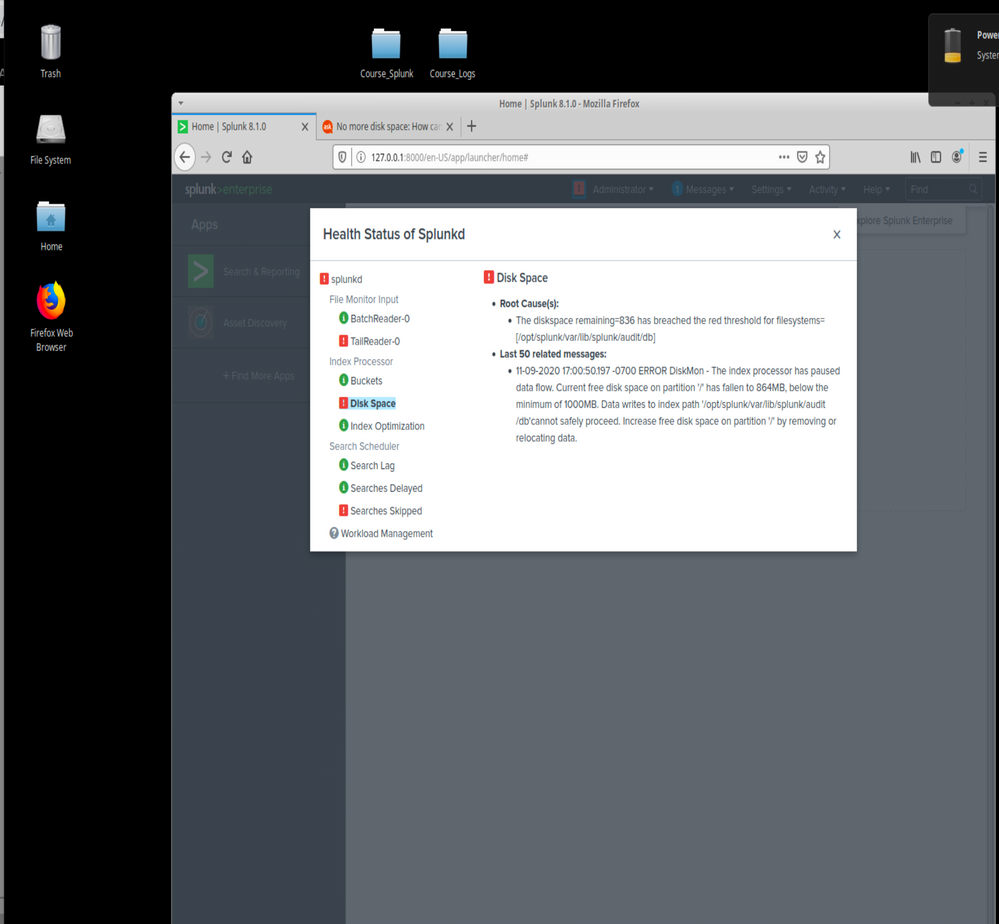
I understand the error has to do with disk space but I have no idea how to actually fix the
issue. I know how to locate the files but I'm not sure what's taking up my memory usage.
I tried troubleshooting myself but can't seem to get a solid answer. I'm also kind of new
to Splunk as I'm a cybersecurity student. Would appreciate some help! Thanks.
- Mark as New
- Bookmark Message
- Subscribe to Message
- Mute Message
- Subscribe to RSS Feed
- Permalink
- Report Inappropriate Content

SinghK
Builder
11-10-2020
12:27 AM
As Soutamo said you have run out of space on indexers.
- Mark as New
- Bookmark Message
- Subscribe to Message
- Mute Message
- Subscribe to RSS Feed
- Permalink
- Report Inappropriate Content

ITWhisperer

SplunkTrust
11-09-2020
11:50 PM
Check the ownership of the files in the splunk area and make sure they are owned by the splunk user. Make sure the splunk processes are running as the splunk user so it has control over its files and can delete files it no longer needs.
- Mark as New
- Bookmark Message
- Subscribe to Message
- Mute Message
- Subscribe to RSS Feed
- Permalink
- Report Inappropriate Content

isoutamo
SplunkTrust
11-09-2020
11:45 PM
You have run out of disk space for splunk. Basically you must add more disks to this system and take it into use for splunk. Another option is shorten retention for all (or some) indexes to free more space.
r. Ismo
r. Ismo

Got questions? Get answers!
Join the Splunk Community Slack to learn, troubleshoot, and make connections with fellow Splunk practitioners in real time!
Meet up IRL or virtually!
Join Splunk User Groups to connect and learn in-person by region or remotely by topic or industry.
Get Updates on the Splunk Community!
[Puzzles] Solve, Learn, Repeat: Character substitutions with Regular Expressions
This challenge was first posted on Slack #puzzles channelFor BORE at .conf23, we had a puzzle question which ...
Splunk Community Badges!
Hey everyone! Ready to earn some serious bragging rights in the community? Along with our existing badges ...
[Puzzles] Solve, Learn, Repeat: Matching cron expressions
This puzzle (first published here) is based on matching timestamps to cron expressions.All the timestamps ...
