
Join the Conversation
- Find Answers
- :
- Splunk Administration
- :
- Getting Data In
- :
- A better way to extract JSON?
- Subscribe to RSS Feed
- Mark Topic as New
- Mark Topic as Read
- Float this Topic for Current User
- Bookmark Topic
- Subscribe to Topic
- Mute Topic
- Printer Friendly Page
- Mark as New
- Bookmark Message
- Subscribe to Message
- Mute Message
- Subscribe to RSS Feed
- Permalink
- Report Inappropriate Content
A better way to extract JSON?

Hello,
I want to get Rspamd logs into Splunk with every info available. The best I could do with Rspamd config yields to this:
2023-11-03 13:02:24 #56502(rspamd_proxy) <7fcfc8>; lua; [string "return function (t...:4: METATEST {"qid":"8BC8C2F741","user":"unknown","ip":"188.68.A.B","header_from":["foo bar via somelist <[email protected]>"],"header_to":["list <[email protected]>"],"header_subject":["proper subject"],"header_date":["Fri, 3 Nov 2023 08:00:43 -0400 (EDT)"],"scan_time":2457,"rcpt":["[email protected]"],"size":6412,"score":-5.217652,"subject":"proper subject","action":"no action","message_id":"[email protected]","fuzzy":[],"rspamd_server":"rack.myself.net","from":"[email protected]","symbols":[{"score":-0.500000,"group":"composite","groups":["composite"],"name":"RCVD_DKIM_ARC_DNSWL_MED"},{"score":0,"group":"headers","groups":["headers"],"name":"FROM_HAS_DN"},{"score":0,"group":"headers","options":["[email protected]","[email protected]"],"groups":["headers"],"name":"FROM_NEQ_ENVFROM"},{"score":-0.010000,"group":"headers","groups":["headers"],"name":"HAS_LIST_UNSUB"},{"score":0,"group":"headers","options":["[email protected]"],"groups":["headers"],"name":"PREVIOUSLY_DELIVERED"},{"score":-1,"group":"abusix","options":["188.68.A.B:from"],"groups":["abusix","rbl"],"name":"RWL_AMI_LASTHOP"},{"score":-0.100000,"group":"mime_types","options":["text/plain"],"groups":["mime_types"],"name":"MIME_GOOD"},{"score":-0.200000,"group":"headers","options":["mailman"],"groups":["headers"],"name":"MAILLIST"},{"score":1,"group":"headers","groups":["headers"],"name":"SUBJECT_ENDS_QUESTION"},{"score":-0.200000,"group":"policies","options":["+ip4:188.68.A.B"],"groups":["policies","spf"],"name":"R_SPF_ALLOW"},{"score":-1,"group":"policies","options":["list.sys4.de:s=2023032101:i=1"],"groups":["policies","arc"],"name":"ARC_ALLOW"},{"score":0,"group":"ungrouped","options":["asn:19xxxx, ipnet:188.68.A.B/20, country:XY"],"groups":[],"name":"ASN"},{"score":0.100000,"group":"headers","groups":["headers"],"name":"RCVD_NO_TLS_LAST"},{"score":0,"group":"headers","groups":["headers","composite"],"name":"FORGED_RECIPIENTS_MAILLIST"},{"score":0,"group":"policies","options":["baz.org:+","bar.org:-"],"groups":["policies","dkim"],"name":"DKIM_TRACE"},{"score":0,"group":"headers","groups":["headers"],"name":"REPLYTO_DOM_NEQ_FROM_DOM"},{"score":0,"group":"policies","options":["bar.org:s=dktest"],"groups":["policies","dkim"],"name":"R_DKIM_REJECT"},{"score":-2.407652,"group":"statistics","options":["97.28%"],"groups":["statistics"],"name":"BAYES_HAM"},{"score":0,"group":"headers","groups":["headers"],"name":"TO_DN_ALL"},{"score":0,"group":"composite","groups":["composite"],"name":"DKIM_MIXED"},{"score":-0.200000,"group":"policies","options":["baz.org:s=20230217-rsa"],"groups":["policies","dkim"],"name":"R_DKIM_ALLOW"},{"score":0,"group":"headers","options":["3"],"groups":["headers"],"name":"RCVD_COUNT_THREE"},{"score":-0.600000,"group":"rbl","options":["188.68.A.B:from","188.68.A.B:received","168.100.A.B:received"],"groups":["rbl","dnswl"],"name":"RCVD_IN_DNSWL_MED"},{"score":-0.100000,"group":"rbl","options":["188.68.A.B:from"],"groups":["rbl","mailspike"],"name":"RWL_MAILSPIKE_GOOD"},{"score":0,"group":"policies","options":["baz.org"],"groups":["policies","dmarc"],"name":"DMARC_NA"},{"score":0,"group":"headers","options":["1"],"groups":["headers"],"name":"RCPT_COUNT_ONE"},{"score":0,"group":"mime_types","options":["0:+"],"groups":["mime_types"],"name":"MIME_TRACE"},{"score":0,"group":"headers","groups":["headers","composite"],"name":"FORGED_SENDER_MAILLIST"},{"score":0,"group":"headers","groups":["headers"],"name":"TO_EQ_FROM"},{"score":0,"group":"headers","options":["[email protected]"],"groups":["headers"],"name":"HAS_REPLYTO"}]}
Currently I’m extracting JSON with a props.conf & a transforms.conf:
props.conf
[rspamd]
KV_MODE = json
TRANSFORMS-json_extract_rspamd = json_extract_rspamd
transforms.conf
[json_extract_rspamd]
SOURCE_KEY = _raw
DEST_KEY = _raw
LOOKAHEAD = 10000
#REGEX = ^([^{]+)({.+})$
REGEX = ^(\d\d\d\d-\d\d-\d\d \d\d:\d\d:\d\d) (#\d+)\(([^)]+)\) ([^;]+); lua[^{]+{(.+})$
FORMAT = {"date":"$1","ida":"$2","process":"$3","idb":"$4",$5
CLONE_SOURCETYPE = _json
I end up with this in splunk:
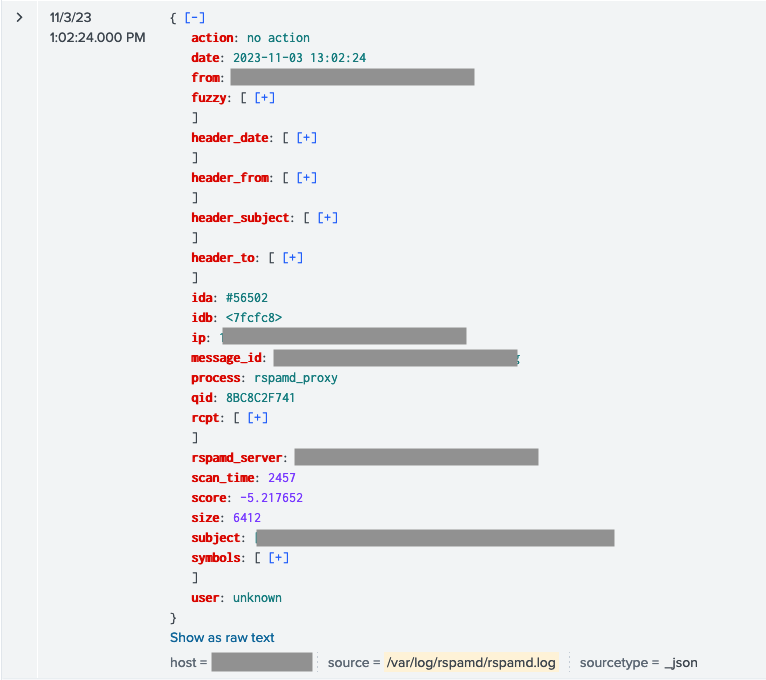
From here, I have 2 problems.
1st problem: contrary to native JSON (from my Amavis logs for example), Splunk does not extract nor process basic stats about fields unless I’m explicitly extract them… That’s quite a pain.
Is there a way / config setting to instruct Splunk to automagically extract every fields?
2nd problem: this JSON is crap. Every object in "symbols[]" looks like this:
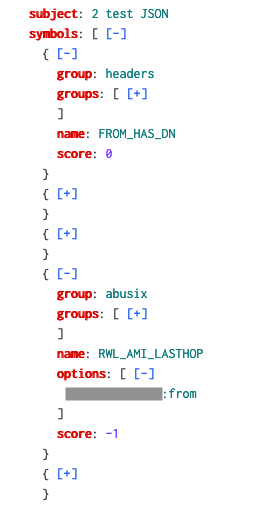
It’s almost unuseable as it prevent me from linking the name of the symbol to its score and to its options.
Is there a parsing option / function I could use to reliably transform this into something I can work with?
A good result could be
turning
{
   group: abusix
   groups: [
     abusix
     rbl
   ]
   name: RWL_AMI_LASTHOP
   options: [
    A.B.C.D:from
   ]
   score: -1
}

into

RWL_AMI_LASTHOP: [
   group: abusix
   groups: [
     abusix
     rbl
   ]
   name: RWL_AMI_LASTHOP
   options: [
    A.B.C.D:from
   ]
   score: -1
]
I’m open to suggestions, I’ve been working for years with the great JSON logs of Amavis (perfect parsing and usability). This problem is new to me…


Join the Splunk Community Slack to learn, troubleshoot, and make connections with fellow Splunk practitioners in real time!
Join Splunk User Groups to connect and learn in-person by region or remotely by topic or industry.
Meet the .conf26 AI Agent Buildathon Winners
Trusted Autonomy in the SOC: A Maturity Journey
Supercharging Windows Security Detection Performance: Introducing Hybrid Field ...
