
Join the Conversation
- Find Answers
- :
- Splunk Administration
- :
- Deployment Architecture
- :
- What is the calculation used to determine Archived...
- Subscribe to RSS Feed
- Mark Topic as New
- Mark Topic as Read
- Float this Topic for Current User
- Bookmark Topic
- Subscribe to Topic
- Mute Topic
- Printer Friendly Page
- Mark as New
- Bookmark Message
- Subscribe to Message
- Mute Message
- Subscribe to RSS Feed
- Permalink
- Report Inappropriate Content

Hi Splunkers,
In the "Architecting Splunk 8.0.1 Enterprise Deployments" coursework, we have been given a data sizing sheet to calculate everything in the coursework, but this sheet does not cover the frozen requirements.
I have tested one of the examples that we had on the "Splunk sizing" website:
https://splunk-sizing.appspot.com/
And it matches what was in the data sizing sheet, but I need to introduce the "frozen" to the table.
What I have done to validate the calculations is as follows:
For example, I have assumed:
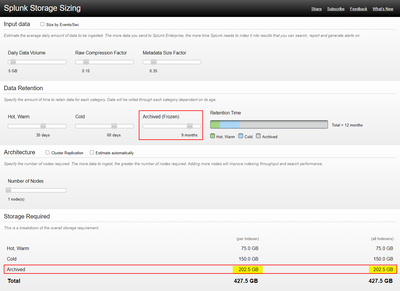
Daily Data Volume = 5GB
Raw Compression Factor = 0.15
Metadata Size Factor = 0.35
Number of Days in Hot/Warm = 30 days
Number of Days in Cold = 60 days

Then for testing, I increased the Archived (Frozen) slider from 0 days to 9 months and then found that the "Archived" storage requirement is now 202.5 GB.
My question is what is the calculation used here to determine the "Archived" storage requirement to be 202.5 GB in this case?
Thank you in advance.
- Mark as New
- Bookmark Message
- Subscribe to Message
- Mute Message
- Subscribe to RSS Feed
- Permalink
- Report Inappropriate Content


Hi @muradgh,
Frozen path keeps only compressed raw data. That is why the calculation is done using below formula;
DailyDataVolume = 5GB
RawCompressionFactor = 0.15
NumberofDaysinFrozen = 9 months = 270 days

ArchivedStorageSpace = DailyDataVolume* RawCompressionFactor* NumberofDaysinFrozen

ArchivedStorageSpace = 5 * 0.15 * 270 = 202.5 GB
Please keep in mind that Splunk does not manage the Archive path. It just moves raw data to that path. There is no retention check. This calculation is only for you to provide enough space. You should manually clean data older than 9 months.
- Mark as New
- Bookmark Message
- Subscribe to Message
- Mute Message
- Subscribe to RSS Feed
- Permalink
- Report Inappropriate Content
Hi @muradgh,
Frozen path keeps only compressed raw data. That is why the calculation is done using below formula;
DailyDataVolume = 5GB
RawCompressionFactor = 0.15
NumberofDaysinFrozen = 9 months = 270 days

ArchivedStorageSpace = DailyDataVolume* RawCompressionFactor* NumberofDaysinFrozen

ArchivedStorageSpace = 5 * 0.15 * 270 = 202.5 GB
Please keep in mind that Splunk does not manage the Archive path. It just moves raw data to that path. There is no retention check. This calculation is only for you to provide enough space. You should manually clean data older than 9 months.
- Mark as New
- Bookmark Message
- Subscribe to Message
- Mute Message
- Subscribe to RSS Feed
- Permalink
- Report Inappropriate Content
Hi @scelikok
Thank you very much.

Accelerating Observability as Code with the Splunk AI Assistant
Integrating Splunk Search API and Quarto to Create Reproducible Investigation ...
Congratulations to the 2025-2026 SplunkTrust!
