
Join the Conversation
- Find Answers
- :
- Splunk Administration
- :
- Deployment Architecture
- :
- Re: How to bypass https in peer configuration and ...
- Subscribe to RSS Feed
- Mark Topic as New
- Mark Topic as Read
- Float this Topic for Current User
- Bookmark Topic
- Subscribe to Topic
- Mute Topic
- Printer Friendly Page
- Mark as New
- Bookmark Message
- Subscribe to Message
- Mute Message
- Subscribe to RSS Feed
- Permalink
- Report Inappropriate Content
How to bypass https in peer configuration and use http

I am trying to set up POC for Splunk indexing and the manager node is up, but runs on an HTTP link (Certificate is not there yet) instead of HTTPS.
While configuring the peer when I provide the address of master node, I am getting the below error:
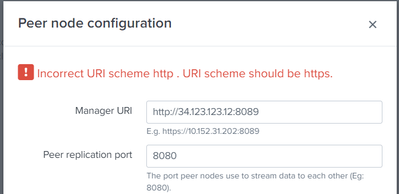
Is there a way to bypass this or create a dummy certificate for Splunk?
- Mark as New
- Bookmark Message
- Subscribe to Message
- Mute Message
- Subscribe to RSS Feed
- Permalink
- Report Inappropriate Content
I have tried the steps and created the certificate using these three documents:
https://docs.splunk.com/Documentation/Splunk/9.1.2/Security/Howtoself-signcertificates
https://docs.splunk.com/Documentation/Splunk/9.1.2/Security/HowtoprepareyoursignedcertificatesforSpl...
web.conf
[settings]
enableSplunkWebSSL = 1
privKeyPath = /opt/splunk/etc/auth/mycerts/myServerPrivateKey.key
serverCert = /opt/splunk/etc/auth/mycerts/myServerCertificate.pem
server.conf
[sslConfig]
enableSplunkdSSL = true
sslRootCAPath = /opt/splunk/etc/auth/mycerts/myCertAuthCertificate.pem
sslPassword = <encrypted>
inputs.conf
[default]
host = splunkpoc2.company.com
[splunktcp-ssl:9997]
disabled = 0
[SSL]
serverCert = /opt/splunk/etc/auth/mycerts/myServerCertificate.pem
sslPassword = $7$UeC5PhW3bITaydrFnqv0+iOwOC+ItQN/CDEZcvtLovDBwTJt
requireClientCert = true
sslVersions = *,-ssl2
sslCommonNameToCheck = indexerpoc1.company.com,indexerpoc2.company.com
Splunk Web comes up correctly but again the HTTP is not getting redirected to https:

- Mark as New
- Bookmark Message
- Subscribe to Message
- Mute Message
- Subscribe to RSS Feed
- Permalink
- Report Inappropriate Content


hi @himaniarora20 ,
this is for using SSL in connection between UFs and IDXs, you don't need to do anything to use self signed certificates in internal connections.
Ciao.
Giuseppe
- Mark as New
- Bookmark Message
- Subscribe to Message
- Mute Message
- Subscribe to RSS Feed
- Permalink
- Report Inappropriate Content
Then what should I do for getting the server up on HTTP?
- Mark as New
- Bookmark Message
- Subscribe to Message
- Mute Message
- Subscribe to RSS Feed
- Permalink
- Report Inappropriate Content

Here is a conf presentation about TLS certs https://conf.splunk.com/watch/conf-online.html?locale=watch&search.event=conf23&search=SEC1936B#/
- Mark as New
- Bookmark Message
- Subscribe to Message
- Mute Message
- Subscribe to RSS Feed
- Permalink
- Report Inappropriate Content
Hi @himaniarora20 ,
I completely agree with @isoutamo , you cannot use internal Splunk connection without https.
If you don't have your own certificate, you can use the default certificate produced by the internal Splunk Certification Authority until you'll have your own.
Ciao.
Giuseppe
- Mark as New
- Bookmark Message
- Subscribe to Message
- Mute Message
- Subscribe to RSS Feed
- Permalink
- Report Inappropriate Content
Hi
if you don't create / use your own certificates then spunk create automatic it's own with Splunk's default CA. You don't need to do anything, just install and start splunk and you have TLS cert on splunkd. Actually I don' t know if there is any way to use it without TLS cert!
If you want to replication port with TLS certs, those you must create and configure by yourself. Default way in PoC is to use plain text connections.
If/when you want to use TLS also on those, you should look from docs https://docs.splunk.com/Documentation/Splunk/latest/Security/AboutsecuringyourSplunkconfigurationwit... and/or .conf presentation https://conf.splunk.com/files/2023/slides/SEC1936B.pdf
r. Ismo


Join the Splunk Community Slack to learn, troubleshoot, and make connections with fellow Splunk practitioners in real time!
Join Splunk User Groups to connect and learn in-person by region or remotely by topic or industry.
At .conf26, Don’t Just See What’s Next. Help Shape It at Innovation Labs.
Forwarder Topology Guidance: Intermediate HF vs Intermediate UF
Data Management Digest – August 2026
