
Join the Conversation
- Find Answers
- :
- Using Splunk
- :
- Dashboards & Visualizations
- :
- lueRe: returning zero value for non existent event...
- Subscribe to RSS Feed
- Mark Topic as New
- Mark Topic as Read
- Float this Topic for Current User
- Bookmark Topic
- Subscribe to Topic
- Mute Topic
- Printer Friendly Page
- Mark as New
- Bookmark Message
- Subscribe to Message
- Mute Message
- Subscribe to RSS Feed
- Permalink
- Report Inappropriate Content

Hi
i want to make a chart that shows real time packet loss percentage of gateways but there are two problem
1.the firewall sends logs only when packet loss occurring therefor in line-chart there is no correct value for zero packet loss since line match two non zero points
2. i want to show all five gateway in single chart with different colors
here is what i search and get...
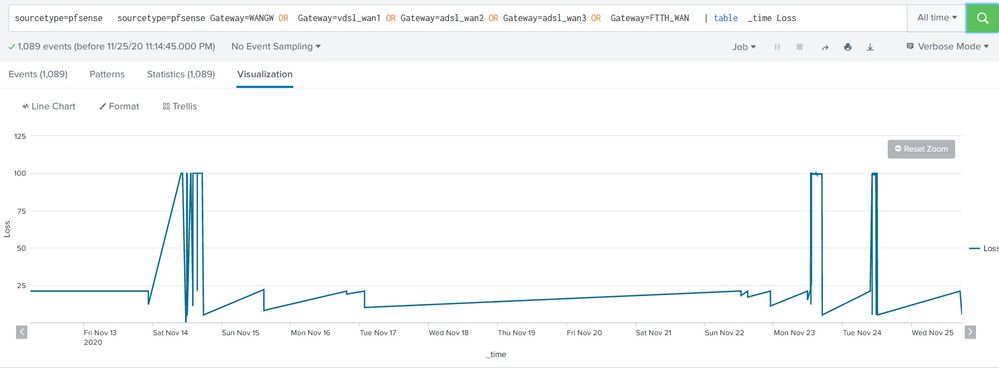
TNX
- Mark as New
- Bookmark Message
- Subscribe to Message
- Mute Message
- Subscribe to RSS Feed
- Permalink
- Report Inappropriate Content

Hi @Depressedadmin ,
For both of your questions, you can use the below answer.
<your base query>
|timechart span=1s count(Loss) as Loss by GATEWAY
This will show all 5 gateway in different colors and it will show the count 0 if it is pocket loss.
PS: Do not select All time until unless it is required and with timechart you can retrieve only 10000 rows at a time, so choose the time wisely else increase the span to 1m or 1h or 1d.
- Mark as New
- Bookmark Message
- Subscribe to Message
- Mute Message
- Subscribe to RSS Feed
- Permalink
- Report Inappropriate Content
Hi @Depressedadmin ,
For both of your questions, you can use the below answer.
<your base query>
|timechart span=1s count(Loss) as Loss by GATEWAY
This will show all 5 gateway in different colors and it will show the count 0 if it is pocket loss.
PS: Do not select All time until unless it is required and with timechart you can retrieve only 10000 rows at a time, so choose the time wisely else increase the span to 1m or 1h or 1d.
- Mark as New
- Bookmark Message
- Subscribe to Message
- Mute Message
- Subscribe to RSS Feed
- Permalink
- Report Inappropriate Content
tnx alot for response, i wanted the value of Loss percentage itself no count or avg or ...
i used list and values instead of count and result is correct but there is points on chart instead of lines...

- Mark as New
- Bookmark Message
- Subscribe to Message
- Mute Message
- Subscribe to RSS Feed
- Permalink
- Report Inappropriate Content
Hi @Depressedadmin ,
to make it looks like a line, please go to Format-> select the second one in the Null values. This will help to plot the line when it is null values.

Join the Splunk Community Slack to learn, troubleshoot, and make connections with fellow Splunk practitioners in real time!
Join Splunk User Groups to connect and learn in-person by region or remotely by topic or industry.
[Puzzles] Solve, Learn, Repeat: Matching cron expressions
Design, Compete, Win: Submit Your Best Splunk Dashboards for a .conf26 Pass
May 2026 Splunk Expert Sessions: Security & Observability
