
Are you a member of the Splunk Community?
- Find Answers
- :
- Using Splunk
- :
- Dashboards & Visualizations
- :
- how can show leading zeros in single value dashboa...
- Subscribe to RSS Feed
- Mark Topic as New
- Mark Topic as Read
- Float this Topic for Current User
- Bookmark Topic
- Subscribe to Topic
- Mute Topic
- Printer Friendly Page
- Mark as New
- Bookmark Message
- Subscribe to Message
- Mute Message
- Subscribe to RSS Feed
- Permalink
- Report Inappropriate Content
how can show leading zeros in single value dashboard ??

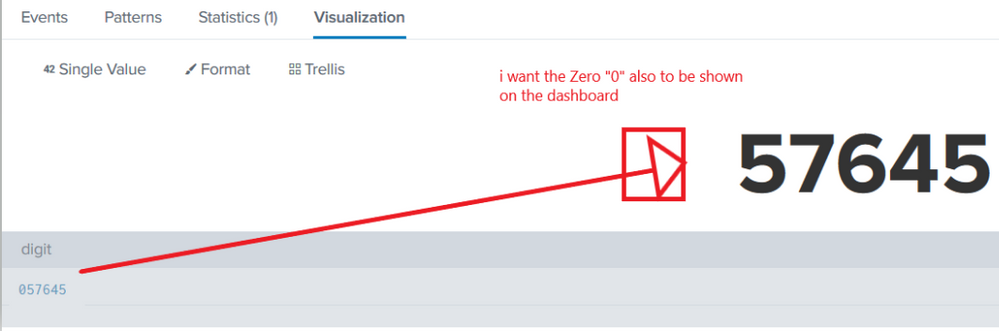
i have a query which result in a 6 digit number for a fieldname that might include leading "0" like 001234, 012345, 123456
my query returns a single fieldname, something like fieldname=001234, and i want to show this number on a single value dashboard. but i go to the visualization the leading zero is removed by splunk and show just the number 1234
please help me achieve this and show the number in a single value dashboard with the leading "0"

- Mark as New
- Bookmark Message
- Subscribe to Message
- Mute Message
- Subscribe to RSS Feed
- Permalink
- Report Inappropriate Content
I am sure there is a better way to solve this, but if you are in a hurry and don't mind a non-numerical suffix, you can concatenate a character such as * to the end of the number
For example
| eval digit=digit."*"
From the looks of it, the visualization itself does some sort of zero and white space stripping, and eval=tostring(digit) does not work either.
Hope this helps
- Mark as New
- Bookmark Message
- Subscribe to Message
- Mute Message
- Subscribe to RSS Feed
- Permalink
- Report Inappropriate Content
@okayal thanks for the comments, though after that the leading zero is stripped off on the visualization while it is present in the search results.
- Mark as New
- Bookmark Message
- Subscribe to Message
- Mute Message
- Subscribe to RSS Feed
- Permalink
- Report Inappropriate Content
Strange, I ran the following, and its working for me
| makeresults
| eval digit="00123"
| eval digit=digit."*"

Index This | Why did the turkey cross the road?
Enter the Agentic Era with Splunk AI Assistant for SPL 1.4
Feel the Splunk Love: Real Stories from Real Customers
