
Are you a member of the Splunk Community?
- Find Answers
- :
- Using Splunk
- :
- Dashboards & Visualizations
- :
- earliest takes null value after Before selection o...
- Subscribe to RSS Feed
- Mark Topic as New
- Mark Topic as Read
- Float this Topic for Current User
- Bookmark Topic
- Subscribe to Topic
- Mute Topic
- Printer Friendly Page
- Mark as New
- Bookmark Message
- Subscribe to Message
- Mute Message
- Subscribe to RSS Feed
- Permalink
- Report Inappropriate Content
earliest takes null value after Before selection of DateRange in TimePicker

Hi,
I am using the Splunk's timepicker Date Range selection with token "timestamp".
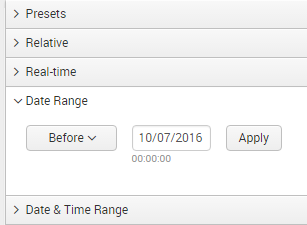
In panel search, this token is used as :
index=xyz sourcetype=abc earliest=$timestamp.earliest$ latest=$timestamp.latest$
When I select before condition, the value passed to earliest is null and because of it no result is shown.
index=xyz sourcetype=abc earliest= latest=1475260200
I kept default earliest as 0 in fieldset, but null issue occurs again if I select some presets and then go back to Before Date Range selection.
One way I was trying to achieve it ,is to assign 0 value to $timestamp.earliest$ if its null. I have used following fieldset, but it didn't worked.
       <fieldset submitButton="false">

    <input type="time" token="time">

      <label>Date Range</label>

      <default>

        <earliest>0</earliest>

        <latest>1475260200</latest>

      </default>

      <change>

        <condition match="$time.earliest$ == ">

          <set token="$time.earliest$">0</set>

        </condition>

      </change>

    </input>
Is there any way to do this.

- Mark as New
- Bookmark Message
- Subscribe to Message
- Mute Message
- Subscribe to RSS Feed
- Permalink
- Report Inappropriate Content

If all else fails, you can bring the timeframe tokens into the search itself and then use subsearches and SPL to ensure that if your token is null, that a value of "0" is used instead. Here is a basic search that shows you what I mean:
index=main [|makeresults
| eval earliest=null(), latest="9999" | fields - _time
| eval earliest=coalesce(earliest, "0")
| format "" "" "" "" "" ""
| rex field=search mode=sed "s/\"//g"]
The important part to notice is is the coalesce command and the fact that you will not be using literal values like "9999" but your tokens like "$time.earliest$".

Index This | Why did the turkey cross the road?
Enter the Agentic Era with Splunk AI Assistant for SPL 1.4
Feel the Splunk Love: Real Stories from Real Customers
