
Join the Conversation
- Find Answers
- :
- Using Splunk
- :
- Dashboards & Visualizations
- :
- Re: dropdown option with asterix
- Subscribe to RSS Feed
- Mark Topic as New
- Mark Topic as Read
- Float this Topic for Current User
- Bookmark Topic
- Subscribe to Topic
- Mute Topic
- Printer Friendly Page
- Mark as New
- Bookmark Message
- Subscribe to Message
- Mute Message
- Subscribe to RSS Feed
- Permalink
- Report Inappropriate Content
dropdown option with asterix

i have a drop down enabled on a panel, however since its a dropdown i can choose only one of the entries at a time.
the multi-select does not look that good such that when i do multi-select , the panel size changes when i select a lot of options from the multi select dropdown.
so in question now , is that, can i do a * choice along with some common names on the drop down.
for ex: i have 6 drop down options abang, bbang, cbang, atest,btest,ctest
now when i type in "bang" , i get to see abang,bbang,cbang in the drop down option to choose from.
here i can choose only one of these, but is there a option i can type in *bang and see data for that in a panel ?
- Mark as New
- Bookmark Message
- Subscribe to Message
- Mute Message
- Subscribe to RSS Feed
- Permalink
- Report Inappropriate Content
- Mark as New
- Bookmark Message
- Subscribe to Message
- Mute Message
- Subscribe to RSS Feed
- Permalink
- Report Inappropriate Content
It worked for me with asterisk on both the sides, I have no idea why my screen hasn't shown up here. Anyway if you still need help try to post xml code here, Some one might take a look at it.
- Mark as New
- Bookmark Message
- Subscribe to Message
- Mute Message
- Subscribe to RSS Feed
- Permalink
- Report Inappropriate Content
Vinay, what you mentioned above are static entires, that works.
but my list in the input is coming from dynamic entires.. so how to make it choose dynamically with asterix..
below is my xml input code..
  <input type="dropdown" token="Site" searchWhenChanged="true" >
    <label>Select Site</label>
    <fieldForLabel>Site</fieldForLabel>
    <fieldForValue>Site</fieldForValue>
    <search>
      <query>index=testindex=-3d@d latest=now |dedup Site|table Site |sort by Site</query>
      <earliest>-7d@h</earliest>
      <latest>now</latest>
    </search>
    <choice value="*">All</choice>
    <default>*</default>
    <initialValue>*</initialValue>
  </input>
- Mark as New
- Bookmark Message
- Subscribe to Message
- Mute Message
- Subscribe to RSS Feed
- Permalink
- Report Inappropriate Content
dropdown test
<input type="dropdown" token="host">
  <label>host</label>
  <choice value="*CVM*">*CVM*</choice>
  <choice value="*VMUI*">*VMUI*</choice>
  <fieldForLabel>host</fieldForLabel>
  <fieldForValue>host</fieldForValue>
</input>


<panel>
  <table>
    <search>
      <query>index=* source="*![alt text][1]" host=$host$| fields host| dedup host | table host</query>
      <earliest>-15m</earliest>
      <latest>now</latest>
      <sampleRatio>1</sampleRatio>
    </search>
    <option name="count">100</option>
    <option name="dataOverlayMode">none</option>
    <option name="drilldown">none</option>
    <option name="percentagesRow">false</option>
    <option name="rowNumbers">true</option>
    <option name="totalsRow">false</option>
    <option name="wrap">true</option>
  </table>
</panel>
- Mark as New
- Bookmark Message
- Subscribe to Message
- Mute Message
- Subscribe to RSS Feed
- Permalink
- Report Inappropriate Content
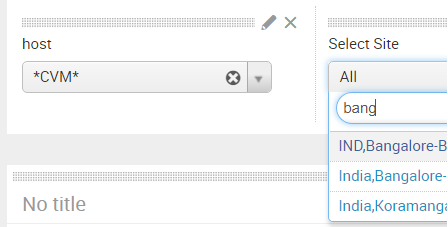
Thanks for reply. This does not help my case, can you check the screenshot i attached, the dropdown list is dynamic and i would like to enforce a asterix so that 3 entries are considered.
Basically i need to consider all that contains BANG in the dropdown input..
but i can only choose 1 in that list...
- Mark as New
- Bookmark Message
- Subscribe to Message
- Mute Message
- Subscribe to RSS Feed
- Permalink
- Report Inappropriate Content



- Mark as New
- Bookmark Message
- Subscribe to Message
- Mute Message
- Subscribe to RSS Feed
- Permalink
- Report Inappropriate Content
Screenshot of the issue, i am unable to make the asterix choice.. how do i make the drop down accept bang* as an option

Join the Splunk Community Slack to learn, troubleshoot, and make connections with fellow Splunk practitioners in real time!
Join Splunk User Groups to connect and learn in-person by region or remotely by topic or industry.
Meet the .conf26 AI Agent Buildathon Winners
Trusted Autonomy in the SOC: A Maturity Journey
Supercharging Windows Security Detection Performance: Introducing Hybrid Field ...
