
Turn on suggestions
Auto-suggest helps you quickly narrow down your search results by suggesting possible matches as you type.
Dashboards & Visualizations
×
Join the Conversation
Without signing in, you're just watching from the sidelines. Sign in or Register to connect, share, and be part of the Splunk Community.
- Find Answers
- :
- Using Splunk
- :
- Dashboards & Visualizations
- :
- What dashboard condition match options can I use t...
Options
- Subscribe to RSS Feed
- Mark Topic as New
- Mark Topic as Read
- Float this Topic for Current User
- Bookmark Topic
- Subscribe to Topic
- Mute Topic
- Printer Friendly Page
- Mark as New
- Bookmark Message
- Subscribe to Message
- Mute Message
- Subscribe to RSS Feed
- Permalink
- Report Inappropriate Content

johnansett
Communicator
06-05-2018
04:58 PM
Hey there,
I am trying to set some conditions a number of dashboard panels. In short, I want to report on percentage of storage utlised at multiple locations, I use a drop down box to select the location and it displays the panels. The issue is that some sites have Nutanix storage, some sites have EMC and some have both. I only want to relevant panels to be displayed.
This is what I have currently... in 'kind of' works:
 <title>$location$ NTNX Storage Capacity Used %</title>
<search base="SUMMARY_STORAGE_KPI">
  <query>search Location="$location$"</query>
    <progress>
          <condition match="'job.resultCount' == 0">
            <unset token="hide_panel"></unset>
          </condition>
          <condition>
            <set token="hide_panel">true</set>
          </condition>
    </progress>
</search>
  <html>
   <div class="custom-result-value $ntnx_range$">
     $ntnx_value$
   </div>
  </html>
</panel>
<panel depends="$hide_panel$">
 <title>$location$ VNX Storage Capacity Used %</title>
<search base="SUMMARY_STORAGE_KPI">
  <query>search Location="$location$"</query>
    <progress>
          <condition match="'job.resultCount' == 0">
            <unset token="hide_panel"></unset>
          </condition>
          <condition>
            <set token="hide_panel">true</set>
          </condition>
    </progress>
</search>
  <html>
   <div class="custom-result-value $vnx_range$">
     $vnx_value$
   </div>
  </html>
</panel>
I think the problem is the way the report presents the data, this is the report:
index="summary" Vendor=NTNX
| bucket span=12h _time
| stats latest(FreeMB) AS NTNXFreeMB, latest(TotalCapacityMB) AS NTNXTotalCapacityMB, latest(UsedMB) AS NTNXUsedMB, by Location, node
| append
[ search index="summary" Vendor=EMC System=VNX
| bucket span=12h _time
| stats latest(FreeMB) AS VNXFreeMB, latest(TotalCapacityMB) AS VNXTotalCapacityMB, latest(UsedMB) AS VNXUsedMB, by Location, node, name]
| stats sum(NTNXUsedMB) AS NTNXUsedMB, sum(NTNXTotalCapacityMB) AS NTNXTotalCapacityMB, sum(VNXUsedMB) AS VNXUsedMB, sum(VNXTotalCapacityMB) AS VNXTotalCapacityMB BY Location
| eval NTNX_Capacity=round('NTNXUsedMB'/'NTNXTotalCapacityMB',2)*100
| eval VNX_Capacity=round('VNXUsedMB'/'VNXTotalCapacityMB',2)*100
| rangemap field=NTNX_Capacity low=0-49 elevated=50-79 severe=80-99
| rename range AS NTNX_Capacity_Range
| rangemap field=VNX_Capacity low=0-49 elevated=50-79 severe=80-99
| rename range AS VNX_Capacity_Range
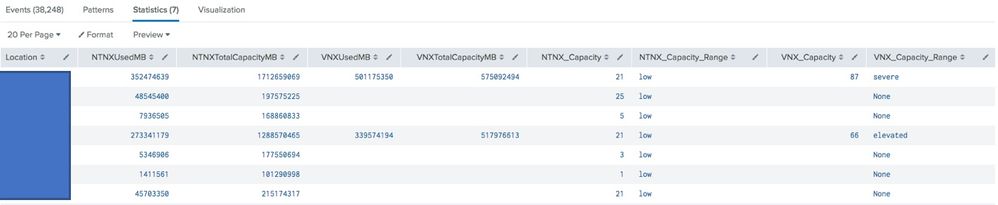
What condition match can I use to hide/unhide depending on the result?
Thanks!!

1 Solution
- Mark as New
- Bookmark Message
- Subscribe to Message
- Mute Message
- Subscribe to RSS Feed
- Permalink
- Report Inappropriate Content

harishalipaka
Motivator
06-05-2018
11:35 PM
try this
<form>
  <label>condiiton</label>
  <fieldset submitButton="false">
    <input type="dropdown" token="field1">
      <label>QueueType</label>
   <choice value="LogFIle1.log">Merch</choice>
   <choice value="LogFIle2.log">NonMerch</choice>
   <choice value="LogFIle3.log">DonMerch</choice>
   <default>LogFIle1.log</default>
   <initialValue>LogFIle1.log</initialValue>
     <change>
          <condition value="LogFIle1.log">
            <set token="Merch">Merch</set>
            <unset token="NonMerch"></unset>

          </condition>
          <condition >
            <unset token="Merch">Merch</unset>
            <set token="NonMerch">NonMerch</set>

          </condition>

        </change>
    </input>
  </fieldset>
  <row depends="$Merch$">
    <panel>
      <table>
        <title>Table 1 $Merch$</title>
        <search>
          <query>| makeresults
| eval A=12
| table _time LogID ENTERPRISE_COMPANY VEHICLE_ID STOREID STOCK_NUMBER STATUS_MESSAGE FAIL_REASON ERROR_MESSAGE</query>
          <earliest>-24h@h</earliest>
          <latest>now</latest>
        </search>
        <option name="drilldown">none</option>
      </table>
    </panel>
  </row>
  <row depends="$NonMerch$">
    <panel>
      <table>
        <title>Table 2</title>
        <search>
          <query>| makeresults
| eval A=12
| table _time LogID INVENTORY_OWNER VEHICLE_ID STOREID STOCK_NUMBER STATUS_MESSAGE FAIL_REASON ERROR_MESSAGE</query>
          <earliest>-24h@h</earliest>
          <latest>now</latest>
        </search>
        <option name="drilldown">none</option>
      </table>
    </panel>
  </row>
</form>
Thanks
Harish
Harish
- Mark as New
- Bookmark Message
- Subscribe to Message
- Mute Message
- Subscribe to RSS Feed
- Permalink
- Report Inappropriate Content
harishalipaka
Motivator
06-05-2018
11:35 PM
try this
<form>
  <label>condiiton</label>
  <fieldset submitButton="false">
    <input type="dropdown" token="field1">
      <label>QueueType</label>
   <choice value="LogFIle1.log">Merch</choice>
   <choice value="LogFIle2.log">NonMerch</choice>
   <choice value="LogFIle3.log">DonMerch</choice>
   <default>LogFIle1.log</default>
   <initialValue>LogFIle1.log</initialValue>
     <change>
          <condition value="LogFIle1.log">
            <set token="Merch">Merch</set>
            <unset token="NonMerch"></unset>

          </condition>
          <condition >
            <unset token="Merch">Merch</unset>
            <set token="NonMerch">NonMerch</set>

          </condition>

        </change>
    </input>
  </fieldset>
  <row depends="$Merch$">
    <panel>
      <table>
        <title>Table 1 $Merch$</title>
        <search>
          <query>| makeresults
| eval A=12
| table _time LogID ENTERPRISE_COMPANY VEHICLE_ID STOREID STOCK_NUMBER STATUS_MESSAGE FAIL_REASON ERROR_MESSAGE</query>
          <earliest>-24h@h</earliest>
          <latest>now</latest>
        </search>
        <option name="drilldown">none</option>
      </table>
    </panel>
  </row>
  <row depends="$NonMerch$">
    <panel>
      <table>
        <title>Table 2</title>
        <search>
          <query>| makeresults
| eval A=12
| table _time LogID INVENTORY_OWNER VEHICLE_ID STOREID STOCK_NUMBER STATUS_MESSAGE FAIL_REASON ERROR_MESSAGE</query>
          <earliest>-24h@h</earliest>
          <latest>now</latest>
        </search>
        <option name="drilldown">none</option>
      </table>
    </panel>
  </row>
</form>
Thanks
Harish
Harish
- Mark as New
- Bookmark Message
- Subscribe to Message
- Mute Message
- Subscribe to RSS Feed
- Permalink
- Report Inappropriate Content
johnansett
Communicator
06-06-2018
08:43 AM
Thanks, I see what you've done there and it worked. Here is my xml for the finished result (which works):
  <change>
       <condition value="Dallas, TX">
         <set token="vnx"></set>
       </condition>
       <condition value="Phoenix, AZ">
         <set token="vnx"></set>
       </condition>
       <condition >
         <unset token="vnx">vnx</unset>
       </condition>
     </change>
</panel>
<panel depends="$vnx$">
 <title>$location$ VNX Storage Capacity Used %</title>
<search base="SUMMARY_STORAGE_KPI">
  <query>search Location="$location$"</query>
    <progress>
      <set token="vnx_value">$result.VNX_Capacity$</set>
      <set token="vnx_range">$result.VNX_Capacity_Range$</set>
    </progress>
</search>
  <html>
   <div class="custom-result-value $vnx_range$">
     $vnx_value$
   </div>
  </html>
</panel>

Got questions? Get answers!
Join the Splunk Community Slack to learn, troubleshoot, and make connections with fellow Splunk practitioners in real time!
Meet up IRL or virtually!
Join Splunk User Groups to connect and learn in-person by region or remotely by topic or industry.
Get Updates on the Splunk Community!
Index This | What travels the world but is also stuck in place?
April 2026 Edition
Hayyy Splunk Education Enthusiasts and the Eternally Curious!
We’re back with this ...
Discover New Use Cases: Unlock Greater Value from Your Existing Splunk Data
Realizing the full potential of your Splunk investment requires more than just understanding current usage; it ...
Continue Your Journey: Join Session 2 of the Data Management and Federation Bootcamp ...
As data volumes continue to grow and environments become more distributed, managing and optimizing data ...
