
Join the Conversation
- Find Answers
- :
- Using Splunk
- :
- Dashboards & Visualizations
- :
- Re: Visualization behaving differently in differen...
- Subscribe to RSS Feed
- Mark Topic as New
- Mark Topic as Read
- Float this Topic for Current User
- Bookmark Topic
- Subscribe to Topic
- Mute Topic
- Printer Friendly Page
- Mark as New
- Bookmark Message
- Subscribe to Message
- Mute Message
- Subscribe to RSS Feed
- Permalink
- Report Inappropriate Content
Visualization behaving differently in different apps

Hi,
I have a timeline visualization as a panel for a dashboard. When I run the visualization as a standalone practice dashboard in the Search & Reporting app, it works as expected.

However, when I run the EXACT same query with the same visualization fomat, it doe not show the top of the timeline as required:
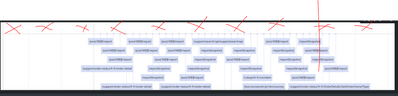
The query used in both dashboards is as follows:
<panel>
<viz type="event-timeline-viz.event-timeline-viz">
<search>
<query>index=fraud_glassbox sourcetype="gb:hit" SESSION_UUID="652a0e70-bfdf-11ec-9d96-005056bf9975"
| rename URL_PATH as label
| eval time_epoch = strptime('SESSION_TIMESTAMP', "%Y-%m-%d %H:%M:%S")
| convert ctime(time_epoch) as hour_minute timeformat="%Y-%m-%d %H:%M"
| strcat hour_minute ":" SEQUENCE combo_time
| rename combo_time as start
| eval tooltip = label
| table label, start,tooltip</query>
<earliest>-7d</earliest>
<latest>now</latest>
<sampleRatio>1</sampleRatio>
</search>
<option name="drilldown">none</option>
<option name="event-timeline-viz.event-timeline-viz.backgroundColor">#ffffff</option>
<option name="event-timeline-viz.event-timeline-viz.eventColor">#d5ddf6</option>
<option name="event-timeline-viz.event-timeline-viz.maxZoom">3600000</option>
<option name="event-timeline-viz.event-timeline-viz.minZoom">60000</option>
<option name="event-timeline-viz.event-timeline-viz.orientation">top</option>
<option name="event-timeline-viz.event-timeline-viz.stack">true</option>
<option name="event-timeline-viz.event-timeline-viz.tokenAllVisible">tok_et_all_visible</option>
<option name="event-timeline-viz.event-timeline-viz.tokenData">tok_et_data</option>
<option name="event-timeline-viz.event-timeline-viz.tokenEnd">tok_et_end</option>
<option name="event-timeline-viz.event-timeline-viz.tokenLabel">tok_et_label</option>
<option name="event-timeline-viz.event-timeline-viz.tokenStart">tok_et_start</option>
<option name="event-timeline-viz.event-timeline-viz.tooltipDateFormat">DD-MMM-YYYY</option>
<option name="event-timeline-viz.event-timeline-viz.tooltipTimeFormat">h:mm:ss A</option>
<option name="height">346</option>
<option name="trellis.enabled">0</option>
<option name="trellis.scales.shared">1</option>
<option name="trellis.size">medium</option>
</viz>
</panel>
What may be the reason for this?
Thanks,
Patrick
- Mark as New
- Bookmark Message
- Subscribe to Message
- Mute Message
- Subscribe to RSS Feed
- Permalink
- Report Inappropriate Content


What version of app (1.71 is latest). Have you tried increasing height in the one that doesn't show the heading?
Other than that - don't know.
- Mark as New
- Bookmark Message
- Subscribe to Message
- Mute Message
- Subscribe to RSS Feed
- Permalink
- Report Inappropriate Content
How would I increase the height?
- Mark as New
- Bookmark Message
- Subscribe to Message
- Mute Message
- Subscribe to RSS Feed
- Permalink
- Report Inappropriate Content
<option name="height">346</option>
Join the Splunk Community Slack to learn, troubleshoot, and make connections with fellow Splunk practitioners in real time!
Join Splunk User Groups to connect and learn in-person by region or remotely by topic or industry.
Persistent Queue at TcpOut — One of Splunk's Most Practical Features
Catalog Is Now Generally Available on Splunk Cloud Platform
Your Path to AgenticOps: AI Experiences for Every Splunk Practitioner
