
Join the Conversation
- Find Answers
- :
- Using Splunk
- :
- Dashboards & Visualizations
- :
- Trellis to align automatically to the panel size
- Subscribe to RSS Feed
- Mark Topic as New
- Mark Topic as Read
- Float this Topic for Current User
- Bookmark Topic
- Subscribe to Topic
- Mute Topic
- Printer Friendly Page
- Mark as New
- Bookmark Message
- Subscribe to Message
- Mute Message
- Subscribe to RSS Feed
- Permalink
- Report Inappropriate Content
Trellis to align automatically to the panel size

how can i make trellis results to fit in the panel , even one results if present instead of having empty space , i want to make it to occupy entire panel. Is there any option to auto fit even one results are available?
- Mark as New
- Bookmark Message
- Subscribe to Message
- Mute Message
- Subscribe to RSS Feed
- Permalink
- Report Inappropriate Content

Hello.
The solution is amazing but im wondering, how to make the trellis not to overlap if the result is huge?
- Mark as New
- Bookmark Message
- Subscribe to Message
- Mute Message
- Subscribe to RSS Feed
- Permalink
- Report Inappropriate Content

@premranjithj depending on number of results you will have to set the width using CSS style override. I have created following run anywhere example based on 5 results. However depending on your use case you may have to code for up to 20.
With 5 results width is ~20%
With 2 results width is ~50%
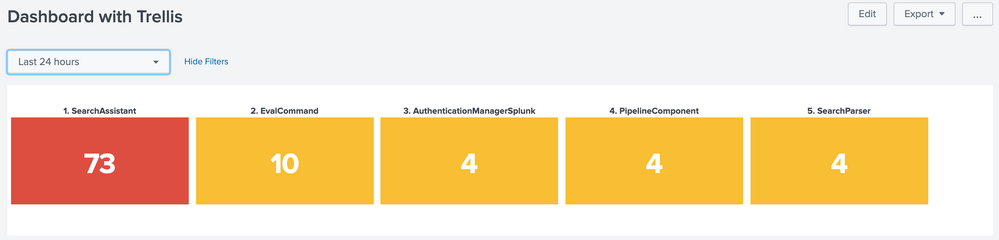
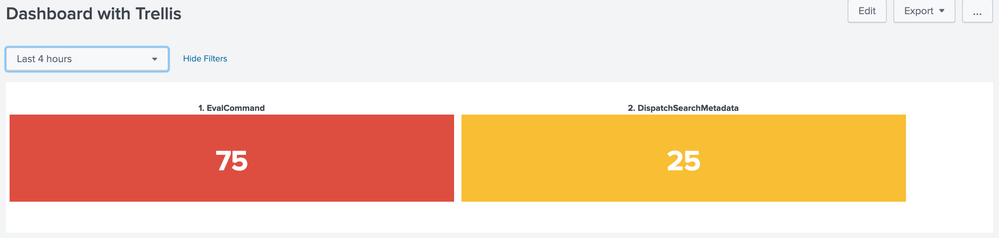
PS: Instead of 100% for 1 viz it is 95% to accommodate padding and similarly for other counts like 2 it is not 50% by 45%.
Following is the Simple XML code for run anywhere example:
<form>
  <label>Dashboard with Trellis</label>
  <fieldset submitButton="false">
    <input type="time" token="field1">
      <label></label>
      <default>
        <earliest>-24h@h</earliest>
        <latest>now</latest>
      </default>
    </input>
  </fieldset>
  <row>
    <panel>
      <html>
        <style>
          #my_single_trellis div.viz-facet{
            $tokWidth$
          }
        </style>
      </html>
      <single id="my_single_trellis">
        <search>
          <query>index=_internal sourcetype=splunkd log_level!=INFO
| stats count by component
| eventstats sum(count) as Total
| eval perc=(count/Total)*100
| fields component perc
| sort - perc
| head 5
| streamstats count as sno
| eval component=sno.". ".component
| stats last(perc) as perc by component</query>
          <earliest>$field1.earliest$</earliest>
          <latest>$field1.latest$</latest>
          <sampleRatio>1</sampleRatio>
          <progress>
            <condition match="$job.resultCount$==0">
              <set token="tokWidth">width: 0% !important;</set>
            </condition>
            <condition match="$job.resultCount$==1">
              <set token="tokWidth">width: 95% !important;</set>
            </condition>
            <condition match="$job.resultCount$==2">
              <set token="tokWidth">width: 45% !important;</set>
            </condition>
            <condition match="$job.resultCount$==3">
              <set token="tokWidth">width: 30% !important;</set>
            </condition>
            <condition match="$job.resultCount$==4">
              <set token="tokWidth">width: 22% !important;</set>
            </condition>
            <condition match="$job.resultCount$==5">
              <set token="tokWidth">width: 18% !important;</set>
            </condition>
            <condition>
              <set token="tokWidth"></set>
            </condition>
          </progress>
        </search>
        <option name="colorBy">value</option>
        <option name="colorMode">block</option>
        <option name="drilldown">none</option>
        <option name="height">183</option>
        <option name="numberPrecision">0</option>
        <option name="rangeColors">["0x53a051","0xf8be34","0xdc4e41"]</option>
        <option name="rangeValues">[0,70]</option>
        <option name="refresh.display">progressbar</option>
        <option name="showSparkline">1</option>
        <option name="showTrendIndicator">1</option>
        <option name="trellis.enabled">1</option>
        <option name="trellis.scales.shared">1</option>
        <option name="trellis.size">medium</option>
        <option name="trendColorInterpretation">standard</option>
        <option name="trendDisplayMode">absolute</option>
        <option name="unitPosition">after</option>
        <option name="useColors">1</option>
        <option name="useThousandSeparators">1</option>
      </single>
    </panel>
  </row>
</form>
| makeresults | eval message= "Happy Splunking!!!"


Accelerating Observability as Code with the Splunk AI Assistant
Integrating Splunk Search API and Quarto to Create Reproducible Investigation ...
Congratulations to the 2025-2026 SplunkTrust!
