
Join the Conversation
- Find Answers
- :
- Using Splunk
- :
- Dashboards & Visualizations
- :
- Re: Time Chart not dynamically changing when I sel...
- Subscribe to RSS Feed
- Mark Topic as New
- Mark Topic as Read
- Float this Topic for Current User
- Bookmark Topic
- Subscribe to Topic
- Mute Topic
- Printer Friendly Page
- Mark as New
- Bookmark Message
- Subscribe to Message
- Mute Message
- Subscribe to RSS Feed
- Permalink
- Report Inappropriate Content

I have added a Time input to my chart, however the display does not update to show the selected time period. I have selected "Search on Change" - but this didn't help. What could I do to fix it?

As always, any help greatly appreciated.
NM
- Mark as New
- Bookmark Message
- Subscribe to Message
- Mute Message
- Subscribe to RSS Feed
- Permalink
- Report Inappropriate Content


OK change the earliest and latest tag values to $field1.earliest$ and $field1.latest$ respectively
- Mark as New
- Bookmark Message
- Subscribe to Message
- Mute Message
- Subscribe to RSS Feed
- Permalink
- Report Inappropriate Content
I don't think so - what would I need to change to do that?
- Mark as New
- Bookmark Message
- Subscribe to Message
- Mute Message
- Subscribe to RSS Feed
- Permalink
- Report Inappropriate Content
It depends on whether you are using Classic Dashboards or Dashboard Studio
- Mark as New
- Bookmark Message
- Subscribe to Message
- Mute Message
- Subscribe to RSS Feed
- Permalink
- Report Inappropriate Content
Classic
- Mark as New
- Bookmark Message
- Subscribe to Message
- Mute Message
- Subscribe to RSS Feed
- Permalink
- Report Inappropriate Content
OK change the earliest and latest tag values to $field1.earliest$ and $field1.latest$ respectively
- Mark as New
- Bookmark Message
- Subscribe to Message
- Mute Message
- Subscribe to RSS Feed
- Permalink
- Report Inappropriate Content
Ahhh - got you (I think!)
Default (this is for each timechart on the dashboard):
| timechart values(value) by mac_address</query>
<earliest>0</earliest>
<latest></latest>
</search>
Changed to:
| timechart values(value) by mac_address</query>
<earliest>$field1.earliest$</earliest>
<latest>$field1.latest$</latest>
</search>
It seems to have worked (I has to save as a new dashboard).
Many thanks again - you are a superb help.
- Mark as New
- Bookmark Message
- Subscribe to Message
- Mute Message
- Subscribe to RSS Feed
- Permalink
- Report Inappropriate Content
Tokens aren't always evaluated in edit mode so you have to save the dashboard to see their effects.
- Mark as New
- Bookmark Message
- Subscribe to Message
- Mute Message
- Subscribe to RSS Feed
- Permalink
- Report Inappropriate Content
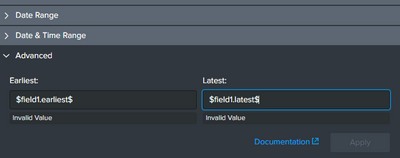
It's returning an invalid value:
- Mark as New
- Bookmark Message
- Subscribe to Message
- Mute Message
- Subscribe to RSS Feed
- Permalink
- Report Inappropriate Content
I meant the earliest and latest settings for the searches in your panels not the timepicker input
Either edit the search for each panel, or switch to source code and change the SimpleXML tag values
- Mark as New
- Bookmark Message
- Subscribe to Message
- Mute Message
- Subscribe to RSS Feed
- Permalink
- Report Inappropriate Content
Are you using the token in your searches for your panels? If so, can you show how you are doing that?


Join the Splunk Community Slack to learn, troubleshoot, and make connections with fellow Splunk practitioners in real time!
Join Splunk User Groups to connect and learn in-person by region or remotely by topic or industry.
Vibe-coding, AI, and Splunkcraft: Highlights from the .conf26 Builder Bar
Thanks for the Memories: .conf26 Took Learning to New Heights
Best Practices: Splunk auto adjust pipeline queue
