
Join the Conversation
- Find Answers
- :
- Using Splunk
- :
- Dashboards & Visualizations
- :
- Splunk Table Drilldown by column name
- Subscribe to RSS Feed
- Mark Topic as New
- Mark Topic as Read
- Float this Topic for Current User
- Bookmark Topic
- Subscribe to Topic
- Mute Topic
- Printer Friendly Page
- Mark as New
- Bookmark Message
- Subscribe to Message
- Mute Message
- Subscribe to RSS Feed
- Permalink
- Report Inappropriate Content
Splunk Table Drilldown by column name

Hi,
Img-1
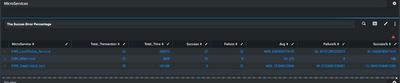
Img-2
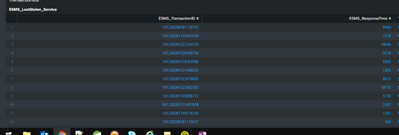
What I want is-
In Img1, when I click on Sucess/Failure/Total_Transaction column value, I want a change with respect to Microservices transaction in img 2, so for example if I click on LostStolen Services for Failure column which has 35 as value, In the next table I want it to print all those 35 transaction ids with status.
NOTE: Here for Success & failure, I have used different flags to count. Could not figure out to use same flag for 2 different column to count.
- Mark as New
- Bookmark Message
- Subscribe to Message
- Mute Message
- Subscribe to RSS Feed
- Permalink
- Report Inappropriate Content

I think you might want to look into click.values. https://docs.splunk.com/Documentation/Splunk/8.1.0/Viz/tokens
This will allow you to assign a token from the table based on it being clicked. It can then feed your other panel search.
- Mark as New
- Bookmark Message
- Subscribe to Message
- Mute Message
- Subscribe to RSS Feed
- Permalink
- Report Inappropriate Content
@aohls Hi, thanks for your help.
I more help, in IMG-1, if the user clicks on "Total_Transaction", how will I change the column name value which is "Total_Transaction" to "*" so that I can get a list of the Transaction irrespective of Fail/Success, tried using eval replace, but its not working.
base query | table ESMS_TransactionID,ESMS_Country, ESMS_ResponseTime, ESMS_MS, ESMS_StatusFailure, ESMS_StatusSuccess| eval ESMS_StatusSuccess= replace(ESMS_StatusSuccess,"Total_Transaction","*")| search ESMS_StatusSuccess=Total_Transaction ESMS_StatusFailure=Total_Transaction- Mark as New
- Bookmark Message
- Subscribe to Message
- Mute Message
- Subscribe to RSS Feed
- Permalink
- Report Inappropriate Content
Just to make sure; my assumption is that when you click img-1 you want to update img-2? I am wondering why you would want to update the Total_Transactions to a *; I think it would be difficult for users to tell what that columns means. You might want to do an add a Summary to your table. Go to Format > Summary and it will give you a totals value at the bottom; you can use | addtotals if you want some more control over it.
Are you looking to update img-1 based what is clicked on img-1? Just not sure why you would like to rename it.


Join the Splunk Community Slack to learn, troubleshoot, and make connections with fellow Splunk practitioners in real time!
Join Splunk User Groups to connect and learn in-person by region or remotely by topic or industry.
SOC4Kafka - New Kafka Connector Powered by OpenTelemetry
Rounding off the Splunk Dashboard Contest
A Four Part Event Series: AI + Observability: AI Agents, LLMs, Apps, & Infrastructure
