
Join the Conversation
- Find Answers
- :
- Using Splunk
- :
- Dashboards & Visualizations
- :
- Set the default Dashboard to Splunk-Standard
- Subscribe to RSS Feed
- Mark Topic as New
- Mark Topic as Read
- Float this Topic for Current User
- Bookmark Topic
- Subscribe to Topic
- Mute Topic
- Printer Friendly Page
- Mark as New
- Bookmark Message
- Subscribe to Message
- Mute Message
- Subscribe to RSS Feed
- Permalink
- Report Inappropriate Content

Hallo
i have set on "app/launcher/home" a Default-Dashboard. Now i want to reset this page to the Splunk-Standard.
In the DropDown i can't choose this empty Page.
Where can i reset this ?
Thanks in advance.
- Mark as New
- Bookmark Message
- Subscribe to Message
- Mute Message
- Subscribe to RSS Feed
- Permalink
- Report Inappropriate Content
thanks for answering.
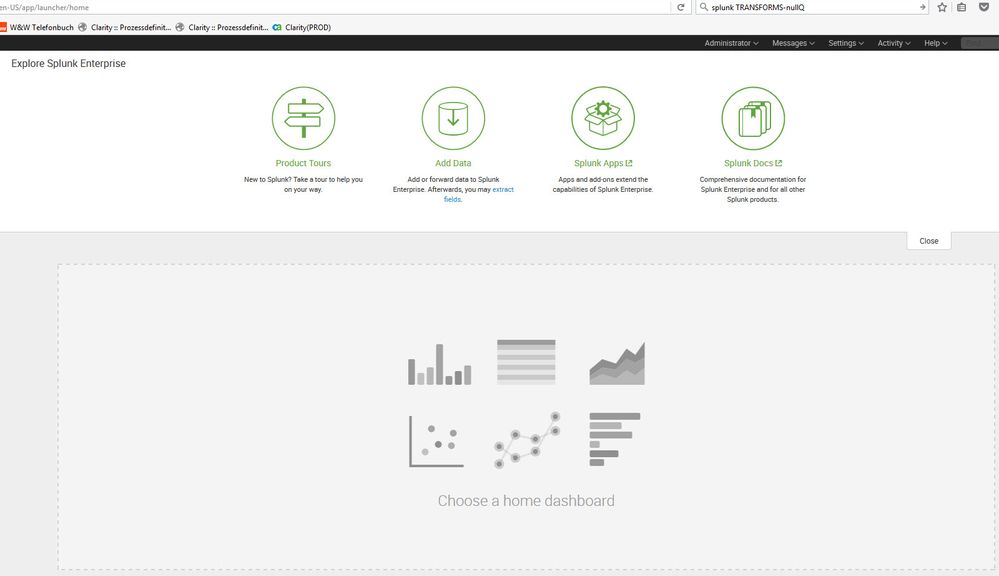
But i want to get the following default-page again.

- Mark as New
- Bookmark Message
- Subscribe to Message
- Mute Message
- Subscribe to RSS Feed
- Permalink
- Report Inappropriate Content
- Mark as New
- Bookmark Message
- Subscribe to Message
- Mute Message
- Subscribe to RSS Feed
- Permalink
- Report Inappropriate Content

This is your Overall Splunk Enterprise Home Page, this is where you can setup a Dashboard By Default through "Choose a home dashboard" option as shown in your screenshot. However, this place is ideally for you to switch to one of your various App. The answer that I have given you is for setting up a default view for specific app.
| makeresults | eval message= "Happy Splunking!!!"
- Mark as New
- Bookmark Message
- Subscribe to Message
- Mute Message
- Subscribe to RSS Feed
- Permalink
- Report Inappropriate Content
i have choose there a dashboard, but i want to reset my choose to this default. I can't to this on the UI.
- Mark as New
- Bookmark Message
- Subscribe to Message
- Mute Message
- Subscribe to RSS Feed
- Permalink
- Report Inappropriate Content
@gerdhuber, Sorry I misunderstood your question. I have edited my answer below to reset the default Dashboard for specific user back to Choose a home dashboard option using user-prefs.conf. Please try out and let me know whether the same works for you or not.
| makeresults | eval message= "Happy Splunking!!!"
- Mark as New
- Bookmark Message
- Subscribe to Message
- Mute Message
- Subscribe to RSS Feed
- Permalink
- Report Inappropriate Content
[Updated]
While the previous answers was to switch the default dashboard within app, the request here is for resetting the user specific default dashboard for Splunk login.
This can be done via user-prefs.conf file which should be located under the following path for specific user...
$SPLUNK_HOME/etc/users/<YourUserName>/user-prefs/local
Please try removing following settings and see if Splunk home dashboard resets once you restart and clear browser's cache.
default_namespace = launcher
display.page.home.dashboardId= /servicesNS/nobody/<YourSplunkApp>/data/ui/views/<YourDefaultDashboard>
Please try this out and let us know if you still face issue.
PS: The user-prefs.conf file is also present under $SPLUNK_HOME/etc/apps/user-prefs/default. I hope you have not made changes to this file and if not please leave this file untouched.
One of the crude way of doing this would be to recreate a new user with same roles/settings as the current user(without the default dashboard set.)
Navigate to Home App and click on Settings > User interface > Views > Navigation Menu set default='true' against the one dashboard which you want to be default.
<view name="contents" default='true' />
For details on Navigation Menu refer to one of the following:
http://docs.splunk.com/Documentation/Splunk/6.4.6/AdvancedDev/BuildNavigation
http://dev.splunk.com/view/webframework-developapps/SP-CAAAEP9
| makeresults | eval message= "Happy Splunking!!!"

Join the Splunk Community Slack to learn, troubleshoot, and make connections with fellow Splunk practitioners in real time!
Join Splunk User Groups to connect and learn in-person by region or remotely by topic or industry.
[Puzzles] Solve, Learn, Repeat: Matching cron expressions
Design, Compete, Win: Submit Your Best Splunk Dashboards for a .conf26 Pass
May 2026 Splunk Expert Sessions: Security & Observability
