
Join the Conversation
- Find Answers
- :
- Using Splunk
- :
- Dashboards & Visualizations
- :
- SameSite cookie
- Subscribe to RSS Feed
- Mark Topic as New
- Mark Topic as Read
- Float this Topic for Current User
- Bookmark Topic
- Subscribe to Topic
- Mute Topic
- Printer Friendly Page
- Mark as New
- Bookmark Message
- Subscribe to Message
- Mute Message
- Subscribe to RSS Feed
- Permalink
- Report Inappropriate Content
SameSite cookie

Hello,
I have noticed that Splunk dashboard is working in Firefox but is not working in Chrome or Edge (maybe more browsers).
I use an iframe to load Splunk in my Wordpress website. This is not a problem since i tried a website that does use the cookie samesite='None'.
To my understanding Chrome did an update where is does not allow third party (Splunk) apps that does not use the samesite cookie.
Is this a known problem? is there a workaround?
Articles i found interesting for understanding this problem:
- https://github.com/GoogleChromeLabs/samesite-examples/blob/master/php.md
- https://blog.heroku.com/chrome-changes-samesite-cookie
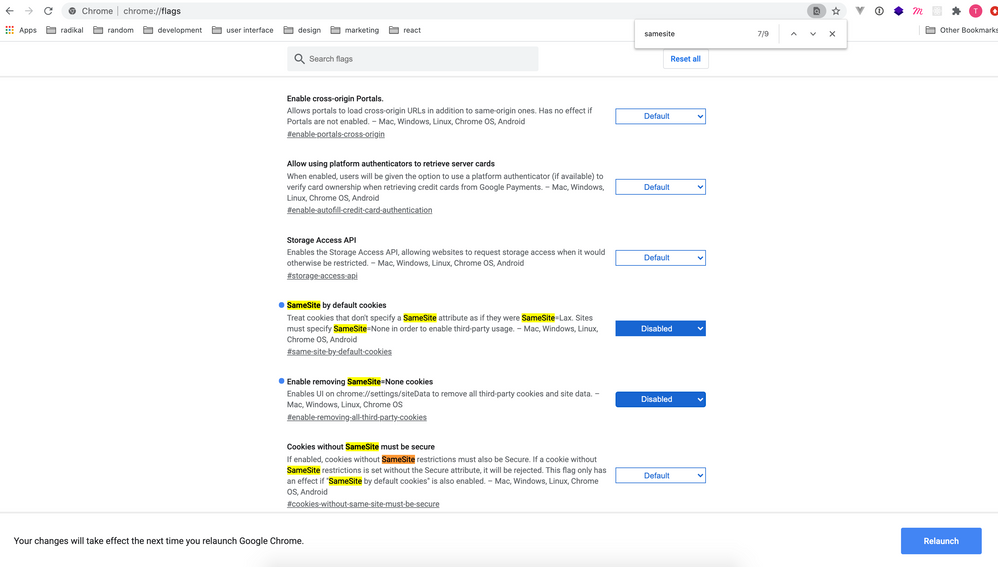
After disabling the 'samesite by default' Splunk works.
Previously i got an answer that this is a wordpress bug, if so can someone explain to me how this is a wordpress bug.
Thanks
- Mark as New
- Bookmark Message
- Subscribe to Message
- Mute Message
- Subscribe to RSS Feed
- Permalink
- Report Inappropriate Content
Hi Guys ,
Have you solved this problem?
Unfortunately, we also have this problem.If you solved this problem , could you please tell us how to fixed it ?
- Mark as New
- Bookmark Message
- Subscribe to Message
- Mute Message
- Subscribe to RSS Feed
- Permalink
- Report Inappropriate Content

I am also currently having this issue. Has anyone found some sort of work around?
- Mark as New
- Bookmark Message
- Subscribe to Message
- Mute Message
- Subscribe to RSS Feed
- Permalink
- Report Inappropriate Content
Hi,
To be honest, i don't know exactly what the problem was or how i solved it, i would love to help but i can't find it in the code.
I think it had something to do with the code where the splunk 'code' comes from.
In my case i had to add something to the script on the other site before i was able to load it into the main site.
By adding this to the script i was able to clear the samesite error.
I know this is not the answer you are looking for but i can only push you in that direction to look for the right answer.

Join the Splunk Community Slack to learn, troubleshoot, and make connections with fellow Splunk practitioners in real time!
Join Splunk User Groups to connect and learn in-person by region or remotely by topic or industry.
Tuning Edge Processor in Hybrid Mode: What Limits Each Data Path
Best Practices: Splunk auto adjust pipeline queue
Request for Professional Development: Attending .conf26
