
Join the Conversation
- Find Answers
- :
- Using Splunk
- :
- Dashboards & Visualizations
- :
- Re: Row expansion rendering for Multiple Tables in...
- Subscribe to RSS Feed
- Mark Topic as New
- Mark Topic as Read
- Float this Topic for Current User
- Bookmark Topic
- Subscribe to Topic
- Mute Topic
- Printer Friendly Page
- Mark as New
- Bookmark Message
- Subscribe to Message
- Mute Message
- Subscribe to RSS Feed
- Permalink
- Report Inappropriate Content

Hi ALL,
We have '3-Panels' containing table like id (table1,table2,table3) which has same Header, while implement the Row Expansion JScript in the dashboard, we are only getting the result in 1st Panel.
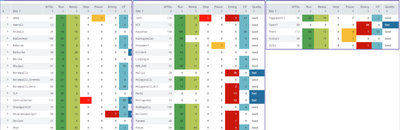
Below is the JavaScript we are using,
require([
'splunkjs/mvc/tableview',
'splunkjs/mvc/chartview',
'splunkjs/mvc/searchmanager',
'splunkjs/mvc',
'underscore',
'splunkjs/mvc/simplexml/ready!'],function(
TableView,
ChartView,
SearchManager,
mvc,
_
){
var EventSearchBasedRowExpansionRenderer = TableView.BaseRowExpansionRenderer.extend({
initialize: function(args) {
// initialize will run once, so we will set up a search and a chart to be reused.
this._searchManager = new SearchManager({
id: 'details-search-manager',
preview: false
});
this._chartView = new TableView({
managerid: 'details-search-manager',
pageSize: "50",
'charting.legend.placement': 'none'
});
},
canRender: function(rowData) {
// Since more than one row expansion renderer can be registered we let each decide if they can handle that
// data
// Here we will always handle it.
return true;
},
render: function($container, rowData) {
// rowData contains information about the row that is expanded. We can see the cells, fields, and values
// We will find the sourcetype cell to use its value
var sourcetypeCell = _(rowData.cells).find(function (cell) {
return cell.field === 'Site';
});
//update the search with the sourcetype that we are interested in
this._searchManager.set({ search: 'index=centralstauts Site=' + sourcetypeCell.value + ' Parameter=Estado Quality=192 | eventstats latest(DateTime) as LastUpdated by Turbine, Quality |stats latest(VALUE) as Status by Turbine, LastUpdated |eval Status =case(Status="100.000" , "Running", Status="75.000" , "Ready", Status="50.000" , "Pause", Status="25.000" , "Stop", Status="0.000" , "Emergency", Status="125.000" , "ManualStop", (Status="150.000") OR (Status="-150.000") , "CommunicationFailure") |table LastUpdated, Turbine, Status',earliest_time: "-3d@d",latest_time: "now", preview: true, cache: true});
// $container is the jquery object where we can put out content.
// In this case we will render our chart and add it to the $container
$container.append(this._chartView.render().el);
}
});
var tableElement = mvc.Components.getInstance("table1");
tableElement.getVisualization(function(tableView) {
// Add custom cell renderer, the table will re-render automatically.
tableView.addRowExpansionRenderer(new EventSearchBasedRowExpansionRenderer());
});
var tableElement = mvc.Components.getInstance("table2");
tableElement.getVisualization(function(tableView) {
// Add custom cell renderer, the table will re-render automatically.
tableView.addRowExpansionRenderer(new EventSearchBasedRowExpansionRenderer());
});
var tableElement = mvc.Components.getInstance("table3");
tableElement.getVisualization(function(tableView) {
// Add custom cell renderer, the table will re-render automatically.
tableView.addRowExpansionRenderer(new EventSearchBasedRowExpansionRenderer());
});
});
- Mark as New
- Bookmark Message
- Subscribe to Message
- Mute Message
- Subscribe to RSS Feed
- Permalink
- Report Inappropriate Content
Got the Solution for my query its working fine now. Please find the below link
- Mark as New
- Bookmark Message
- Subscribe to Message
- Mute Message
- Subscribe to RSS Feed
- Permalink
- Report Inappropriate Content
Got the Solution for my query its working fine now. Please find the below link
- Mark as New
- Bookmark Message
- Subscribe to Message
- Mute Message
- Subscribe to RSS Feed
- Permalink
- Report Inappropriate Content
Hi all,
I am eagerly waiting for the solution but no one. Is it possible or not? please let me know
- Mark as New
- Bookmark Message
- Subscribe to Message
- Mute Message
- Subscribe to RSS Feed
- Permalink
- Report Inappropriate Content
Anyone please help me on this?

Join the Splunk Community Slack to learn, troubleshoot, and make connections with fellow Splunk practitioners in real time!
Join Splunk User Groups to connect and learn in-person by region or remotely by topic or industry.
[Puzzles] Solve, Learn, Repeat: Matching cron expressions
Design, Compete, Win: Submit Your Best Splunk Dashboards for a .conf26 Pass
May 2026 Splunk Expert Sessions: Security & Observability
