
Join the Conversation
- Find Answers
- :
- Using Splunk
- :
- Dashboards & Visualizations
- :
- Re: Reverse Stacked Order of Column Chart
- Subscribe to RSS Feed
- Mark Topic as New
- Mark Topic as Read
- Float this Topic for Current User
- Bookmark Topic
- Subscribe to Topic
- Mute Topic
- Printer Friendly Page
- Mark as New
- Bookmark Message
- Subscribe to Message
- Mute Message
- Subscribe to RSS Feed
- Permalink
- Report Inappropriate Content

Hi, I am new to Splunk. I have a stacked column chart after issuing this query:
(index="A" OR index="B")
    | chart count(Level) over _time span=1mon by Level usenull=f useother=f
where Level has four values: 1,2,3,4
The chart is like this:
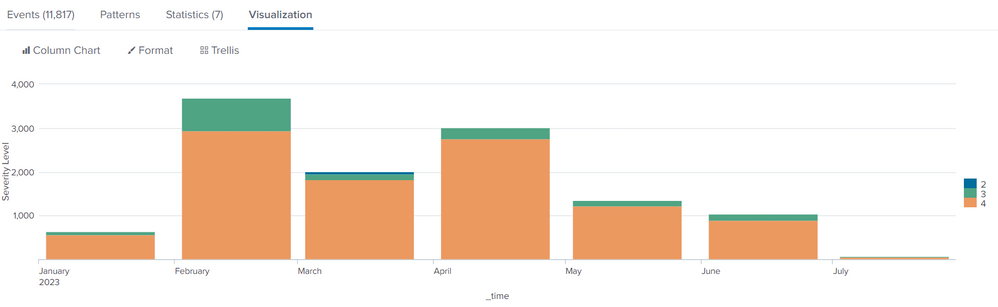
As you can see the stack order is now 2 > 3 > 4 (from top to bottom), what if I want to reverse it to display like 4 > 3 > 2 (from top to bottom). I have seen similar questions here using transpose or reverse, I tried follow but still have no luck. Could anyone help?
- Mark as New
- Bookmark Message
- Subscribe to Message
- Mute Message
- Subscribe to RSS Feed
- Permalink
- Report Inappropriate Content


appendcols will sort the column names again.
Try it outside the appendcols
(index="A" OR index="B")
| eval Satisfaction = if(Satisfaction="good with comment", "good", Satisfaction)
| eval Satisfaction = if(Satisfaction="bad with comment", "bad", Satisfaction)
| chart  count(Satisfaction) over _time span=1mon by Satisfaction usenull=f useother=f
| appendcols
[ | search (index="A" OR index="B")
| chart count(Level) over _time span=1mon by Level usenull=f useother=f ]
| transpose 0 header_field=_time column_name=Level
| reverse
| transpose 0 header_field=Level column_name=_time- Mark as New
- Bookmark Message
- Subscribe to Message
- Mute Message
- Subscribe to RSS Feed
- Permalink
- Report Inappropriate Content
The visualisation with put the bars in the order of the fields, first at the top.
Chart with order the fields in a sorted order, so in your case 1 will be first (and therefore top of the stack).
To rectify this, you could try this
| transpose 0 header_field=_time column_name=level
| reverse
| transpose 0 header_field=level column_name=_time- Mark as New
- Bookmark Message
- Subscribe to Message
- Mute Message
- Subscribe to RSS Feed
- Permalink
- Report Inappropriate Content
thanks for the reply. It worked. But what if I put it in chart overlay, like this:
(index="A" OR index="B")
| eval Satisfaction = if(Satisfaction="good with comment", "good", Satisfaction)
| eval Satisfaction = if(Satisfaction="bad with comment", "bad", Satisfaction)
| chart  count(Satisfaction) over _time span=1mon by Satisfaction usenull=f useother=f
| appendcols
[ | search (index="A" OR index="B")
| chart count(Level) over _time span=1mon by Level usenull=f useother=f ]
where Level is from index A and Satisfaction is from index B. The chart like this:
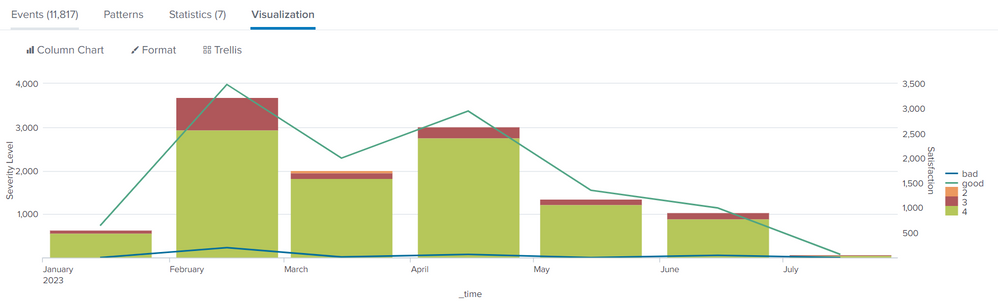
I tried to wrap your suggestions in the appendcols cause this is column chart part where I want to reverse the order but it seemed won't work.
- Mark as New
- Bookmark Message
- Subscribe to Message
- Mute Message
- Subscribe to RSS Feed
- Permalink
- Report Inappropriate Content
appendcols will sort the column names again.
Try it outside the appendcols
(index="A" OR index="B")
| eval Satisfaction = if(Satisfaction="good with comment", "good", Satisfaction)
| eval Satisfaction = if(Satisfaction="bad with comment", "bad", Satisfaction)
| chart  count(Satisfaction) over _time span=1mon by Satisfaction usenull=f useother=f
| appendcols
[ | search (index="A" OR index="B")
| chart count(Level) over _time span=1mon by Level usenull=f useother=f ]
| transpose 0 header_field=_time column_name=Level
| reverse
| transpose 0 header_field=Level column_name=_time- Mark as New
- Bookmark Message
- Subscribe to Message
- Mute Message
- Subscribe to RSS Feed
- Permalink
- Report Inappropriate Content
Thank you. It worked.

Join the Splunk Community Slack to learn, troubleshoot, and make connections with fellow Splunk practitioners in real time!
Join Splunk User Groups to connect and learn in-person by region or remotely by topic or industry.
Index This | What travels the world but is also stuck in place?
Discover New Use Cases: Unlock Greater Value from Your Existing Splunk Data
Continue Your Journey: Join Session 2 of the Data Management and Federation Bootcamp ...
