
Join the Conversation
- Find Answers
- :
- Using Splunk
- :
- Dashboards & Visualizations
- :
- Remove "No title" From Dashboard Panels and Panel ...
- Subscribe to RSS Feed
- Mark Topic as New
- Mark Topic as Read
- Float this Topic for Current User
- Bookmark Topic
- Subscribe to Topic
- Mute Topic
- Printer Friendly Page
- Mark as New
- Bookmark Message
- Subscribe to Message
- Mute Message
- Subscribe to RSS Feed
- Permalink
- Report Inappropriate Content

Hello,
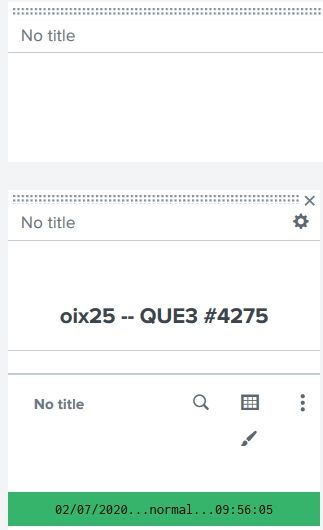
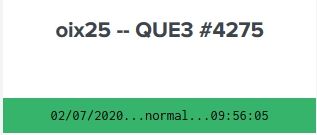
I'm trying to learn (if possible) how to remove the space left by No title in panels and visualizations. I want to reclaim this real estate.
When editing vs results in dashboard.
Thanks and God bless,
Genesius


- Mark as New
- Bookmark Message
- Subscribe to Message
- Mute Message
- Subscribe to RSS Feed
- Permalink
- Report Inappropriate Content
1) Did some digging around with the Inspect Element in FireFox.
2) Found the underlying (not seen in dashboard editor) element was <div class="panel-body html">
3) Googled "css hide element panel-row div".
4) Found this property: display: value;.
5) Added to various areas in my XML,
    <panel depends="$alwaysHideCSS$">
      <html>
       <style>
         #prtr1{
           width:17% !important;
           padding-top: 1px !important;
         }
         #prtr2{
           width:17% !important;
           padding-top: 1px !important;
         }
         #prtr3{
           width:17% !important;
           padding-top: 1px !important;
         }
         #prtr4{
           width:17% !important;
           padding-top: 1px !important;
         }
         #prtr5{
           width:17% !important;
           padding-top: 1px !important;
         }
         #prtr6{
           width:17% !important;
           padding-top: 1px !important;
         }
         #prtr7{
           width:17% !important;
           padding-top: 1px !important;
           padding-botom: 1px !important;
         }
         .dashboard-body {
             padding-top: 1px !important;
             padding-bottom: 1px !important;
             background: #1E93C6 !important;
         }
         .dashboard-header h2{
             padding-top: 1px !important;
             padding-bottom: 1px !important;
             color: #ff0000 !important;
         }
         .dashboard-panel {
             padding-top: 1px !important;
             padding-bottom: 1px !important;
             text-align: center !important;
             font-weight: bold !important;
             border-top-right-radius: 15px;
             border-top-left-radius: 15px;
             line-height: 1px; !important;
         }
         .dashboard-cell {
             padding-top: 1px !important;
             padding-bottom: 1px !important;
             background: #7d8073 !important;
         }
          thead{
            display: none !important;
         }
         </style>
      </html>
    </panel>
till it worked.
The original thead{ visibility: hidden; } was removed from each element.
Thanks and God bless,
Genesius
- Mark as New
- Bookmark Message
- Subscribe to Message
- Mute Message
- Subscribe to RSS Feed
- Permalink
- Report Inappropriate Content
1) Did some digging around with the Inspect Element in FireFox.
2) Found the underlying (not seen in dashboard editor) element was <div class="panel-body html">
3) Googled "css hide element panel-row div".
4) Found this property: display: value;.
5) Added to various areas in my XML,
    <panel depends="$alwaysHideCSS$">
      <html>
       <style>
         #prtr1{
           width:17% !important;
           padding-top: 1px !important;
         }
         #prtr2{
           width:17% !important;
           padding-top: 1px !important;
         }
         #prtr3{
           width:17% !important;
           padding-top: 1px !important;
         }
         #prtr4{
           width:17% !important;
           padding-top: 1px !important;
         }
         #prtr5{
           width:17% !important;
           padding-top: 1px !important;
         }
         #prtr6{
           width:17% !important;
           padding-top: 1px !important;
         }
         #prtr7{
           width:17% !important;
           padding-top: 1px !important;
           padding-botom: 1px !important;
         }
         .dashboard-body {
             padding-top: 1px !important;
             padding-bottom: 1px !important;
             background: #1E93C6 !important;
         }
         .dashboard-header h2{
             padding-top: 1px !important;
             padding-bottom: 1px !important;
             color: #ff0000 !important;
         }
         .dashboard-panel {
             padding-top: 1px !important;
             padding-bottom: 1px !important;
             text-align: center !important;
             font-weight: bold !important;
             border-top-right-radius: 15px;
             border-top-left-radius: 15px;
             line-height: 1px; !important;
         }
         .dashboard-cell {
             padding-top: 1px !important;
             padding-bottom: 1px !important;
             background: #7d8073 !important;
         }
          thead{
            display: none !important;
         }
         </style>
      </html>
    </panel>
till it worked.
The original thead{ visibility: hidden; } was removed from each element.
Thanks and God bless,
Genesius
- Mark as New
- Bookmark Message
- Subscribe to Message
- Mute Message
- Subscribe to RSS Feed
- Permalink
- Report Inappropriate Content

It's not the No Title that's taking up space, it's the html break that you have. you might be able to use some CSS to reduce the space, but I don't have any written up that'll help at the moment.
- Mark as New
- Bookmark Message
- Subscribe to Message
- Mute Message
- Subscribe to RSS Feed
- Permalink
- Report Inappropriate Content
Thanks cmerriman.
Anyone have any ideas? I'm checking the Dashboards app, but I can't find anything helpful.
I'm also Googling, but don't know how to phrase it. I'm seeing css for
tags, but I don't think that is it.
Thanks and God bless,
Genesius

Accelerating Observability as Code with the Splunk AI Assistant
Integrating Splunk Search API and Quarto to Create Reproducible Investigation ...
Congratulations to the 2025-2026 SplunkTrust!
