
Turn on suggestions
Auto-suggest helps you quickly narrow down your search results by suggesting possible matches as you type.
Dashboards & Visualizations
×
Join the Conversation
Without signing in, you're just watching from the sidelines. Sign in or Register to connect, share, and be part of the Splunk Community.
Turn on suggestions
Auto-suggest helps you quickly narrow down your search results by suggesting possible matches as you type.
- Find Answers
- :
- Using Splunk
- :
- Dashboards & Visualizations
- :
- Re: Pie Chart - Add a line break in the label
Options
- Subscribe to RSS Feed
- Mark Topic as New
- Mark Topic as Read
- Float this Topic for Current User
- Bookmark Topic
- Subscribe to Topic
- Mute Topic
- Printer Friendly Page
- Mark as New
- Bookmark Message
- Subscribe to Message
- Mute Message
- Subscribe to RSS Feed
- Permalink
- Report Inappropriate Content
Pie Chart - Add a line break in the label

sebsg
New Member
03-30-2020
01:05 AM
I would like to add a line break in the label in order to have the full title as well as the value and the percentage
Actually :

Desired outcome :

End of SPL used :
....
| eventstats sum(tache) as total_tache
| eval percent = round((tache/total_tache)*100,2)
| eval DR=DR." (".'tache'.")".",".'percent'."%"
| rex mode=sed field=DR "s/,/\n/g"
I tried to use the command "sed", it works in a table but not in a pie chart.
Can you help me ?
- Mark as New
- Bookmark Message
- Subscribe to Message
- Mute Message
- Subscribe to RSS Feed
- Permalink
- Report Inappropriate Content

to4kawa
Ultra Champion
04-04-2020
04:40 PM
| makeresults
| eval _raw="BDDF BORDEAUX ILE_DE_FRANCE_SUD ILE_DE_FRANCE_NORD LILLE LYON MARSEILLE RENNIS STRASBOURG
8 23 65 81 10 38 43 32 23"
| multikv
| fields - _* linecount
| transpose 0 column_name=region
| rename "row 1" as count
| eventstats sum(count) as total
| eval perc= round(count / total * 100,2)."%"
| eval display=region."


(".count.") - ".perc
| table display count
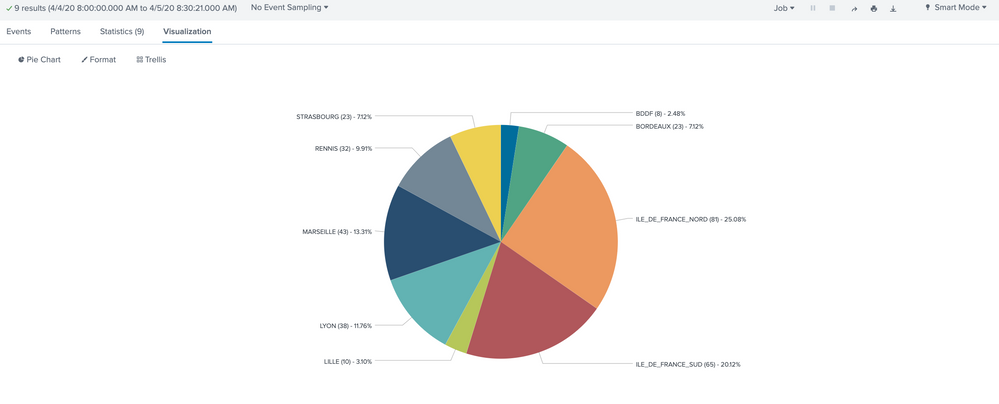


Default Pie Chart can't display multivalue and truncate long spaces.

- Mark as New
- Bookmark Message
- Subscribe to Message
- Mute Message
- Subscribe to RSS Feed
- Permalink
- Report Inappropriate Content
sebsg
New Member
04-05-2020
11:51 PM
So there is no solution to this problem ?
Since it's impossible to make line breaks in a Pie Chart

Get Updates on the Splunk Community!
Upcoming Webinar: Unmasking Insider Threats with Slunk Enterprise Security’s UEBA
Join us on Wed, Dec 10. at 10AM PST / 1PM EST for a live webinar and demo with Splunk experts! Discover how ...
.conf25 technical session recap of Observability for Gen AI: Monitoring LLM ...
If you’re unfamiliar, .conf is Splunk’s premier event where the Splunk community, customers, partners, and ...
A Season of Skills: New Splunk Courses to Light Up Your Learning Journey
There’s something special about this time of year—maybe it’s the glow of the holidays, maybe it’s the ...
