
Join the Conversation
- Find Answers
- :
- Using Splunk
- :
- Dashboards & Visualizations
- :
- Re: Panel does not render anything when I javascri...
- Subscribe to RSS Feed
- Mark Topic as New
- Mark Topic as Read
- Float this Topic for Current User
- Bookmark Topic
- Subscribe to Topic
- Mute Topic
- Printer Friendly Page
- Mark as New
- Bookmark Message
- Subscribe to Message
- Mute Message
- Subscribe to RSS Feed
- Permalink
- Report Inappropriate Content
Panel does not render anything when I javascript code to source code

I am trying to make my own COVID-19 dashboard. I was wondering if I could use the code provided on the CDC website.
You can find this code by visiting https://www.cdc.gov/coronavirus/2019-ncov/cases-updates/cases-in-us.html and scroll down to "Deaths by Jurisdiction" and click on "Add US Map to your website"
<div data-post-id="50079" data-site-id="499" data-site-root-folder="coronavirus" class="mb-3" data-host="www.cdc.gov" data-theme="theme-cyan" data-cdc-widget="cdcMaps" data-config-url="/coronavirus/2019-ncov/cases-updates/us-case-count-maps-charts/map-cases-us-DeathOnly_Desktop.json">
</div>
<script src="//tools.cdc.gov/TemplatePackage/contrib/widgets/tp-widget-external-loader.js"></script>
What is wrong with this piece of code I added to my dashboard? There are no errors but I don't see any panel on the dashboard.
<row>
    <panel>
      <html>
        <title>Deaths by Jurisdiction </title>
      <div data-post-id="50079" data-site-id="499" data-site-root-folder="coronavirus" class="mb-3" data-host="www.cdc.gov" data-theme="theme-cyan" data-cdc-widget="cdcMaps" data-config-url="/coronavirus/2019-ncov/cases-updates/us-case-count-maps-charts/map-cases-us-DeathOnly_Desktop.json">
        </div>
        <script src="//tools.cdc.gov/TemplatePackage/contrib/widgets/tp-widget-external-loader.js"></script>
      </html>
    </panel>
  </row>
- Mark as New
- Bookmark Message
- Subscribe to Message
- Mute Message
- Subscribe to RSS Feed
- Permalink
- Report Inappropriate Content

@g-money ideally you should not add Javascript (rather any static resources) from external website without knowing the complete code. This will open up your app/web page to cross site insecure contents and XSS attack.
Splunk4Good provides you with several insightful Covid dashboards along with github repo for you to build your based on your data source, please see if that would suit your needs. https://covid-19.splunkforgood.com/hub
Having said that, there are two ways you can use internet based static JS file reference.
1. Convert an Empty Simple XML Dashboard to HTML Dashboard and past the HTML content as is in the html section of the HTML dashboard.
2. For Simple XML JS extension, add a dummy JS file to your Splunk Apps's appserver/static folder and reference web based JS file in that dummy JS file.
Please find below Example of Simple XML JS Extension approach as HTML Dashboard would be straight forward. PS: Use at your own caution as stated earlier.
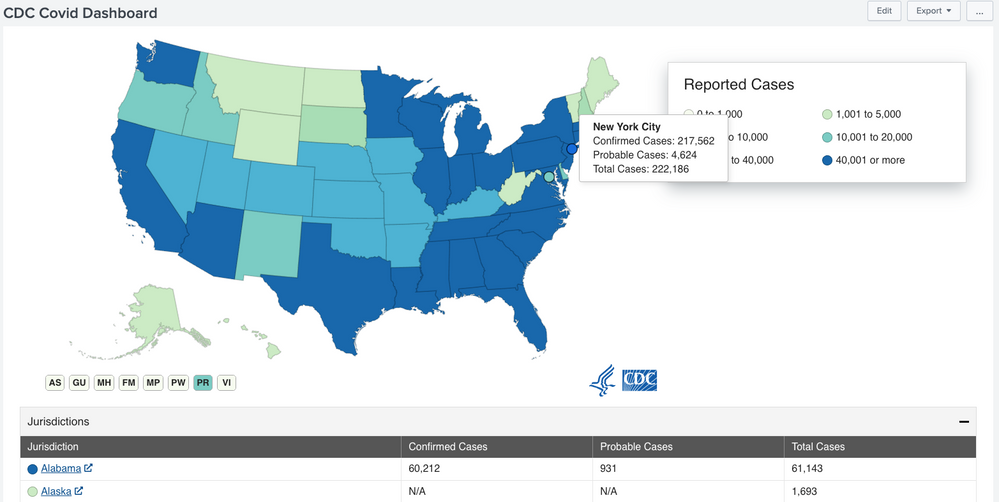
Following is the Simple XML Dashboard code (notice <script> section is not added to the <html> panel):
<dashboard script="cdc_covid_dummy.js">
  <label>CDC Covid Dashboard</label>
  <row>
    <panel>
      <html>
        <div data-post-id="50079" data-site-id="499" data-site-root-folder="coronavirus" class="mb-3" data-host="www.cdc.gov" data-theme="theme-cyan" data-cdc-widget="cdcMaps" data-config-url="/coronavirus/2019-ncov/cases-updates/us-case-count-maps-charts/map-cases-us-CaseOnly_Desktop.json">
        </div>
      </html>
    </panel>
  </row>
</dashboard>
Following is the required JS file cdc_covid_dummy.js to be placed under your Splunk app's appserver/static folder (may require refresh, bump or restart of Splunk instance and also clearing of web browser history):
require(['//tools.cdc.gov/TemplatePackage/contrib/widgets/tp-widget-external-loader.js',
    'splunkjs/mvc/simplexml/ready!'
], function () {
    // Dummy JS to link CDC JS over Web
});
Please try out and confirm! Recommended approach would be to use Splunk4Good code and plug in your data source.
Do UPVOTE if this reply helps 🙂
| makeresults | eval message= "Happy Splunking!!!"


Join the Splunk Community Slack to learn, troubleshoot, and make connections with fellow Splunk practitioners in real time!
Join Splunk User Groups to connect and learn in-person by region or remotely by topic or industry.
A Four-Part Event Series: Full Stack Observability For the AI Era
SOC4Kafka - New Kafka Connector Powered by OpenTelemetry
Event Series: Level up your SOC: Advancing with Splunk Enterprise Security
