
Join the Conversation
- Find Answers
- :
- Using Splunk
- :
- Dashboards & Visualizations
- :
- Re: Move Trellis Chart Components Closer Together
- Subscribe to RSS Feed
- Mark Topic as New
- Mark Topic as Read
- Float this Topic for Current User
- Bookmark Topic
- Subscribe to Topic
- Mute Topic
- Printer Friendly Page
- Mark as New
- Bookmark Message
- Subscribe to Message
- Mute Message
- Subscribe to RSS Feed
- Permalink
- Report Inappropriate Content

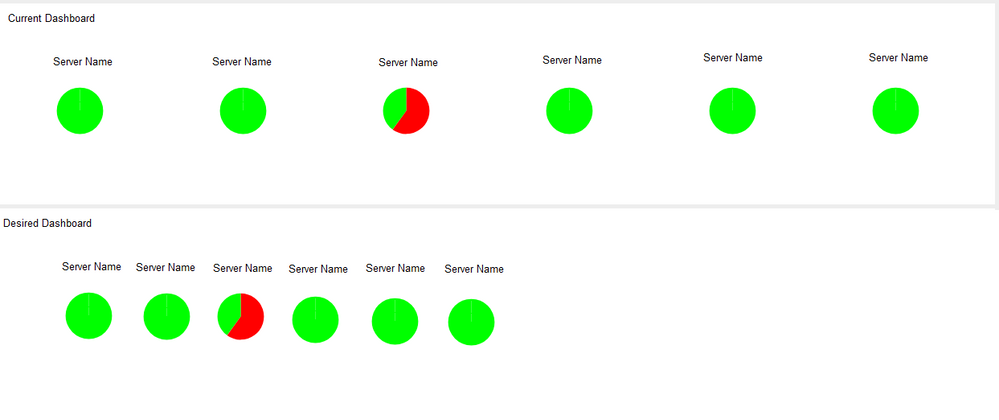
I have a trellis chart in a panel on a dashboard that is a collection of pie charts.
I need to add a new pie chart, but doing so brings up a scroll wheel on the side of the panel and doesn't show the 7th chart unless the user scrolls. Project requirements dictate that I cannot expand the panel or make the user scroll for the information.
I want to move the pie charts closer together within the trellis, so that more charts can fit. I probably need to decrease the horizontal spacing of the pie charts within the trellis, but I don't know how.
Does anyone know how to do that?

- Mark as New
- Bookmark Message
- Subscribe to Message
- Mute Message
- Subscribe to RSS Feed
- Permalink
- Report Inappropriate Content

For the simple case I played with, I was able to accomplish this using some CSS in SimpleXML. Try adding this to your SimpleXML before the closing <dashboard> or <form> element.
  <row depends="$cssHidden$">
    <html>
      <style>
        .viz-panel {
          width: 200px !important;
        }
      </style>
    </html>
  </row>
- Mark as New
- Bookmark Message
- Subscribe to Message
- Mute Message
- Subscribe to RSS Feed
- Permalink
- Report Inappropriate Content
For the simple case I played with, I was able to accomplish this using some CSS in SimpleXML. Try adding this to your SimpleXML before the closing <dashboard> or <form> element.
  <row depends="$cssHidden$">
    <html>
      <style>
        .viz-panel {
          width: 200px !important;
        }
      </style>
    </html>
  </row>
- Mark as New
- Bookmark Message
- Subscribe to Message
- Mute Message
- Subscribe to RSS Feed
- Permalink
- Report Inappropriate Content

What if I have multiple trellis panels and I only want the spacing custom on one or I want different custom spacing on each?
I tried adding "id=customtrellis" to the panel and setting:
<style>
  #customtrellis.viz-panel {
    width: 16% !important;
  }
</style>
That doesn't work. Any suggestions?
- Mark as New
- Bookmark Message
- Subscribe to Message
- Mute Message
- Subscribe to RSS Feed
- Permalink
- Report Inappropriate Content
I think I got it. added a space between the id and the class:
<style>
  #customtrellis .viz-panel {
    width: 16% !important;
  }
</style>
- Mark as New
- Bookmark Message
- Subscribe to Message
- Mute Message
- Subscribe to RSS Feed
- Permalink
- Report Inappropriate Content
That was the variable I needed, thanks.
200px actually pushed things farther apart; I ended up with 110px.

Join the Splunk Community Slack to learn, troubleshoot, and make connections with fellow Splunk practitioners in real time!
Join Splunk User Groups to connect and learn in-person by region or remotely by topic or industry.
Data Outage Monitoring and Reporting
Manage Datasets and Connections in Catalog on Splunk Cloud Platform
Persistent Queue at TcpOut — One of Splunk's Most Practical Features
