
Join the Conversation
- Find Answers
- :
- Using Splunk
- :
- Dashboards & Visualizations
- :
- Modify search time based on dropdown selection
- Subscribe to RSS Feed
- Mark Topic as New
- Mark Topic as Read
- Float this Topic for Current User
- Bookmark Topic
- Subscribe to Topic
- Mute Topic
- Printer Friendly Page
- Mark as New
- Bookmark Message
- Subscribe to Message
- Mute Message
- Subscribe to RSS Feed
- Permalink
- Report Inappropriate Content

I have a dropdown selection for a Policy field. I want to be able modify the search time based on the policy selected in the dropdown.
The drop down has 3 static options and depending on what is selected the time of the search needs to be either the last 60 mins or the last 7 days. I am not sure on how to modify the time parameters on the search. I tried inserting the earliest/latest info into the PolicyTOK but had issues getting it to behave correctly
   <row>
    <panel>
      <input type="dropdown" token="PolicyTOK">
        <label>Details</label>
        <choice value="untagged">Untagged</choice>
        <choice value="stopped">Stopped</choice>
        <choice value="terminated">Terminated</choice>
        <default>untagged</default>
      </input>
      <table>
        <search>
          <query>index=xxx sourcetype=_json "message.Records{}.Sns.Message.policy.name"="$PolicyTOK$" | spath output=AccountId path=message.Records{}.Sns.Message.account_id | spath output=account path=message.Records{}.Sns.Message.account | spath output=region path=message.Records{}.Sns.Message.region | spath output=InstanceId path=message.Records{}.Sns.Message.resources{}.InstanceId |dedup AccountId | table account AccountId region InstanceId  | sort AccountId</query>
        <earliest>-60m@m</earliest>
        <latest>now</latest>
        </search>
        <option name="drilldown">none</option>
      </table>
    </panel>
  </row>
- Mark as New
- Bookmark Message
- Subscribe to Message
- Mute Message
- Subscribe to RSS Feed
- Permalink
- Report Inappropriate Content

@a238574, you can use dropdown's <change> event handler to set additional time tokens as needed.
Following is a run anywhere dashboard example based on your question. PS: You have defined three static dropdown values and two time ranges to be selected. Please confirm time range to be applied for specific option selected. I have set first two options i.e. untagged and Stopped with last 7 days time range and Terminated with last 60 minutes time range. Please correct as per your use case.
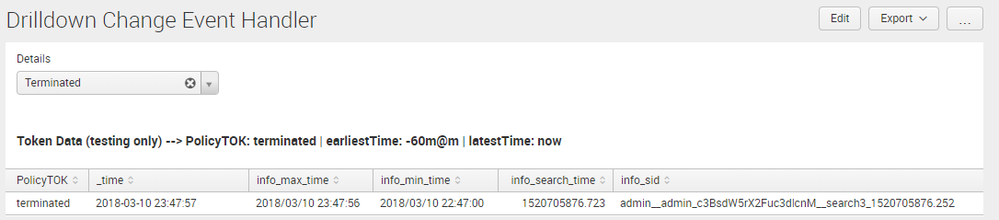
<form>
  <label>Drilldown Change Event Handler</label>
  <fieldset submitButton="false"></fieldset>
  <row>
    <panel>
      <input type="dropdown" token="PolicyTOK" searchWhenChanged="true">
        <label>Details</label>
        <choice value="untagged">Untagged</choice>
        <choice value="stopped">Stopped</choice>
        <choice value="terminated">Terminated</choice>
        <default>untagged</default>
        <change>
          <condition value="untagged">
            <set token="earliestTime">-7d@d</set>
            <set token="latestTime">now</set>
          </condition>
          <condition value="stopped">
            <set token="earliestTime">-7d@d</set>
            <set token="latestTime">now</set>
          </condition>
          <condition value="terminated">
            <set token="earliestTime">-60m@m</set>
            <set token="latestTime">now</set>
          </condition>
        </change>
      </input>
      <table>
        <title>Token Data (testing only) --> PolicyTOK: $PolicyTOK$ | earliestTime: $earliestTime$ | latestTime: $latestTime$</title>
        <search>
          <query>| makeresults
| eval PolicyTOK="$PolicyTOK$"
| addinfo
| fieldformat info_min_time=strftime(info_min_time,"%Y/%m/%d %H:%M:%S")
| fieldformat info_max_time=strftime(info_max_time,"%Y/%m/%d %H:%M:%S")</query>
          <earliest>$earliestTime$</earliest>
          <latest>$latestTime$</latest>
        </search>
        <option name="drilldown">none</option>
        <option name="refresh.display">progressbar</option>
      </table>
    </panel>
  </row>
</form>
| makeresults | eval message= "Happy Splunking!!!"
- Mark as New
- Bookmark Message
- Subscribe to Message
- Mute Message
- Subscribe to RSS Feed
- Permalink
- Report Inappropriate Content
@a238574, you can use dropdown's <change> event handler to set additional time tokens as needed.
Following is a run anywhere dashboard example based on your question. PS: You have defined three static dropdown values and two time ranges to be selected. Please confirm time range to be applied for specific option selected. I have set first two options i.e. untagged and Stopped with last 7 days time range and Terminated with last 60 minutes time range. Please correct as per your use case.
<form>
  <label>Drilldown Change Event Handler</label>
  <fieldset submitButton="false"></fieldset>
  <row>
    <panel>
      <input type="dropdown" token="PolicyTOK" searchWhenChanged="true">
        <label>Details</label>
        <choice value="untagged">Untagged</choice>
        <choice value="stopped">Stopped</choice>
        <choice value="terminated">Terminated</choice>
        <default>untagged</default>
        <change>
          <condition value="untagged">
            <set token="earliestTime">-7d@d</set>
            <set token="latestTime">now</set>
          </condition>
          <condition value="stopped">
            <set token="earliestTime">-7d@d</set>
            <set token="latestTime">now</set>
          </condition>
          <condition value="terminated">
            <set token="earliestTime">-60m@m</set>
            <set token="latestTime">now</set>
          </condition>
        </change>
      </input>
      <table>
        <title>Token Data (testing only) --> PolicyTOK: $PolicyTOK$ | earliestTime: $earliestTime$ | latestTime: $latestTime$</title>
        <search>
          <query>| makeresults
| eval PolicyTOK="$PolicyTOK$"
| addinfo
| fieldformat info_min_time=strftime(info_min_time,"%Y/%m/%d %H:%M:%S")
| fieldformat info_max_time=strftime(info_max_time,"%Y/%m/%d %H:%M:%S")</query>
          <earliest>$earliestTime$</earliest>
          <latest>$latestTime$</latest>
        </search>
        <option name="drilldown">none</option>
        <option name="refresh.display">progressbar</option>
      </table>
    </panel>
  </row>
</form>
| makeresults | eval message= "Happy Splunking!!!"
- Mark as New
- Bookmark Message
- Subscribe to Message
- Mute Message
- Subscribe to RSS Feed
- Permalink
- Report Inappropriate Content
Simple and functional.... I know where I made my mistake.... I was adding the time parameters to the query using an incorrect syntax
- Mark as New
- Bookmark Message
- Subscribe to Message
- Mute Message
- Subscribe to RSS Feed
- Permalink
- Report Inappropriate Content

Hi,
Try this - `
- Mark as New
- Bookmark Message
- Subscribe to Message
- Mute Message
- Subscribe to RSS Feed
- Permalink
- Report Inappropriate Content
Hi,
Try this - | eval diff=round((now()-_time)/3600)|eval filter=case(("PolicyTOK"="untagged" OR
"PolicyTOK"="stopped"),168,"PolicyTOK"="terminated",1) |where diff<=filter
What this does :
The first eval calculates the difference in hours from current time (now()) till the time each event occured / was indexed (_time)
Having got the difference in hours the second eval sets the filter (I am assuming , for example, untagged and stopped events need to filter events for the last 7 days) depending on the token selection to a limit value, 7*24=168 hours for 7 days and of course 1 hour for last 60 minutes.
Now, the where will filter out unwanted events, so for example something that was indexed prior to 7 days will have a diff value greater than 168. Assuming that an user selection of untagged is made from the dropdown the where will eliminate all events where diff is greater than 168.
You might need to tinker this around a bit to fit your requirements exactly.



Join the Splunk Community Slack to learn, troubleshoot, and make connections with fellow Splunk practitioners in real time!
Join Splunk User Groups to connect and learn in-person by region or remotely by topic or industry.
Data Management Digest – September 2026
Federated Search for CloudWatch Unified Data Store Is Generally Available
Announcing Modern Navigation: A New Era of Splunk User Experience
