
Join the Conversation
- Find Answers
- :
- Using Splunk
- :
- Dashboards & Visualizations
- :
- Is there an easy way to change the color of a non ...
- Subscribe to RSS Feed
- Mark Topic as New
- Mark Topic as Read
- Float this Topic for Current User
- Bookmark Topic
- Subscribe to Topic
- Mute Topic
- Printer Friendly Page
- Mark as New
- Bookmark Message
- Subscribe to Message
- Mute Message
- Subscribe to RSS Feed
- Permalink
- Report Inappropriate Content


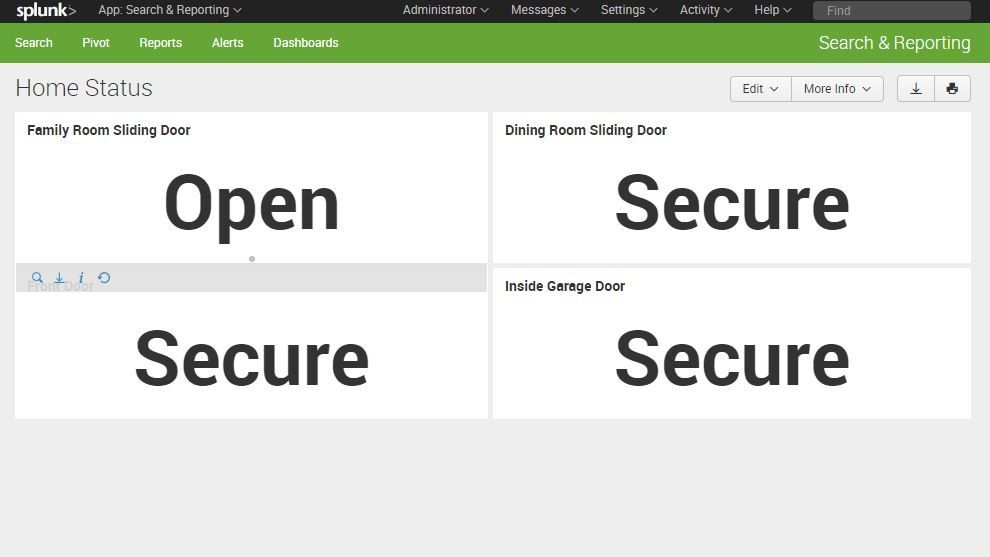
I am working on creating a dashboard of my home status that looks like the graphic attached. Ideally I would like to have a green background around the word 'Secure' and a red background around the word 'Open'. It seems like the single value type is designed to change colors based on numeric values. Is there an easy way to make it change based on some text or other condition?

- Mark as New
- Bookmark Message
- Subscribe to Message
- Mute Message
- Subscribe to RSS Feed
- Permalink
- Report Inappropriate Content

Look at the Splunk 6.x Dashboard Example app for different customization's available https://splunkbase.splunk.com/app/1603/
Something like this would work for your case (run anywhere sample)
<dashboard>
  <label>Custom Color</label>
  <row>
    <panel>
      <single>
        <search>
          <query>| gentimes start=-1 | eval Result="Secure" | table Result | eval range=if(Result="Secure","low","severe")</query>
        </search>
      </single>
      <single>
        <search>
          <query>| gentimes start=-1 | eval Result="Open" | table Result | eval range=if(Result="Secure","low","severe")</query>
        </search>
      </single>
    </panel>
  </row>
</dashboard>
- Mark as New
- Bookmark Message
- Subscribe to Message
- Mute Message
- Subscribe to RSS Feed
- Permalink
- Report Inappropriate Content
Look at the Splunk 6.x Dashboard Example app for different customization's available https://splunkbase.splunk.com/app/1603/
Something like this would work for your case (run anywhere sample)
<dashboard>
  <label>Custom Color</label>
  <row>
    <panel>
      <single>
        <search>
          <query>| gentimes start=-1 | eval Result="Secure" | table Result | eval range=if(Result="Secure","low","severe")</query>
        </search>
      </single>
      <single>
        <search>
          <query>| gentimes start=-1 | eval Result="Open" | table Result | eval range=if(Result="Secure","low","severe")</query>
        </search>
      </single>
    </panel>
  </row>
</dashboard>
- Mark as New
- Bookmark Message
- Subscribe to Message
- Mute Message
- Subscribe to RSS Feed
- Permalink
- Report Inappropriate Content
Works like a champion!! I looked over the dashbaord examples but didnt catch that snippet of code. So easy once you see how this works. Thank you again.

Splunk Search APIを使えば調査過程が残せます
Integrating Splunk Search API and Quarto to Create Reproducible Investigation ...
Congratulations to the 2025-2026 SplunkTrust!
