
Join the Conversation
- Find Answers
- :
- Using Splunk
- :
- Dashboards & Visualizations
- :
- Is it possible to increase the size of pie chart i...
- Subscribe to RSS Feed
- Mark Topic as New
- Mark Topic as Read
- Float this Topic for Current User
- Bookmark Topic
- Subscribe to Topic
- Mute Topic
- Printer Friendly Page
- Mark as New
- Bookmark Message
- Subscribe to Message
- Mute Message
- Subscribe to RSS Feed
- Permalink
- Report Inappropriate Content

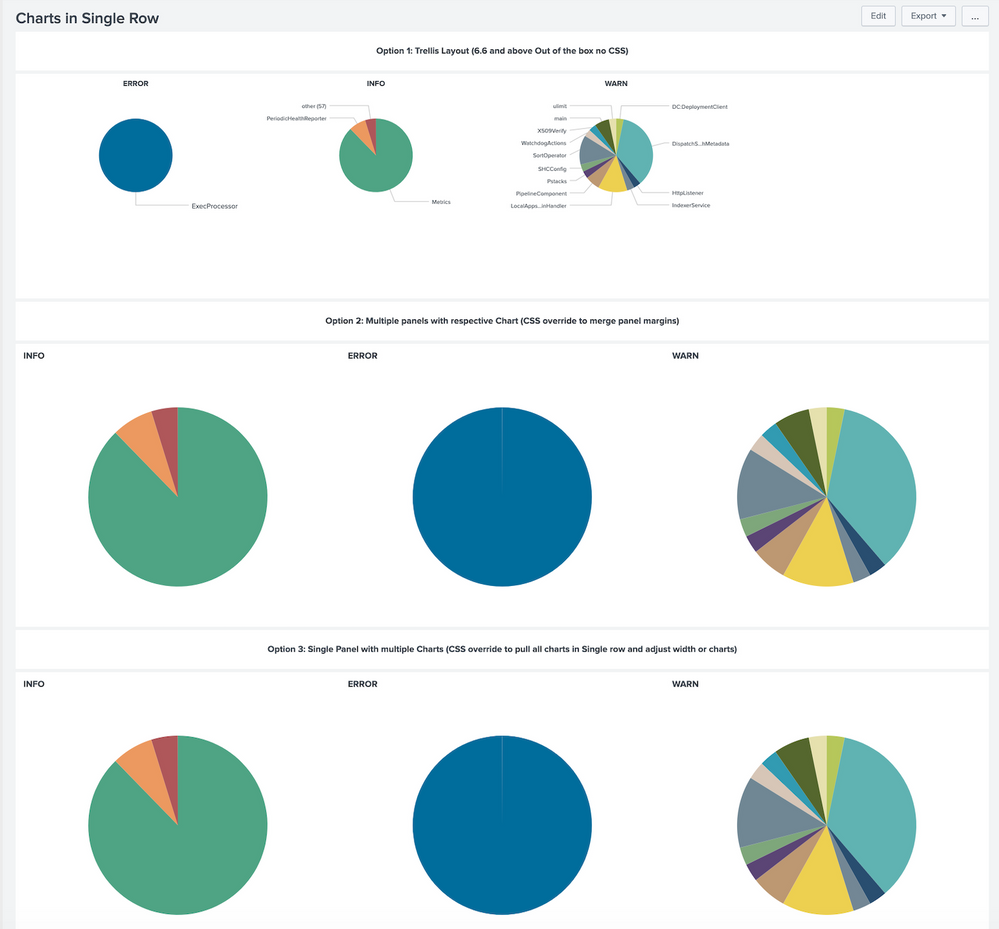
I am having 4 pie charts in a row and because of which people who are using small screen laptops finding it difficult to read the pie chart information. As there is blank white space in the pie chart panel which I think can be utilized to increase the size of pie chart image.
I am using simple XML and want to implement this change in it.
Anyone have any idea how to do it?
- Mark as New
- Bookmark Message
- Subscribe to Message
- Mute Message
- Subscribe to RSS Feed
- Permalink
- Report Inappropriate Content

First, you can tweak the height of the chart by adding an option such as
<option name="height">600</option>
Second, you can use CSS Override to remove the margins so the white spaces are removed.
Third, if you can live without the labels, remove them so more spaces are used for showing the pies.
<option name="charting.chart.showLabels">false</option>
An example is show below using the _internal index
<dashboard>
  <label>Charts in Single Row</label>
  <row>
    <panel>
      <html>
         <h3 style="text-align:center;">Option 1: Trellis Layout (6.6 and above Out of the box no CSS)</h3>
       </html>
    </panel>
  </row>
  <row>
    <panel>
      <chart>
        <search>
          <query>index=_internal sourcetype=splunkd log_level IN ("INFO","WARN","ERROR")
 | stats count by component log_level</query>
          <earliest>-60m@m</earliest>
          <latest>now</latest>
        </search>
        <option name="charting.axisLabelsX.majorLabelStyle.rotation">-45</option>
        <option name="charting.axisTitleX.visibility">collapsed</option>
        <option name="charting.axisTitleY.visibility">collapsed</option>
        <option name="charting.axisTitleY2.visibility">collapsed</option>
        <option name="charting.chart">pie</option>
        <option name="charting.drilldown">all</option>
        <option name="charting.legend.placement">none</option>
        <option name="height">346</option>
        <option name="refresh.display">progressbar</option>
        <option name="trellis.enabled">1</option>
        <option name="trellis.scales.shared">0</option>
        <option name="trellis.splitBy">log_level</option>
      </chart>
    </panel>
  </row>
  <row>
    <panel>
      <html>
         <h3 style="text-align:center;">Option 2: Multiple panels with respective Chart (CSS override to merge panel margins)</h3>
         <style>
           #multiplePanelsWithIndividualCharts .dashboard-panel{
             margin-right: 0px !important;
           }
         </style>
       </html>
    </panel>
  </row>
  <row id="multiplePanelsWithIndividualCharts">
    <panel>
      <chart>
        <title>INFO</title>
        <search>
          <query>index=_internal sourcetype=splunkd log_level=INFO
 | chart count as INFO by component</query>
          <earliest>-60m@m</earliest>
          <latest>now</latest>
        </search>
        <option name="charting.chart">pie</option>
        <option name="charting.drilldown">all</option>
        <option name="charting.legend.placement">none</option>
        <option name="height">400</option>
        <option name="refresh.display">progressbar</option>
        <option name="charting.chart.showLabels">false</option>
      </chart>
    </panel>
    <panel>
      <chart>
        <title>ERROR</title>
        <search>
          <query>index=_internal sourcetype=splunkd log_level=ERROR
 | chart count as ERROR by component</query>
          <earliest>-60m@m</earliest>
          <latest>now</latest>
        </search>
        <option name="charting.chart">pie</option>
        <option name="charting.drilldown">all</option>
        <option name="charting.legend.placement">none</option>
        <option name="height">400</option>
        <option name="refresh.display">progressbar</option>
        <option name="charting.chart.showLabels">false</option>
      </chart>
    </panel>
    <panel>
      <chart>
        <title>WARN</title>
        <search>
          <query>index=_internal sourcetype=splunkd log_level=WARN
 | chart count as WARN by component</query>
          <earliest>-60m@m</earliest>
          <latest>now</latest>
        </search>
        <option name="charting.chart">pie</option>
        <option name="charting.drilldown">all</option>
        <option name="charting.legend.placement">none</option>
        <option name="height">400</option>
        <option name="refresh.display">progressbar</option>
        <option name="charting.chart.showLabels">false</option>
      </chart>
    </panel>
  </row>
  <row>
    <panel>
      <html>
         <h3 style="text-align:center;">Option 3: Single Panel with multiple Charts (CSS override to pull all charts in Single row and adjust width or charts)</h3>
         <style>
           #panelWithMultipleCharts .dashboard-panel{
               display: flex !important;
           }
           #panelWithMultipleCharts .panel-element-row{
               width:33.33% !important;
           }
         </style>
       </html>
    </panel>
  </row>
  <row id="panelWithMultipleCharts">
    <panel>
      <chart>
        <title>INFO</title>
        <search>
          <query>index=_internal sourcetype=splunkd log_level=INFO
 | chart count as INFO by component</query>
          <earliest>-60m@m</earliest>
          <latest>now</latest>
        </search>
        <option name="charting.chart">pie</option>
        <option name="charting.drilldown">all</option>
        <option name="charting.legend.placement">none</option>
        <option name="height">400</option>
        <option name="refresh.display">progressbar</option>
        <option name="charting.chart.showLabels">false</option>
      </chart>
      <chart>
        <title>ERROR</title>
        <search>
          <query>index=_internal sourcetype=splunkd log_level=ERROR
 | chart count as ERROR by component</query>
          <earliest>-60m@m</earliest>
          <latest>now</latest>
        </search>
        <option name="charting.chart">pie</option>
        <option name="charting.drilldown">all</option>
        <option name="charting.legend.placement">none</option>
        <option name="height">400</option>
        <option name="refresh.display">progressbar</option>
        <option name="charting.chart.showLabels">false</option>
      </chart>
      <chart>
        <title>WARN</title>
        <search>
          <query>index=_internal sourcetype=splunkd log_level=WARN
 | chart count as WARN by component</query>
          <earliest>-60m@m</earliest>
          <latest>now</latest>
        </search>
        <option name="charting.chart">pie</option>
        <option name="charting.drilldown">all</option>
        <option name="charting.legend.placement">none</option>
        <option name="height">400</option>
        <option name="refresh.display">progressbar</option>
        <option name="charting.chart.showLabels">false</option>
      </chart>
    </panel>
  </row>
</dashboard>
This is how it looks like after these tweaks. Hope this helps.


- Mark as New
- Bookmark Message
- Subscribe to Message
- Mute Message
- Subscribe to RSS Feed
- Permalink
- Report Inappropriate Content
First, you can tweak the height of the chart by adding an option such as
<option name="height">600</option>
Second, you can use CSS Override to remove the margins so the white spaces are removed.
Third, if you can live without the labels, remove them so more spaces are used for showing the pies.
<option name="charting.chart.showLabels">false</option>
An example is show below using the _internal index
<dashboard>
  <label>Charts in Single Row</label>
  <row>
    <panel>
      <html>
         <h3 style="text-align:center;">Option 1: Trellis Layout (6.6 and above Out of the box no CSS)</h3>
       </html>
    </panel>
  </row>
  <row>
    <panel>
      <chart>
        <search>
          <query>index=_internal sourcetype=splunkd log_level IN ("INFO","WARN","ERROR")
 | stats count by component log_level</query>
          <earliest>-60m@m</earliest>
          <latest>now</latest>
        </search>
        <option name="charting.axisLabelsX.majorLabelStyle.rotation">-45</option>
        <option name="charting.axisTitleX.visibility">collapsed</option>
        <option name="charting.axisTitleY.visibility">collapsed</option>
        <option name="charting.axisTitleY2.visibility">collapsed</option>
        <option name="charting.chart">pie</option>
        <option name="charting.drilldown">all</option>
        <option name="charting.legend.placement">none</option>
        <option name="height">346</option>
        <option name="refresh.display">progressbar</option>
        <option name="trellis.enabled">1</option>
        <option name="trellis.scales.shared">0</option>
        <option name="trellis.splitBy">log_level</option>
      </chart>
    </panel>
  </row>
  <row>
    <panel>
      <html>
         <h3 style="text-align:center;">Option 2: Multiple panels with respective Chart (CSS override to merge panel margins)</h3>
         <style>
           #multiplePanelsWithIndividualCharts .dashboard-panel{
             margin-right: 0px !important;
           }
         </style>
       </html>
    </panel>
  </row>
  <row id="multiplePanelsWithIndividualCharts">
    <panel>
      <chart>
        <title>INFO</title>
        <search>
          <query>index=_internal sourcetype=splunkd log_level=INFO
 | chart count as INFO by component</query>
          <earliest>-60m@m</earliest>
          <latest>now</latest>
        </search>
        <option name="charting.chart">pie</option>
        <option name="charting.drilldown">all</option>
        <option name="charting.legend.placement">none</option>
        <option name="height">400</option>
        <option name="refresh.display">progressbar</option>
        <option name="charting.chart.showLabels">false</option>
      </chart>
    </panel>
    <panel>
      <chart>
        <title>ERROR</title>
        <search>
          <query>index=_internal sourcetype=splunkd log_level=ERROR
 | chart count as ERROR by component</query>
          <earliest>-60m@m</earliest>
          <latest>now</latest>
        </search>
        <option name="charting.chart">pie</option>
        <option name="charting.drilldown">all</option>
        <option name="charting.legend.placement">none</option>
        <option name="height">400</option>
        <option name="refresh.display">progressbar</option>
        <option name="charting.chart.showLabels">false</option>
      </chart>
    </panel>
    <panel>
      <chart>
        <title>WARN</title>
        <search>
          <query>index=_internal sourcetype=splunkd log_level=WARN
 | chart count as WARN by component</query>
          <earliest>-60m@m</earliest>
          <latest>now</latest>
        </search>
        <option name="charting.chart">pie</option>
        <option name="charting.drilldown">all</option>
        <option name="charting.legend.placement">none</option>
        <option name="height">400</option>
        <option name="refresh.display">progressbar</option>
        <option name="charting.chart.showLabels">false</option>
      </chart>
    </panel>
  </row>
  <row>
    <panel>
      <html>
         <h3 style="text-align:center;">Option 3: Single Panel with multiple Charts (CSS override to pull all charts in Single row and adjust width or charts)</h3>
         <style>
           #panelWithMultipleCharts .dashboard-panel{
               display: flex !important;
           }
           #panelWithMultipleCharts .panel-element-row{
               width:33.33% !important;
           }
         </style>
       </html>
    </panel>
  </row>
  <row id="panelWithMultipleCharts">
    <panel>
      <chart>
        <title>INFO</title>
        <search>
          <query>index=_internal sourcetype=splunkd log_level=INFO
 | chart count as INFO by component</query>
          <earliest>-60m@m</earliest>
          <latest>now</latest>
        </search>
        <option name="charting.chart">pie</option>
        <option name="charting.drilldown">all</option>
        <option name="charting.legend.placement">none</option>
        <option name="height">400</option>
        <option name="refresh.display">progressbar</option>
        <option name="charting.chart.showLabels">false</option>
      </chart>
      <chart>
        <title>ERROR</title>
        <search>
          <query>index=_internal sourcetype=splunkd log_level=ERROR
 | chart count as ERROR by component</query>
          <earliest>-60m@m</earliest>
          <latest>now</latest>
        </search>
        <option name="charting.chart">pie</option>
        <option name="charting.drilldown">all</option>
        <option name="charting.legend.placement">none</option>
        <option name="height">400</option>
        <option name="refresh.display">progressbar</option>
        <option name="charting.chart.showLabels">false</option>
      </chart>
      <chart>
        <title>WARN</title>
        <search>
          <query>index=_internal sourcetype=splunkd log_level=WARN
 | chart count as WARN by component</query>
          <earliest>-60m@m</earliest>
          <latest>now</latest>
        </search>
        <option name="charting.chart">pie</option>
        <option name="charting.drilldown">all</option>
        <option name="charting.legend.placement">none</option>
        <option name="height">400</option>
        <option name="refresh.display">progressbar</option>
        <option name="charting.chart.showLabels">false</option>
      </chart>
    </panel>
  </row>
</dashboard>
This is how it looks like after these tweaks. Hope this helps.
- Mark as New
- Bookmark Message
- Subscribe to Message
- Mute Message
- Subscribe to RSS Feed
- Permalink
- Report Inappropriate Content

Cool, didn’t know we can do this.

Your Guide to Splunk Digital Experience Monitoring
Data Management Digest – November 2025
Upcoming Webinar: Unmasking Insider Threats with Slunk Enterprise Security’s UEBA
